
Server Guide Part 1: Introduction to the Server World
- Posted in
- IT Computing
What makes a server different?
This is far from an academic or philosophical question as it allows you to see the difference between a souped up desktop with the label "server" which is being sold with a higher profit margin and a real server configuration that will be offering reliable services for years.
A few years ago, the question above would have been very easy to answer for a typical hardware person. Servers used to distinguish themselves on first sight from a normal desktop pc: they had SCSI disks, RAID controllers, multiple CPUs with large amounts of cache and Gigabit Ethernet. In a nutshell, servers had faster and more CPUs, better storage and faster access to the LAN.
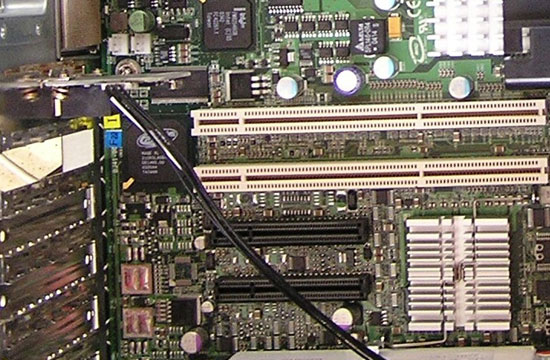
PCI-e (black) has still a long way to go before it
will replace PCI-X (white) in the server world
It is clear that is a pretty simplistic and wrong way to understand what servers are all about. Since the introduction of new SATA features (SATA revision 2.5) such as staggered spindle spin up, Native Command Queuing and Port Multipliers, servers are equipped with SATA drives just like desktop PCs. A high end desktop pc has two CPU cores, 10,000 rpm SATA drives, gigabit Ethernet and RAID-5. Next year that same desktop might even have 4 cores.
So it is pretty clear that the hardware gap between servers and desktops is shrinking and not really a good way to judge. What makes a server a server? A server's main purpose is to make certain IT services (database, web, mail, DHCP...) available to many users at the same time, and concurrent access to these services is an important build criteria. Secondly, a server is a business tool, therefore it will be evaluated on how much it costs to deliver those services during each year or semester. The focus on Total Cost of Ownership (TCO) and concurrent access performance is what really sets a server apart from a typical desktop at home.
Basically, a server is different on the following points:
The three last points all are part of lowering TCO. So what is TCO anyway?
This is far from an academic or philosophical question as it allows you to see the difference between a souped up desktop with the label "server" which is being sold with a higher profit margin and a real server configuration that will be offering reliable services for years.
A few years ago, the question above would have been very easy to answer for a typical hardware person. Servers used to distinguish themselves on first sight from a normal desktop pc: they had SCSI disks, RAID controllers, multiple CPUs with large amounts of cache and Gigabit Ethernet. In a nutshell, servers had faster and more CPUs, better storage and faster access to the LAN.
PCI-e (black) has still a long way to go before it
will replace PCI-X (white) in the server world
It is clear that is a pretty simplistic and wrong way to understand what servers are all about. Since the introduction of new SATA features (SATA revision 2.5) such as staggered spindle spin up, Native Command Queuing and Port Multipliers, servers are equipped with SATA drives just like desktop PCs. A high end desktop pc has two CPU cores, 10,000 rpm SATA drives, gigabit Ethernet and RAID-5. Next year that same desktop might even have 4 cores.
So it is pretty clear that the hardware gap between servers and desktops is shrinking and not really a good way to judge. What makes a server a server? A server's main purpose is to make certain IT services (database, web, mail, DHCP...) available to many users at the same time, and concurrent access to these services is an important build criteria. Secondly, a server is a business tool, therefore it will be evaluated on how much it costs to deliver those services during each year or semester. The focus on Total Cost of Ownership (TCO) and concurrent access performance is what really sets a server apart from a typical desktop at home.
Basically, a server is different on the following points:
- Hardware optimized for concurrent access
- Professional upgrade slots such as PCI-X
- RAS features
- Chassis format
- Remote management
The three last points all are part of lowering TCO. So what is TCO anyway?
Originally published at https://www.anandtech.com/show/2065 (Wayback Machine).