
A Trio of Thermaltake Towers
- Posted in
- Cases/Cooling/PSUs
Thermaltake Eclipse DV - Extra Images
To finish the coverage of the Eclipse DV here are few more pictures we took of the enclosure. The window is a little different from the original Eclipse, and includes a vent over the CPU which could have an 80mm fan attached if desired.
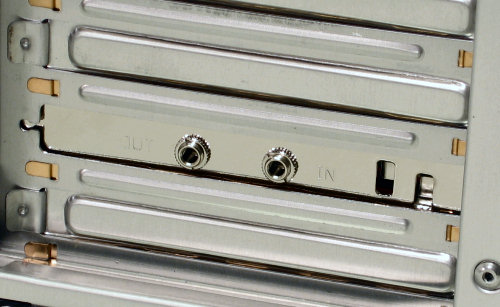
The back is nearly identical to the Eclipse and Armor Jr. cases, except for one of the stock slot covers. The jacks are fed from the included combo drive so audio can be passed back into a sound card in case it doesn't have the necessary CD headers internally.
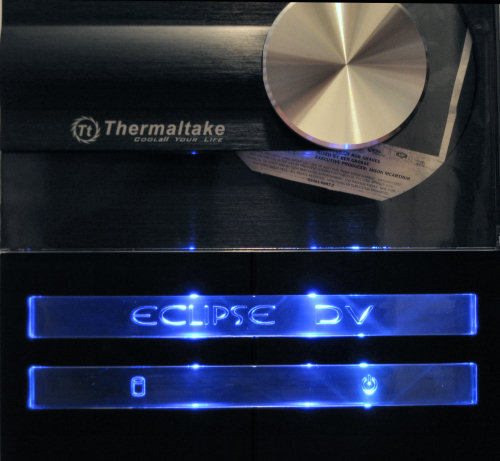
When powered on, the Eclipse DV puts on quite a show. As we mentioned previously there's a "volume indicator" on the front at the bottom that lights up, but it seems to correspond more with CD access than sound.

The clear plastic in front is lit up at the tops and bottoms over each piece, and HDD activity triggers an extra flash of red on the left side of the bottom piece.
In this final shot the drive is open and the texture of the brushed aluminum front is easy to see. It should be noted that this design is really only for people who know they can take relatively good care of their computers and media - it should be no surprise that this might not be the best case for a frequent LAN party attendee. One missed-placed step while the drive is open and the centerpiece of the case could be ruined.
To finish the coverage of the Eclipse DV here are few more pictures we took of the enclosure. The window is a little different from the original Eclipse, and includes a vent over the CPU which could have an 80mm fan attached if desired.
 |
| Click to enlarge |
The back is nearly identical to the Eclipse and Armor Jr. cases, except for one of the stock slot covers. The jacks are fed from the included combo drive so audio can be passed back into a sound card in case it doesn't have the necessary CD headers internally.
When powered on, the Eclipse DV puts on quite a show. As we mentioned previously there's a "volume indicator" on the front at the bottom that lights up, but it seems to correspond more with CD access than sound.
The clear plastic in front is lit up at the tops and bottoms over each piece, and HDD activity triggers an extra flash of red on the left side of the bottom piece.
In this final shot the drive is open and the texture of the brushed aluminum front is easy to see. It should be noted that this design is really only for people who know they can take relatively good care of their computers and media - it should be no surprise that this might not be the best case for a frequent LAN party attendee. One missed-placed step while the drive is open and the centerpiece of the case could be ruined.
 |
| Click to enlarge |
Originally published at https://www.anandtech.com/show/2063 (Wayback Machine).