
Dell DTR Laptop Shootout - M1710 vs. E1705
- Posted in
- Laptops
Gaming Performance: Call of Duty 2
Call of Duty 2 is interesting because it's one of the few games touted as supporting SMP. (We will get to Quake 4 later, and we don't have results from Oblivion for this article. Without seriously reducing graphics quality, Oblivion is only playable on the M1710.) We're running with the official version 1.2 patch, with high-quality lighting, anisotropic filtering, and maximum (Extra) texture sizes on everything but the specular highlights, which are set to high detail. We also enabled "Optimize for SLI" on all three systems, and it appears that the setting might actually be better labeled as "Optimize for SMP". We aren't entirely sure how the game and driver settings are changed at this time, but CPU usage on dual core systems definitely increases when it is enabled, and frame rates are improved quite a bit as well - at least in situations where we're not GPU limited.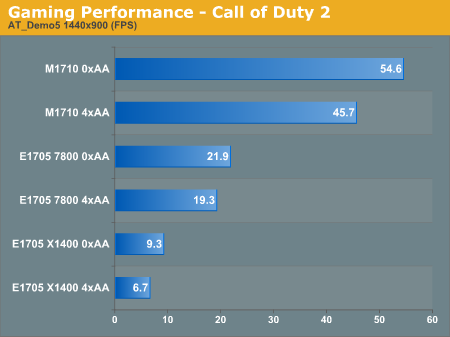
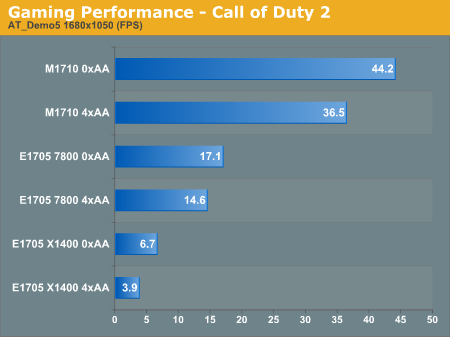
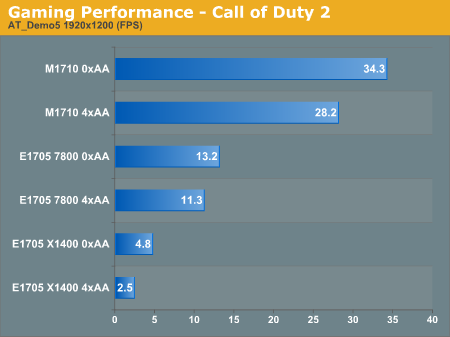
As before, the X1400 configuration makes a dismal showing. (After finishing the Call of Duty 2 benchmarks, we decided it was pointless to continue benchmarking 4xAA on the X1400.) You can also see that while the GeForce Go 7800 is at least twice as fast as the X1400, it struggles with the latest games on high-quality settings as well. The clock speeds of the GeForce Go 7800 are quite low relative to desktop 7800 cards (it's clocked at 250/658 instead of the 425/1000 clock speeds that desktop models carry), and combined with the fact that it has 12 pixel pipelines versus 24 on the GeForce Go 7900 GTX and it's easy to see why it's less than half as fast. Of course, it also costs about one fourth as much. (The GeForce Go 7800 is a $200 upgrade from Dell, and the GeForce Go 7900 GTX is a $400 upgrade from the 7800 GS, which is already a $350 upgrade.)
Originally published at https://www.anandtech.com/show/2016 (Wayback Machine).