
Dell DTR Laptop Shootout - M1710 vs. E1705
- Posted in
- Laptops
Noise and Heat
If you've been wondering why we even bothered to include the X1400 configuration in this article - since it's completely outclassed by either of its big brothers - we're finally getting to some benchmarks where it can turn the tables. We'll start with the more mundane noise levels and temperatures before we get to power draw. In order to provide full load situations, we ran two instances of Folding@Home on the CPU and looped 3DMark05 in the foreground.Noise
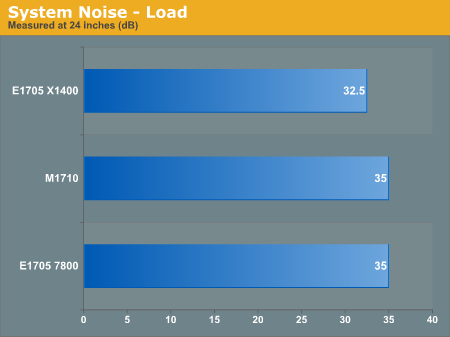
Despite having substantially different graphics processors, the noise levels on all three systems are pretty comparable. The two GeForce configurations get slightly louder at full load, but when idling all three computers drop below 30 dB. (We didn't bother to create a graph showing all three at <30 dB when idle.) Our SPL meter can't reliably measure anything below 30 dB, so we essentially have to declare a tie. The slight noise of the hard drive can be clearly heard over anything else, and if you allow the hard drive to power off when it's not in use the systems become about as silent as possible. Of course, the instant you actually do any work, the hard drive has to spin back up, but only extended use of CPU or GPU intensive applications will raise the noise level above 30 dB.
Heat
We measured temperatures across the bottom of the system as well as on the keyboard and palm rests. Graphs don't do a good job of conveying this information, so we've used a table instead. We broke down the temperatures into five primary areas: left-hand, right hand, left leg, right leg, and bottom center. The bottom center area of the laptop houses the memory, and while this area would generally not be touching your legs with the system sitting on your lap, it did generate enough heat that we felt this hotspot needed to be pointed out.
| Laptop Temperatures (°C) | ||||||
| M1710 Load | M1710 Idle | 7800 Load | 7800 Idle | X1400 Load | X1400 Idle | |
| Bottom Left | 32-38 | 30-37 | 32-38 | 30-37 | 28-37 | 29-34 |
| Bottom Right | 40-44 | 39-42 | 37-41 | 39-42 | 31-35 | 34-38 |
| Bottom Center | 47-48 | 39-40 | 40-41 | 39-40 | 38-39 | 35-36 |
| Top Left | 32-35 | 31-34 | 30-33 | 31-34 | 27-31 | 27-31 |
| Top Right | 36-41 | 35-38 | 35-39 | 35-38 | 27-31 | 30-35 |
One of the interesting items that you almost immediately notice is that the temperatures under idle conditions aren't substantially cooler than temperatures under load conditions. The reason is quite simple: unless the CPU and/or GPU are generating a lot of heat, most of the fans are shut off. We never experienced any heat related crashes during our testing, and the temperatures are all low enough that we don't expect problems for most people. All testing was conducted in a 22°C environment; however, in a hotter climate the M1710 could potentially get too hot.
A temperature of 40+ °C might be considered uncomfortably warm for many people, especially if the laptop is resting directly against the skin. If you were outside on a warm summer day, surface temperatures would almost certainly be hotter than you would want in your lap. We didn't find it to be too bad while wearing jeans in more moderate conditions, but these systems are definitely more at home sitting on a table rather than your lap, which is typical of desktop replacement notebooks.
Originally published at https://www.anandtech.com/show/2016 (Wayback Machine).