
Beelink GTR7 mini-PC Review: A Complete AMD Phoenix Package at 65W
Setup Notes and Platform Analysis
Our review sample of the Beelink GTR7 7840HS came with all necessary components pre-installed - including the OS. Prior to setting up the OS on first boot, we took some time to look into the BIOS interface. While the interface is fairly basic (navigable only via keyboard), a lot of options are exposed for end users to play around with. The video below presents an overview of the BIOS interface.
The main screen provides a quick overview of the system configuration with the memory capacity and speed being the most important from a system configuration viewpoint. The BIOS version is also available in this screen. The system is equipped with both firmware and discrete TPMs, with the firmware TPM enabled by default. Various TPM aspects can be configured in the 'Advanced > TPM/DTPM Computing' sub-section. ACPI settings in the same section allows for configuration of hibernation and suspend states.
The UMA Frame buffer size (VRAM) is set to 4GB by default under 'AMD CBS > NBIO Common Options > GFX Configuration', but it can be as high as 16GB (with 32GB of DRAM installed). Other iGPU configurations such as GPU host cache settings can also be configured in this sub-section. Other northbridge options such as audio output paths and PCIe loopback mode can also be configured in this section. AMD CBS also allows configuration of behavior on AC power loss and restoration, and various system management unit options such as thermal and power parameters (sustained power limit, package power tracking, skin-temperature aware power management, etc.). Beelink sets all power numbers under SmartShift control to 65000 (mW) by default. The other configuration sub-sections under AMD CBS also allows control over aspects like CPU virtualization support, resizable BAR, SR-IOV, and PCIe hot-plug support, USB hardware parameters like timeouts, NVMe device tests, UEFI network stack configuration for the I225-V LAN controllers, etc.
USB ports can be selectively locked from 'Chipset > South Bridge > SB USB Configuration'. The 'North Bridge' subsection is informative in nature and provides the size and speed of the memory modules attached. The BIOS password and secure boot state can be modified in the 'Security' section. This section also includes the TCG Pyrite 2.0 configuration for the NVMe SSD (if it is supported by the installed drive). The 'Boot' section allows configuration of the NumLock state during the boot process, and the fast boot setting. The boot order for various boot devices can also be set up. The 'Save & Exit' section allows users to either save and reset, or reset without saving, override all settings with the factory defaults, or save a particular configuration as user defaults. Most importantly, it also includes a boot override that allows the selection of a particular boot device for the next boot alone.
The block diagram below presents the overall high-speed I/O distribution.
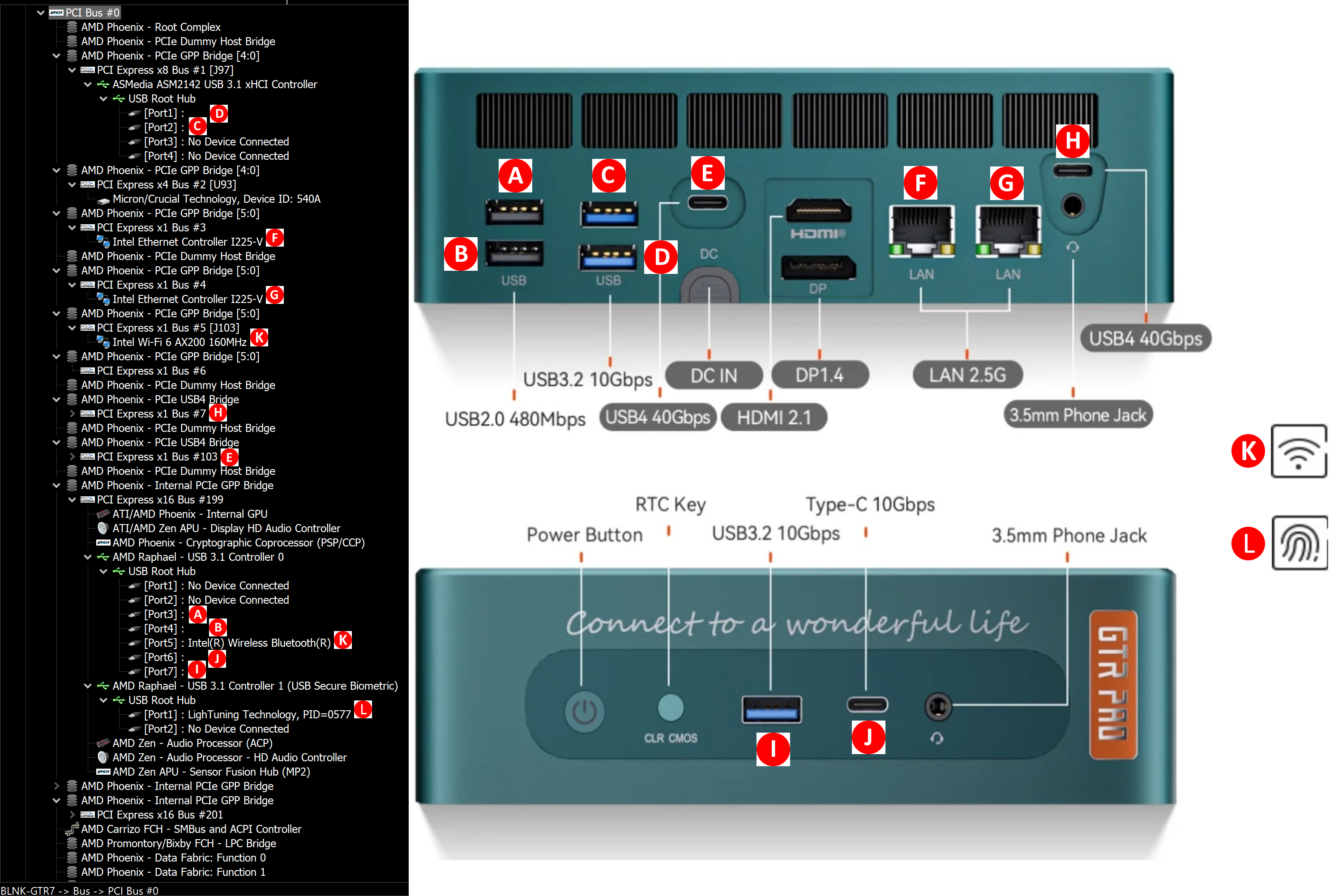
Except for the two rear USB 3.2 Gen 2 (10 Gbps) Type-A ports enabled by an ASMedia ASM3142 controller chip (detected as ASM2142 in the kernel), all the other USB ports (including the two USB4 ports denoted as PCIe USB4 Bridge in the diagram above) are natively from the controller hub on the Phoenix die. There are twenty usable PCIe Gen4 lanes, and the break-up is as below:
- PCIe 3.0 x2: ASMedia ASM3142
- PCIe 4.0 x4: M.2 2280 SSD Slot #0
- PCIe 4.0 x4: M.2 2280 SSD Slot #1
- PCIe 2.0 x1: Intel I225-V #0
- PCIe 2.0 x1: Intel I225-V #1
- PCIe 2.0 x1: Intel AX200 Wi-Fi 6
While the USB4 ports support PCIe tunneling with full Thunderbolt 3 compatibility (including external GPU enclosures), they do not have support for USB 3.2 Gen 2x2 (20 Gbps) clients. Those operate at 10 Gbps speeds in both USB4 ports of the GTR7 7840HS.
In today's review, we compare the Beelink GTR7 against a host of other systems configured with similarly high TDPs. Since the GTR7 claims to operate at 65W, we also included the ASRock DeskMeet B660 in the mix - even though it is configured with a 65W budget for the CPU alone, and the discrete GPU having its own envelop.
| Comparative PC Configurations | ||
| Aspect | Beelink GTR7 | |
| CPU | AMD Ryzen 7 7840HS Zen 4 (Phoenix) 8C/16T, 3.8 - 5.1 GHz TSMC 4nm, 16MB L3, 35-54W Target TDP : 65W |
AMD Ryzen 7 7840HS Zen 4 (Phoenix) 8C/16T, 3.8 - 5.1 GHz TSMC 4nm, 16MB L3, 35-54W Target TDP : 65W |
| GPU | AMD Radeon 780M (RDNA3 / Phoenix) - Integrated (12 CUs @ 2.7 GHz) |
AMD Radeon 780M (RDNA3 / Phoenix) - Integrated (12 CUs @ 2.7 GHz) |
| RAM | Crucial CT16G56C46S5.M8G1 DDR5-5600 SODIMM 46-45-45-90 @ 5600 MHz 2x16 GB |
Crucial CT16G56C46S5.M8G1 DDR5-5600 SODIMM 46-45-45-90 @ 5600 MHz 2x16 GB |
| Storage | Crucial P3 Plus CT1000P3PSSD8 (1 TB; M.2 2280 PCIe 4.0 x4 NVMe;) (Micron 176L 3D QLC (N48R); Phison E21T Controller) |
Crucial P3 Plus CT1000P3PSSD8 (1 TB; M.2 2280 PCIe 4.0 x4 NVMe;) (Micron 176L 3D QLC (N48R); Phison E21T Controller) |
| Wi-Fi | 2x 2.5 GbE RJ-45 (Intel I225-V) Intel Wi-Fi 6 AX200 (2x2 802.11ax - 2.4 Gbps) |
2x 2.5 GbE RJ-45 (Intel I225-V) Intel Wi-Fi 6 AX200 (2x2 802.11ax - 2.4 Gbps) |
| Price (in USD, when built) | (Street Pricing on Aug 19th, 2023) US $709 (as configured, with OS) |
(Street Pricing on Aug 19th, 2023) US $709 (as configured, with OS) |
Benchmarks were processed afresh on all of the above systems with the latest BIOS for each. The next few sections will deal with comparative benchmarks for the above systems.
Originally published at https://www.anandtech.com/show/20018/beelink-gtr7-minipc-review-a-complete-amd-phoenix-package-at-65w (Wayback Machine).