
Exclusive: ASUS Debuts AGEIA PhysX Hardware
- Posted in
- GPUs
ASUS PhysX Card
It's not as dramatic as a 7900 GTX or an X1900 XTX, but here it is in all its glory. We welcome the new ASUS PhysX card to the fold: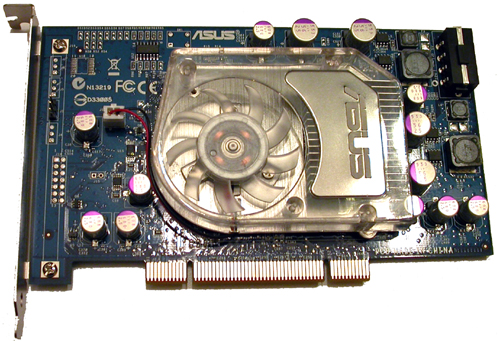
The chip and the RAM are under the heatsink/fan, and there really isn't that much else going on here. The slot cover on the card has AGEIA PhysX written on it, and there's a 4-pin Molex connector on the back of the card for power. We're happy to report that the fan doesn't make much noise and the card doesn't get very warm (especially when compared to GPUs).
We did have an occasional issue when installing the card after the drivers were already installed: after we powered up the system the first time, we couldn't use the AGEIA hardware until we hard powered our system and then booted up again. This didn't happen every time we installed the card, but it did happen more than once. This is probably not a big deal and could easily be an issue with the fact that we are using early software and early hardware. Other than that, everything seemed to work great in the two pieces of software it's currently possible to test.
Our test system is setup similarly to our graphics test systems, with the addition of a low speed CPU. We were curious to find out if the PhysX card helps out slower processors more than fast CPUs, so we set our FX-57 to a 9X multiplier to simulate an Opteron 144. Otherwise, the test bed is the same as we've used for recent GPU reviews:
AMD Athlon 64 FX-57
AMD Opteron 144 (simulated)
ASUS NVIDIA nForce4 SLI X16 Motherboard
2GB OCZ DDR RAM
ATI Radeon X1900 XTX
ASUS PhysX PPU
Windows XP SP2
OCZ PowerStream 600W PSU
Now let's see how the card actually performs in practice.
Originally published at https://www.anandtech.com/show/2001 (Wayback Machine).