
MSI: SLI Plus Eight
- Posted in
- Motherboards
Memory Performance
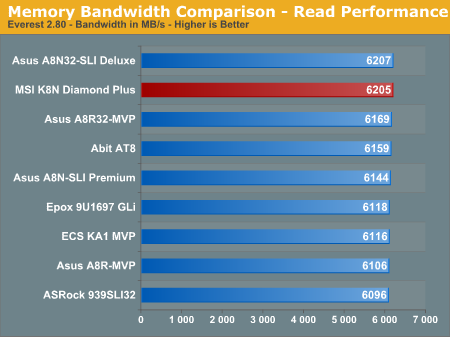
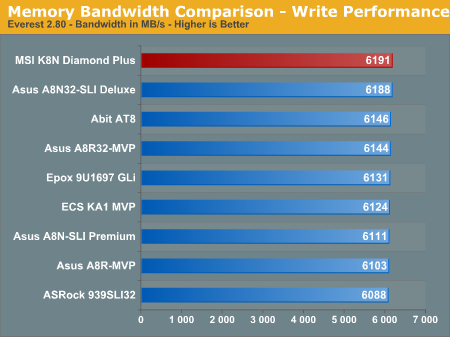
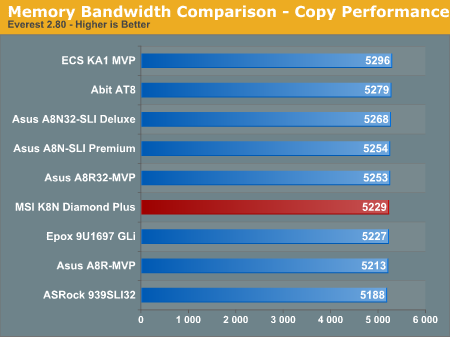
We recently switched to version 2.80 of Everest so these scores are not comparable to previous tests with version 2.50. We have also added the memory copy bandwidth benchmark to our test suite. The read and write scores of the MSI K8N Diamond Plus are excellent and account for the consistent performance of this board in our benchmarks. The memory copy performance is average within the class but can be tweaked for improved performance through the extensive memory options available in the BIOS.
Overclocking Performance
The overclocking performance graphs allow for a better comparison on the overclocking capabilities of previously tested boards. For more details on the specific overclocking abilities of this board please refer to the Overclocking and Memory Stress Test section in the Basic Features section.
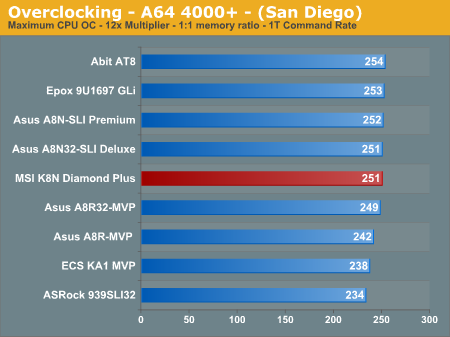
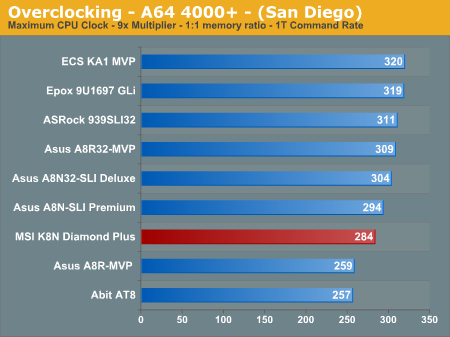
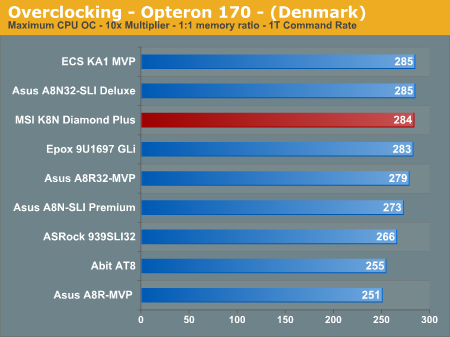
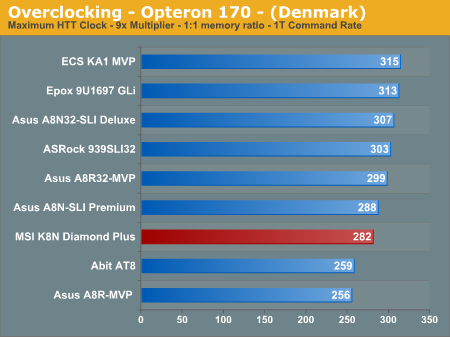
The MSI K8N Diamond Plus is a very good overclocking platform at the stock multiplier settings for our AMD Athlon64 4000+ CPU. We had no issues booting into Windows XP at 256HTT x12 settings and running our 3DMark/game benchmarks but the system was not Prime95/MemTest86 stable for more than four hours unless we dropped to a 251HTT x 12 setting. This is still an excellent result and attests to the quality of components utilized on the board. The same holds true for our AMD Opteron 170 at the stock 10x multiplier as we easily reached a 284HTT x10 setting that was extremely stable.
However, the ability of the MSI K8N Diamond Plus to stably overclock our Athlon64 4000+ or Opteron 170 CPUs higher HTT settings was a disappointment. We tried various voltage settings, LDT multipliers, and memory modules but the system remained unstable at any HTT setting higher than 284. We were never able to reach a 300HTT setting although an Asus A8N32-SLI board utilizing the same chipset was able to break this barrier. Hopefully our test results are due to a less than average board and not a pattern as the 3.0a BIOS has enabled other users to pass the 300HTT setting. In the end, we have to advise caution if you're expecting to overclock the HyperTransport bus to 300 MHz or higher; some boards reach that level apparently, but our particular board did not.
We recently switched to version 2.80 of Everest so these scores are not comparable to previous tests with version 2.50. We have also added the memory copy bandwidth benchmark to our test suite. The read and write scores of the MSI K8N Diamond Plus are excellent and account for the consistent performance of this board in our benchmarks. The memory copy performance is average within the class but can be tweaked for improved performance through the extensive memory options available in the BIOS.
Overclocking Performance
The overclocking performance graphs allow for a better comparison on the overclocking capabilities of previously tested boards. For more details on the specific overclocking abilities of this board please refer to the Overclocking and Memory Stress Test section in the Basic Features section.
The MSI K8N Diamond Plus is a very good overclocking platform at the stock multiplier settings for our AMD Athlon64 4000+ CPU. We had no issues booting into Windows XP at 256HTT x12 settings and running our 3DMark/game benchmarks but the system was not Prime95/MemTest86 stable for more than four hours unless we dropped to a 251HTT x 12 setting. This is still an excellent result and attests to the quality of components utilized on the board. The same holds true for our AMD Opteron 170 at the stock 10x multiplier as we easily reached a 284HTT x10 setting that was extremely stable.
However, the ability of the MSI K8N Diamond Plus to stably overclock our Athlon64 4000+ or Opteron 170 CPUs higher HTT settings was a disappointment. We tried various voltage settings, LDT multipliers, and memory modules but the system remained unstable at any HTT setting higher than 284. We were never able to reach a 300HTT setting although an Asus A8N32-SLI board utilizing the same chipset was able to break this barrier. Hopefully our test results are due to a less than average board and not a pattern as the 3.0a BIOS has enabled other users to pass the 300HTT setting. In the end, we have to advise caution if you're expecting to overclock the HyperTransport bus to 300 MHz or higher; some boards reach that level apparently, but our particular board did not.
Originally published at https://www.anandtech.com/show/1989 (Wayback Machine).