
Abit AT8: µGuru comes to the RD480
- Posted in
- Motherboards
FSB Overclocking Results
Memory Stress Testing
Memory stress tests look at the ability of the Abit AT8 to operate at the officially supported memory frequencies of DDR-400, at the best performing memory timings that the OCZ PC4800 Platinum Edition will support.
The Abit AT8 was very stable with 2 DDR modules in Dual-Channel mode at the settings of 2-2-2-5 at 2.7V provided that we used the OCZ PC4800 memory and 1.1 BIOS. We will now install all four available memory slots, which will result in more strenuous requirements on the memory subsystem than testing 2 DDR modules on a motherboard.
The Abit AT8 was very stable with 4 DDR modules in Dual-Channel operation at the settings of 2-2-2-7, but required the command rate to be increased to 2T along with a voltage increase to 2.8. Once again, we had to utilize our OCZ PC4800 memory and BIOS 1.1 in order to achieve these settings. Although other memory types were fully compatible, they required the 1.1 BIOS and memory settings adjusted to SPD values in the BIOS for one reboot sequence before changing the memory settings manually.
| Front Side Bus Overclocking Testbed | |
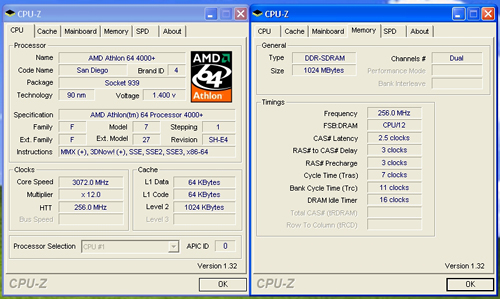
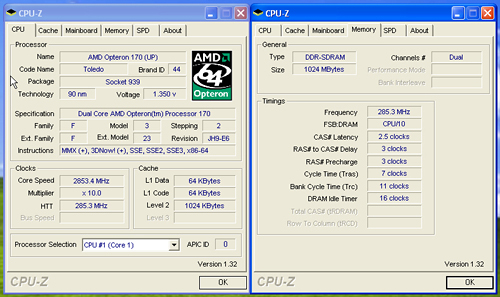
| Processor: | AMD Athlon 64 4000+ ( San Diego) AMD Opteron 170 ( Toledo) |
| CPU Voltage: AMD Athlon 64 4000+ AMD Opteron 170 |
1.5250V (1.4000V default) 1.4500V (1.3500V default) |
| Memory Settings: | 2.5-3-3-7 1T - (12x) 2.5-3-3-7 1T - (10x) |
| Memory Voltage: | 2.9V +.30mV |
| NB 1.2V Setting: | 1.60V |
| HT Voltage: | 1.35V |
| LDT Multiplier: | 5x up to 250HTT, 4x up to 285HTT |
| Memory: | OCZ PC4800 Platinum Edition |
| Cooling: | Zalman CNPS9500 |
| Power Supply: | OCZ Power Stream 520 |
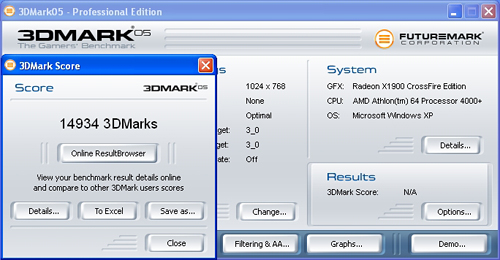
| Maximum CPU OverClock: (AMD Athlon 64 4000+) |
256HTT x 12 (3072MHz) +28% |
| Maximum HTT OverClock: (AMD Athlon 64 4000+) |
256HTT x 9 (2304MHz) +28% |
| Maximum CPU OverClock: (AMD Opteron 170) |
285HTT x 10 (2850MHz) +42% |
| Maximum HTT OverClock: (AMD Opteron 170) |
285HTT x 9 (2565MHz) +42% |
Memory Stress Testing
Memory stress tests look at the ability of the Abit AT8 to operate at the officially supported memory frequencies of DDR-400, at the best performing memory timings that the OCZ PC4800 Platinum Edition will support.
| Abit AT8 Stable DDR-400 Timings - 2 DIMMs (2/4 slots populated - 1 Dual-Channel Bank) |
|
| Clock Speed: | 200MHz |
| CAS Latency: | 2 |
| RAS to CAS Delay: | 2 |
| RAS Precharge: | 2 |
| RAS Cycle Time: | 5 |
| Command Rate: | 1T |
| Voltage: | 2.7V |
The Abit AT8 was very stable with 2 DDR modules in Dual-Channel mode at the settings of 2-2-2-5 at 2.7V provided that we used the OCZ PC4800 memory and 1.1 BIOS. We will now install all four available memory slots, which will result in more strenuous requirements on the memory subsystem than testing 2 DDR modules on a motherboard.
| Abit AT8 Stable DDR-400 Timings - 4 DIMMs (4/4 slots populated - 2 Dual-Channel Banks) |
|
| Clock Speed: | 200MHz (800FSB) |
| CAS Latency: | 2 |
| RAS to CAS Delay: | 2 |
| RAS Precharge: | 2 |
| RAS Cycle Time: | 7 |
| Command Rate: | 2T |
| Voltage: | 2.8V |
The Abit AT8 was very stable with 4 DDR modules in Dual-Channel operation at the settings of 2-2-2-7, but required the command rate to be increased to 2T along with a voltage increase to 2.8. Once again, we had to utilize our OCZ PC4800 memory and BIOS 1.1 in order to achieve these settings. Although other memory types were fully compatible, they required the 1.1 BIOS and memory settings adjusted to SPD values in the BIOS for one reboot sequence before changing the memory settings manually.
Originally published at https://www.anandtech.com/show/1969 (Wayback Machine).