
Updated: AOpen MiniPC – Imitation is the Sincerest Form of Flattery
- Posted in
- Systems
Encoding and Multimedia Benchmarks
Using AutoGK, we tested the multimedia encoding capabilities of the systems. For HTPC use, we tested the playback of several different video files as well and checked CPU use. For video playback, we used DVI as well as component output running 720p resolutions. We also tested performance connected to a Dell 2405FPW running at the native 1920x1200 resolution of the display, as video scaling can increase the load on the system for video content. The Pentium 4 506 chip had some issues during testing, so unfortunately, we didn't get AutoGK results with it.
DivX and Xvid encoding are good enough for casual use, but clearly, the Pentium M chip is not as fast as other platforms. Even the lowly Sempron 3100+ outpaces the Pentium M 740, though the margin is relatively close. Running a Core Duo processor would help quite a bit, but even that wouldn't catch up with Pentium D or Athlon X2 performance. For multimedia creation, the MiniPC is probably too slow for serious work. However, if you just want to encode the occasional video clip, letting the system process the file overnight will get the job done before you wake up in the morning. WMV9HD encoding is a different matter, but that's slow even on the fastest dual core systems.
Video Decoding
If you have a second PC doing the encoding work, the MiniPC works quite well as an HTPC. For video playback, there won't be any graphs, but I instead focused on the overall experience. Lower demand playback like MPEG-2 isn't even remotely a problem, so let's move on to the more demanding tasks.
Playing back 720p and 1080i content - even with scaling the video to fill the screen - worked without a hitch, with the CPU running a maximum of 50-80% load. (We'll talk a bit more about 1080i content later.) Every now and then, you might see a slight skip, most likely caused by another application using the hard disk, but otherwise, HDTV content worked fine. DivX and Xvid playback presented no difficulties either, with CPU load for both under 25% at typical (720x480) resolutions. DivXHD used more CPU time for the higher resolution, but playback still only used about 50% of the CPU power.
The other systems were all equal to the MiniPC or substantially better, but the bottom line is that for the currently most common video formats, all of the tested systems handled MPEG-2/HD/DivX/Xvid video playback with enough CPU power left in reserve that stutters shouldn't be a problem. Multitasking might present problems on the slower systems, of course, so we wouldn't recommend trying dual display output on the MiniPC with one display showing an HDTV stream, if you're trying to get work done, but few people really do that in our experience.
WMV9HD is a different story, but we've come to expect that from our most brutal video playback tests. 720p was okay, though it sometimes struggled (hitting upwards of 80% CPU usage); basically, it ran about as well as a 1080i HD transport stream. 1080p on the other hand was essentially unwatchable. Dual cores and even GPU acceleration are pretty much required to get completely smooth WMV9HD support for 1080p content; even a fast Athlon X2 or Pentium D will struggle with 1080p WMV9HD decoding, unless the GPU offloads some of the work. As nice as WMV9HD looks, it's difficult to justify the performance requirements at this time. DivXHD files encode and decode with much less CPU power, and file sizes are pretty comparable. As long as you stick to the other less CPU intensive codecs, the MiniPC will work fine.
Using AutoGK, we tested the multimedia encoding capabilities of the systems. For HTPC use, we tested the playback of several different video files as well and checked CPU use. For video playback, we used DVI as well as component output running 720p resolutions. We also tested performance connected to a Dell 2405FPW running at the native 1920x1200 resolution of the display, as video scaling can increase the load on the system for video content. The Pentium 4 506 chip had some issues during testing, so unfortunately, we didn't get AutoGK results with it.
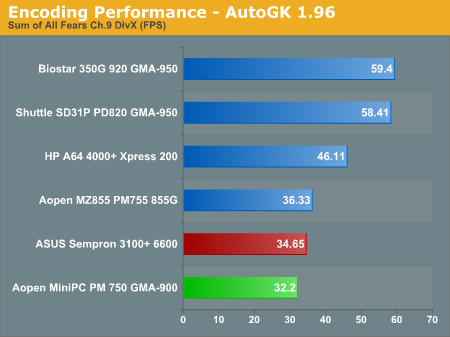
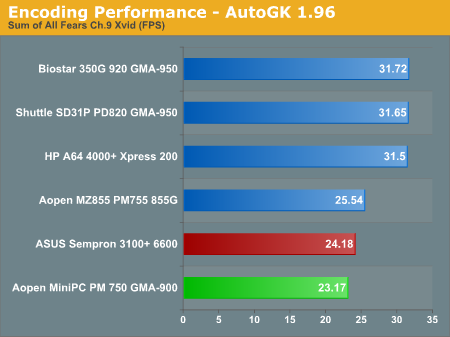
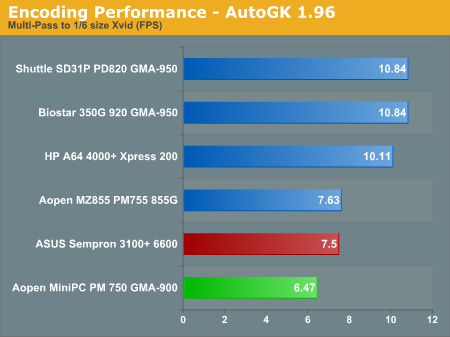
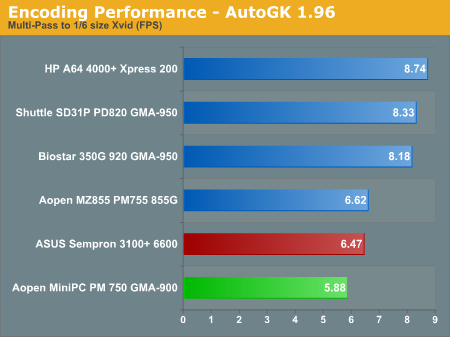
DivX and Xvid encoding are good enough for casual use, but clearly, the Pentium M chip is not as fast as other platforms. Even the lowly Sempron 3100+ outpaces the Pentium M 740, though the margin is relatively close. Running a Core Duo processor would help quite a bit, but even that wouldn't catch up with Pentium D or Athlon X2 performance. For multimedia creation, the MiniPC is probably too slow for serious work. However, if you just want to encode the occasional video clip, letting the system process the file overnight will get the job done before you wake up in the morning. WMV9HD encoding is a different matter, but that's slow even on the fastest dual core systems.
Video Decoding
If you have a second PC doing the encoding work, the MiniPC works quite well as an HTPC. For video playback, there won't be any graphs, but I instead focused on the overall experience. Lower demand playback like MPEG-2 isn't even remotely a problem, so let's move on to the more demanding tasks.
Playing back 720p and 1080i content - even with scaling the video to fill the screen - worked without a hitch, with the CPU running a maximum of 50-80% load. (We'll talk a bit more about 1080i content later.) Every now and then, you might see a slight skip, most likely caused by another application using the hard disk, but otherwise, HDTV content worked fine. DivX and Xvid playback presented no difficulties either, with CPU load for both under 25% at typical (720x480) resolutions. DivXHD used more CPU time for the higher resolution, but playback still only used about 50% of the CPU power.
The other systems were all equal to the MiniPC or substantially better, but the bottom line is that for the currently most common video formats, all of the tested systems handled MPEG-2/HD/DivX/Xvid video playback with enough CPU power left in reserve that stutters shouldn't be a problem. Multitasking might present problems on the slower systems, of course, so we wouldn't recommend trying dual display output on the MiniPC with one display showing an HDTV stream, if you're trying to get work done, but few people really do that in our experience.
WMV9HD is a different story, but we've come to expect that from our most brutal video playback tests. 720p was okay, though it sometimes struggled (hitting upwards of 80% CPU usage); basically, it ran about as well as a 1080i HD transport stream. 1080p on the other hand was essentially unwatchable. Dual cores and even GPU acceleration are pretty much required to get completely smooth WMV9HD support for 1080p content; even a fast Athlon X2 or Pentium D will struggle with 1080p WMV9HD decoding, unless the GPU offloads some of the work. As nice as WMV9HD looks, it's difficult to justify the performance requirements at this time. DivXHD files encode and decode with much less CPU power, and file sizes are pretty comparable. As long as you stick to the other less CPU intensive codecs, the MiniPC will work fine.
Originally published at https://www.anandtech.com/show/1957 (Wayback Machine).