
Apple Makes the Switch: iMac G5 vs. iMac Core Duo
- Posted in
- Mac
Core Duo vs. G5
At the heart of today's comparison are two processors, Intel's Core Duo and IBM's PowerPC 970FX, otherwise known as the G5.
Johan did a great job of classifying the G5 as virtually the best of both worlds, a very wide superscalar CPU that is also very deeply pipelined. While these characteristics give the G5 a fairly competitive performance profile, they also make it quite power hungry (particularly the pipeline depth). But thanks to still being stuck with a small 512KB L2 cache, the G5 only weighs in at a meager 58 million transistors with the 90nm die taking up 66 mm2.
The Core Duo, on the other hand, is composed of 151.6 million transistors, 2.6x the number of transistors in the G5. But because it was built on Intel's 65nm process, the die size is still quite reasonable at 90.24 mm2. Most importantly, the Core Duo is based on a very power optimized mobile architecture, so it should have the power consumption advantage as well.
We have been longing to compare the G5 to x86 processors for a while now, but we've always run into the problem of achieving equal platforms. Thankfully, Apple has two iMacs, one based on the Core Duo and one based on the G5, that are virtually identical, thus facilitating our comparison.
From the end-user's standpoint, it's virtually impossible to tell the G5 from the Core Duo iMac. If you look at the right preference panels or open up the system profiler, it is obvious; but from normal application usage and interaction, the transition is truly seamless (which is very impressive considering that they completely changed CPU architectures).
It could be that the OS X scheduler just does a better job, or it could be that the 512MB of memory on these machines was enough of a bottleneck that I couldn't really gauge the improvement in responsiveness, thanks to a dual core machine. My best guess is that it is a combination of both. It's not that you don't notice a benefit when moving to dual core. Rather, it's just that the difference in responsiveness isn't as great as what I was expecting. One other potential reason is that the OS X interface in general isn't particularly responsive, so it may just be that the dual core effect is dulled, thanks to a slower UI (slower compared to Windows that is).
The other thing worth pointing out is that the Core Duo based iMac offers no settings for CPU power consumption. On the iMac G5, you can set processor performance to Automatic, Highest or Reduced, giving the user the option of choosing the balance between power consumption and CPU performance. On the Core Duo based iMac, no such setting exists, presumably because the CPU seems to manage the balance very well on its own. In theory, the G5's Automatic setting should be the same, behaving a lot like Cool'n'Quiet on an AMD system (or EIST on an Intel system). It should barely impact performance by fulfilling CPU demand when necessary and really kicking in during idle or low use periods; the problem is that this isn't always the case.
For the majority of performance tests that I conducted on the iMacs, leaving the G5 set to Automatic actually gave me performance within about 3% of the system's performance if I set the energy saver setting to Highest. However, there were some benchmarks where the iMac incorrectly would not increase CPU frequency in order to accommodate a very high demand task. The best example that I could find was my Quicktime Pro 7 H.264 encoding test (the same test that I actually use in Windows for my CPU reviews). With the G5 running in Automatic mode, the test took over 25 minutes to complete, compared to 9.8 minutes for the Core Duo. Setting the processor performance to Highest, the G5's time dropped down to a more respectable 12.3 minutes, a reduction of more than 50%! The goal of the Automatic processor performance setting should be to crank up CPU frequency when it's needed, and scale it back when it's not. The results that I saw in my Quicktime test show that it fails at that goal in a major way, which isn't acceptable. There were a few other isolated cases where the same was true, forcing me to leave the iMac G5 in its Highest performance state for all of my performance tests.
At the heart of today's comparison are two processors, Intel's Core Duo and IBM's PowerPC 970FX, otherwise known as the G5.
Johan did a great job of classifying the G5 as virtually the best of both worlds, a very wide superscalar CPU that is also very deeply pipelined. While these characteristics give the G5 a fairly competitive performance profile, they also make it quite power hungry (particularly the pipeline depth). But thanks to still being stuck with a small 512KB L2 cache, the G5 only weighs in at a meager 58 million transistors with the 90nm die taking up 66 mm2.
The Core Duo, on the other hand, is composed of 151.6 million transistors, 2.6x the number of transistors in the G5. But because it was built on Intel's 65nm process, the die size is still quite reasonable at 90.24 mm2. Most importantly, the Core Duo is based on a very power optimized mobile architecture, so it should have the power consumption advantage as well.
We have been longing to compare the G5 to x86 processors for a while now, but we've always run into the problem of achieving equal platforms. Thankfully, Apple has two iMacs, one based on the Core Duo and one based on the G5, that are virtually identical, thus facilitating our comparison.
From the end-user's standpoint, it's virtually impossible to tell the G5 from the Core Duo iMac. If you look at the right preference panels or open up the system profiler, it is obvious; but from normal application usage and interaction, the transition is truly seamless (which is very impressive considering that they completely changed CPU architectures).
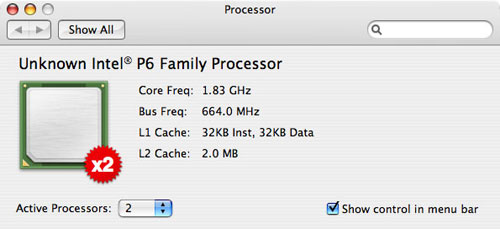
It could be that the OS X scheduler just does a better job, or it could be that the 512MB of memory on these machines was enough of a bottleneck that I couldn't really gauge the improvement in responsiveness, thanks to a dual core machine. My best guess is that it is a combination of both. It's not that you don't notice a benefit when moving to dual core. Rather, it's just that the difference in responsiveness isn't as great as what I was expecting. One other potential reason is that the OS X interface in general isn't particularly responsive, so it may just be that the dual core effect is dulled, thanks to a slower UI (slower compared to Windows that is).
The other thing worth pointing out is that the Core Duo based iMac offers no settings for CPU power consumption. On the iMac G5, you can set processor performance to Automatic, Highest or Reduced, giving the user the option of choosing the balance between power consumption and CPU performance. On the Core Duo based iMac, no such setting exists, presumably because the CPU seems to manage the balance very well on its own. In theory, the G5's Automatic setting should be the same, behaving a lot like Cool'n'Quiet on an AMD system (or EIST on an Intel system). It should barely impact performance by fulfilling CPU demand when necessary and really kicking in during idle or low use periods; the problem is that this isn't always the case.
For the majority of performance tests that I conducted on the iMacs, leaving the G5 set to Automatic actually gave me performance within about 3% of the system's performance if I set the energy saver setting to Highest. However, there were some benchmarks where the iMac incorrectly would not increase CPU frequency in order to accommodate a very high demand task. The best example that I could find was my Quicktime Pro 7 H.264 encoding test (the same test that I actually use in Windows for my CPU reviews). With the G5 running in Automatic mode, the test took over 25 minutes to complete, compared to 9.8 minutes for the Core Duo. Setting the processor performance to Highest, the G5's time dropped down to a more respectable 12.3 minutes, a reduction of more than 50%! The goal of the Automatic processor performance setting should be to crank up CPU frequency when it's needed, and scale it back when it's not. The results that I saw in my Quicktime test show that it fails at that goal in a major way, which isn't acceptable. There were a few other isolated cases where the same was true, forcing me to leave the iMac G5 in its Highest performance state for all of my performance tests.
Originally published at https://www.anandtech.com/show/1936 (Wayback Machine).