
ATI's New Leader in Graphics Performance: The Radeon X1900 Series
- Posted in
- GPUs
Image Quality, Feature Tests, and Power
Something we'd like to look at a bit more in-depth for this review is image quality. It's no secret that due to ATI and NVIDIA's differences in rendering graphics, there is always going to be some variation in the look of the graphics from one brand to another. Most times this variation is too subtle to notice, but upon closer inspection, certain patterns tend to emerge.
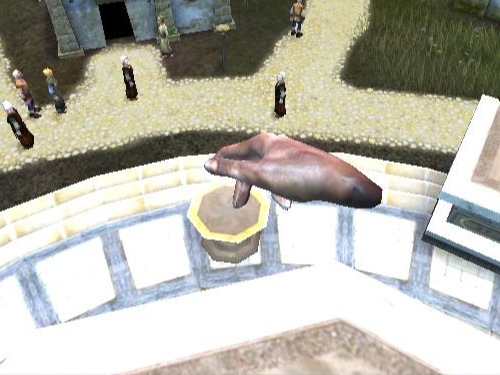
With Black and White 2, we can see how well the in-game maximum AA does at cleaning up the image. Note how there is a significant difference between the edges in the pictures without AA and with "high" AA enabled by the game. However, we don't see the same kind of difference between the image without AA enabled and the one with maximum quality enabled (in the graphics driver). This is a good example of in-game AA doing a much better job, quality and performance-wise, than the max quality settings in the control panel. We suspect that Black and White 2 has implimented a custom AA algorithm and has issues running stock MSAA algorithms. For this reason we recommend using the Black and White 2's in-game AA instead of the control panel's AA settings.
Both ATI and NVIDIA hardware look great and render similar images, and luckily for ATI there is an upcoming patch that should improve performance.
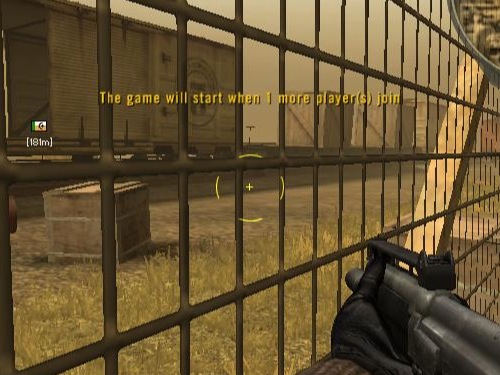
Battlefield 2 gives us a good view of how the maximum quality settings in the control panel (specifically transparency AA) fix certain graphical problems in games. Fences in particular have a tendency to render inaccurately, especially when looking through them at certain angles. While you can see that the in-game AA without adaptive or transparency AA cleans up a lot of jagged edges (the flag pole for instance), it still has trouble with parts of the fence.
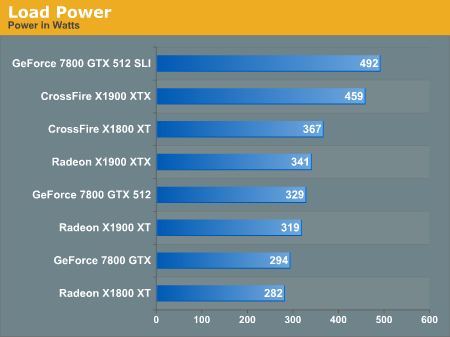
As for power, we ran the multitexturing and pixel shader feature tests under 3dmark06 and measured the maximum powerload via our trusty Kill-A-Watt. This measures power at the wall before the PSU, so it doesn't focus only on the graphics cards.
We can see the CrossFire and SLI systems pull insane ammounts of power, but even as a single card the X1900 XTX is a very hungry part.
Something we'd like to look at a bit more in-depth for this review is image quality. It's no secret that due to ATI and NVIDIA's differences in rendering graphics, there is always going to be some variation in the look of the graphics from one brand to another. Most times this variation is too subtle to notice, but upon closer inspection, certain patterns tend to emerge.
Hold your mouse over the links below to see Image Quality (Right Click the links to download the full-resolution images):
| ATI | |||
| NVIDIA |
With Black and White 2, we can see how well the in-game maximum AA does at cleaning up the image. Note how there is a significant difference between the edges in the pictures without AA and with "high" AA enabled by the game. However, we don't see the same kind of difference between the image without AA enabled and the one with maximum quality enabled (in the graphics driver). This is a good example of in-game AA doing a much better job, quality and performance-wise, than the max quality settings in the control panel. We suspect that Black and White 2 has implimented a custom AA algorithm and has issues running stock MSAA algorithms. For this reason we recommend using the Black and White 2's in-game AA instead of the control panel's AA settings.
Both ATI and NVIDIA hardware look great and render similar images, and luckily for ATI there is an upcoming patch that should improve performance.
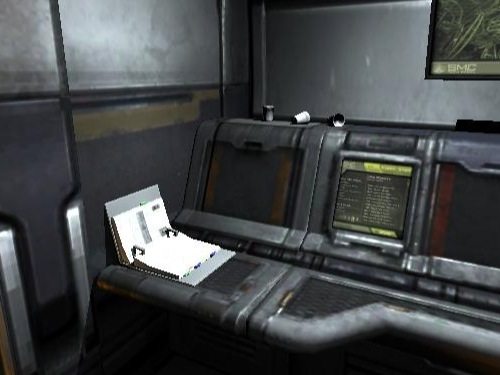
Hold your mouse over the links below to see Image Quality (Right Click the links to download the full-resolution images):
Hold your mouse over the links below to see Image Quality (Right Click the links to download the full-resolution images):
Battlefield 2 gives us a good view of how the maximum quality settings in the control panel (specifically transparency AA) fix certain graphical problems in games. Fences in particular have a tendency to render inaccurately, especially when looking through them at certain angles. While you can see that the in-game AA without adaptive or transparency AA cleans up a lot of jagged edges (the flag pole for instance), it still has trouble with parts of the fence.
As for power, we ran the multitexturing and pixel shader feature tests under 3dmark06 and measured the maximum powerload via our trusty Kill-A-Watt. This measures power at the wall before the PSU, so it doesn't focus only on the graphics cards.
We can see the CrossFire and SLI systems pull insane ammounts of power, but even as a single card the X1900 XTX is a very hungry part.
Originally published at https://www.anandtech.com/show/1930 (Wayback Machine).