
Mid-Range to High-End Buyer's Guide, January 2006
- Posted in
- Guides
Remaining Recommendations
The majority of the remaining parts all have a lesser impact on performance, and for several areas, you can just get whatever is cheapest. A low cost case might have sharp edges inside, and a low cost PSU might be noisy or fail prematurely - particularly if you load up the system with higher end components - but otherwise, there isn't a huge difference between the remaining components other than prices. Since we're giving Mid-Range and High-End configurations, we will be spending quite a bit more on the latter for what some may feel are unimportant aspects of a computer system. The Z-5500 speakers, for example, are overkill if you're living in an apartment or small house. For that matter, even the Z-2300 speakers are more than what many users will need. More than any of the other recommendations, there is a lot of subjective opinion in picking out these remaining items. If you don't want powerful speakers, save the money. If sound quality is important - which is our assumption on the High-End platform - you will probably want good speakers as well as a discrete sound card. If you're happy with a cheap case, you can cut costs there as well. Here are our guidelines for the remaining components.
The only two areas where it's really worth upgrading to something more than the above choices are storage and the power supply. If you're planning on running multiple GPUs with multiple hard drives, the 400W SmartPower 2.0 in the Mid-Range system may prove insufficient. The ePOWER/Tagan in the High-End system is more than enough for almost any use, though there are quite a few alternatives with a similar price. Fotron Source, Antec, Enermax, Seasonic, OCZ, and several other companies make PSUs worth considering, but we like the modular design, SLI support, and general high-quality of the Tagan unit. $120 is a lot to pay for a power supply, but then we'd even take it one step further and recommend picking up a UPS to go with the computer. $100 will get a good quality UPS that will help prevent loss of data from anything ranging from a power outage to an electrical surge.
The hard drives both ended up being from Western Digital, with the only upgrade on the High-End component being the move to a 16MB cache model. 250GB of storage and 3.0Gbps transfer rates are plenty for the vast majority of users. You could even drop down to a 160GB or even 80GB HDD if you don't need the storage, though the cost per GB on the 250GB drives is the lowest of any of the models. If you store lots of music, movies, photos, etc. on your system, though, you might want to go the other way and look for more storage capacity. Seagate's 300GB and larger 7200.9 drives can be found with 16MB of cache for the ultimate in capacity and performance, but prices are quite high. Some people still swear by the faster access times of the WD Raptor drives, but personally, I would add more RAM before worrying about spending $150 for a 74GB drive. If you want some data reliability, some motherboards are even shipping with integrated RAID 5 controllers: use 3 or 4 HDDs and you can get over a TB of storage and still be protected from data loss as long as no more than one drive fails. That's really more low-end server/high-end workstation stuff, however, so we'll stick with a single 250GB drive for now.
The majority of the remaining parts all have a lesser impact on performance, and for several areas, you can just get whatever is cheapest. A low cost case might have sharp edges inside, and a low cost PSU might be noisy or fail prematurely - particularly if you load up the system with higher end components - but otherwise, there isn't a huge difference between the remaining components other than prices. Since we're giving Mid-Range and High-End configurations, we will be spending quite a bit more on the latter for what some may feel are unimportant aspects of a computer system. The Z-5500 speakers, for example, are overkill if you're living in an apartment or small house. For that matter, even the Z-2300 speakers are more than what many users will need. More than any of the other recommendations, there is a lot of subjective opinion in picking out these remaining items. If you don't want powerful speakers, save the money. If sound quality is important - which is our assumption on the High-End platform - you will probably want good speakers as well as a discrete sound card. If you're happy with a cheap case, you can cut costs there as well. Here are our guidelines for the remaining components.
 |
 |
 |
| Click images to enlarge. | ||
| Mid-Range Components | ||
| Hard Drive | Western Digital 3.0Gbps 250GB 7200RPM 8MB Caviar SE | 99 |
| Optical Drive | BenQ DVDR DQ60 (OEM) | 41 |
| Case and Power Supply | Antec Solution SLK3800B + 400W SmartPower 2.0 | 116 |
| Speakers | Logitech Z-2300 2.1 | 112 |
| Keyboard and Mouse | Microsoft Comfort Curve 2000 + Optical Mouse | 30 |
| Total | 398 | |
 |
 |
 |
| Click images to enlarge. | ||
| High-End Components | ||
| Hard Drive | Western Digital 3.0Gbps 250GB 7200RPM 16MB Caviar SE16 | 115 |
| Optical Drive | NEC DVDR ND-3550A | 43 |
| Case | Lian Li PC-6077B Aluminum | 138 |
| Power Supply | ePOWER/Tagan TG-530-U15 530W | 120 |
| Sound Card | Creative Sound Blaster Audigy 2 ZS | 73 |
| Speakers | Logitech Z-5500 5.1 w/Dolby Digital | 253 |
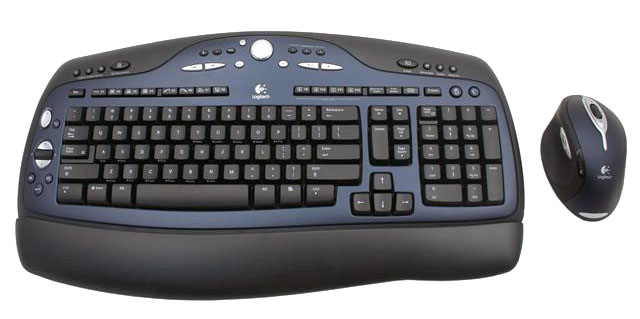
| Keyboard and Mouse | Logitech Cordless Desktop MX3100 (Laser tracking mouse) | 95 |
| Total | 837 | |
The only two areas where it's really worth upgrading to something more than the above choices are storage and the power supply. If you're planning on running multiple GPUs with multiple hard drives, the 400W SmartPower 2.0 in the Mid-Range system may prove insufficient. The ePOWER/Tagan in the High-End system is more than enough for almost any use, though there are quite a few alternatives with a similar price. Fotron Source, Antec, Enermax, Seasonic, OCZ, and several other companies make PSUs worth considering, but we like the modular design, SLI support, and general high-quality of the Tagan unit. $120 is a lot to pay for a power supply, but then we'd even take it one step further and recommend picking up a UPS to go with the computer. $100 will get a good quality UPS that will help prevent loss of data from anything ranging from a power outage to an electrical surge.
The hard drives both ended up being from Western Digital, with the only upgrade on the High-End component being the move to a 16MB cache model. 250GB of storage and 3.0Gbps transfer rates are plenty for the vast majority of users. You could even drop down to a 160GB or even 80GB HDD if you don't need the storage, though the cost per GB on the 250GB drives is the lowest of any of the models. If you store lots of music, movies, photos, etc. on your system, though, you might want to go the other way and look for more storage capacity. Seagate's 300GB and larger 7200.9 drives can be found with 16MB of cache for the ultimate in capacity and performance, but prices are quite high. Some people still swear by the faster access times of the WD Raptor drives, but personally, I would add more RAM before worrying about spending $150 for a 74GB drive. If you want some data reliability, some motherboards are even shipping with integrated RAID 5 controllers: use 3 or 4 HDDs and you can get over a TB of storage and still be protected from data loss as long as no more than one drive fails. That's really more low-end server/high-end workstation stuff, however, so we'll stick with a single 250GB drive for now.
Originally published at https://www.anandtech.com/show/1911 (Wayback Machine).