
ATI Radeon X800 GTO Mini Roundup: Sapphire, Connect3D, and PowerColor
- Posted in
- GPUs
Test Setup/Battlefield 2 Performance
We tested the X800 GTO alongside a variety of cards, and we used two resolutions: 1280x1024 and 1600x1200. We also tested each resolution with 4XAA and 8XAF for a total of 4 numbers per game. We would like to mention that as a general rule, a game is more or less unplayable under about 29 or 30 frames per second (depending on the game); however, each person has their limit. We've found that for fast-paced games like Battlefield 2 and Halflife 2, 35 fps and above will allow for enjoyable gameplay, while games like Splinter Cell would be just as fun at a much lower fps. This ultimately, of course, is all up to the personal preference of the player.
Here is the system that we used for testing:
MSI K8N Neo4 Platinum/SLI motherboard
AMD Athlon 64 FX-55 Processor
2x512MB OCZ 2-2-2-6 1T DDR400 RAM
Seagate 7200.7 120 GB Hard Drive
OCZ 600 W PowerStream Power Supply
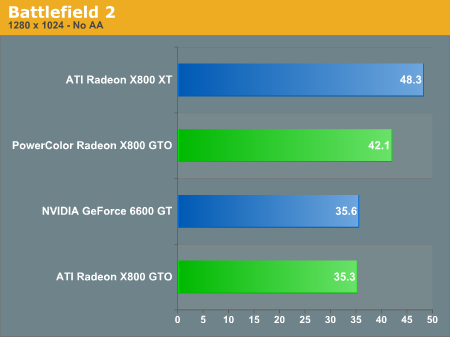
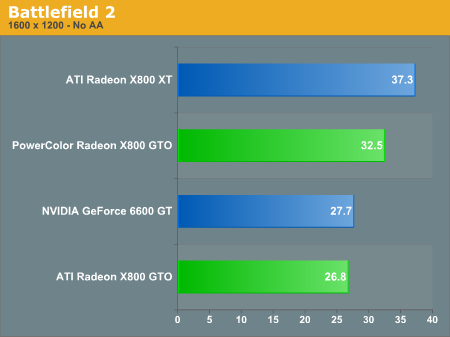
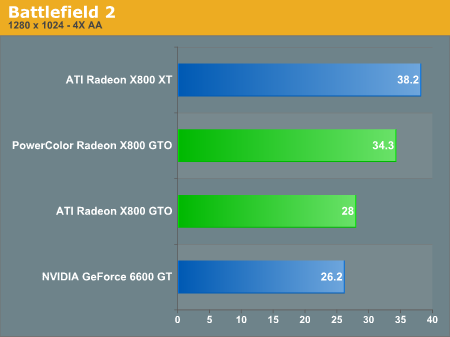
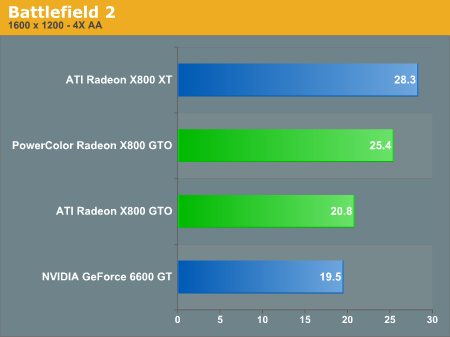
Starting out our tests with Battlefield 2, we see that the PowerColor X800 GTO 16 scores significantly higher than the standard X800 GTO. Note that because the other three X800 GTOs are all clocked at stock speeds (400/490), they are all represented as the reference ATI Radeon X800 GTO. Keep in mind that the X800 XT is a much higher priced part, but in Bf2, the PowerColor GTO gets framerates that aren't far behind it. This is interesting when you consider that the X800 XT costs $100 to $200 more than the PowerColor X800 GTO 16 at the time of this writing.
We would see the same type of performance from the other GTOs if we were able to unlock the pixel pipelines to 16, but with PowerColor offering an unlocked part out of the box, there's no chance that you'll end up stuck with 12 pipes.
We tested the X800 GTO alongside a variety of cards, and we used two resolutions: 1280x1024 and 1600x1200. We also tested each resolution with 4XAA and 8XAF for a total of 4 numbers per game. We would like to mention that as a general rule, a game is more or less unplayable under about 29 or 30 frames per second (depending on the game); however, each person has their limit. We've found that for fast-paced games like Battlefield 2 and Halflife 2, 35 fps and above will allow for enjoyable gameplay, while games like Splinter Cell would be just as fun at a much lower fps. This ultimately, of course, is all up to the personal preference of the player.
Here is the system that we used for testing:
MSI K8N Neo4 Platinum/SLI motherboard
AMD Athlon 64 FX-55 Processor
2x512MB OCZ 2-2-2-6 1T DDR400 RAM
Seagate 7200.7 120 GB Hard Drive
OCZ 600 W PowerStream Power Supply
Starting out our tests with Battlefield 2, we see that the PowerColor X800 GTO 16 scores significantly higher than the standard X800 GTO. Note that because the other three X800 GTOs are all clocked at stock speeds (400/490), they are all represented as the reference ATI Radeon X800 GTO. Keep in mind that the X800 XT is a much higher priced part, but in Bf2, the PowerColor GTO gets framerates that aren't far behind it. This is interesting when you consider that the X800 XT costs $100 to $200 more than the PowerColor X800 GTO 16 at the time of this writing.
We would see the same type of performance from the other GTOs if we were able to unlock the pixel pipelines to 16, but with PowerColor offering an unlocked part out of the box, there's no chance that you'll end up stuck with 12 pipes.
Originally published at https://www.anandtech.com/show/1908 (Wayback Machine).