
ATI Radeon X800 GTO Mini Roundup: Sapphire, Connect3D, and PowerColor
- Posted in
- GPUs
Overclocking/Load Power
No doubt that many have heard the rumors of the GTO2's overclocking abilities, but you can be assured that they aren't completely unfounded. There has been much talk of how this card is capable of being modded from its standard 12 pixel pipelines up to 16 pipelines, which, when combined with clock speed boosts, make it capable of performing the same as an X850 Pro for a ridiculously lower price. While, in all honesty, this is technically possible, changing the pipes requires meddling with the BIOS, which is a good way to ruin your card. So, we've decided to focus solely on overclocking the engine and memory clock speeds. We would also like to add that you should only overclock your card at your own risk, as there is always a possibility for damage to occur if not done with care.
Note that we weren't able to overclock the X800 GTO Ultimate because the fan-less heat sink means that there is a much greater risk of damage to the card due to heat. We found that this card has so far taken the lead as being the most screamingly hot card to touch after running a few tests on it. This is unfortunately the price of silent operation, and those in very hot climates or with computer cases that have poor ventilation may run into cooling problems with this card.
We also weren't able to get much of an overclock on the PowerColor X800 GTO 16, which isn't very surprising given that it comes with 16 pixel pipelines enabled. The fact that these extra pipelines are enabled for this card seems to greatly reduce its overclocking headroom below other X800 GTOs. We were still able to overclock the card a little more, for an engine clock of 440MHz and memory clock of 500MHz. This wasn't enough to help the PowerColor X800 GTO 16 match either the Connect3D or the Sapphire GTO2 in performance when overclocked, however.
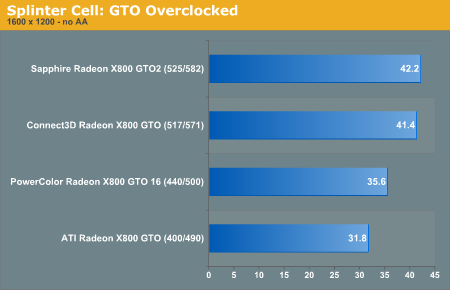
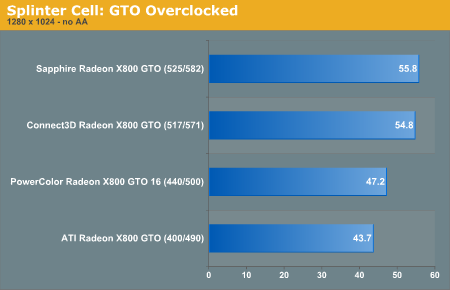
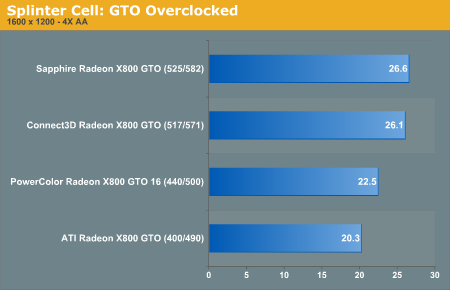
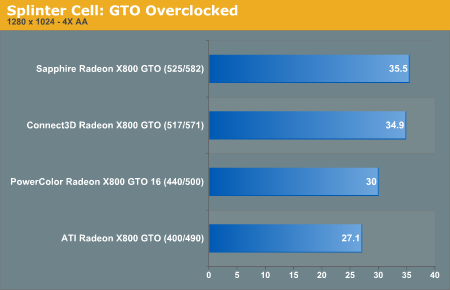
When we came around to seeing the kind of overclocking that the X800 GTO2 could do, we were indeed impressed. It turns out that the card has the ability to overclock, and we managed to get it to run stable with a core clock speed of 525MHz and a memory speed of 582MHz. This gave us some fairly impressive gains in framerates in Splinter Cell over the standard factory clock of 400Mhz and 490MHz, as you can see by the graph(s). (Note that on the graph, ATI Radeon X800 GTO represents the X800 GTO at reference clock speeds.)
Load Power
No doubt that many have heard the rumors of the GTO2's overclocking abilities, but you can be assured that they aren't completely unfounded. There has been much talk of how this card is capable of being modded from its standard 12 pixel pipelines up to 16 pipelines, which, when combined with clock speed boosts, make it capable of performing the same as an X850 Pro for a ridiculously lower price. While, in all honesty, this is technically possible, changing the pipes requires meddling with the BIOS, which is a good way to ruin your card. So, we've decided to focus solely on overclocking the engine and memory clock speeds. We would also like to add that you should only overclock your card at your own risk, as there is always a possibility for damage to occur if not done with care.
Note that we weren't able to overclock the X800 GTO Ultimate because the fan-less heat sink means that there is a much greater risk of damage to the card due to heat. We found that this card has so far taken the lead as being the most screamingly hot card to touch after running a few tests on it. This is unfortunately the price of silent operation, and those in very hot climates or with computer cases that have poor ventilation may run into cooling problems with this card.
We also weren't able to get much of an overclock on the PowerColor X800 GTO 16, which isn't very surprising given that it comes with 16 pixel pipelines enabled. The fact that these extra pipelines are enabled for this card seems to greatly reduce its overclocking headroom below other X800 GTOs. We were still able to overclock the card a little more, for an engine clock of 440MHz and memory clock of 500MHz. This wasn't enough to help the PowerColor X800 GTO 16 match either the Connect3D or the Sapphire GTO2 in performance when overclocked, however.
When we came around to seeing the kind of overclocking that the X800 GTO2 could do, we were indeed impressed. It turns out that the card has the ability to overclock, and we managed to get it to run stable with a core clock speed of 525MHz and a memory speed of 582MHz. This gave us some fairly impressive gains in framerates in Splinter Cell over the standard factory clock of 400Mhz and 490MHz, as you can see by the graph(s). (Note that on the graph, ATI Radeon X800 GTO represents the X800 GTO at reference clock speeds.)
Load Power
Originally published at https://www.anandtech.com/show/1908 (Wayback Machine).