
The All-In-Wonder 2006 PCIe Edition: The Latest Multimedia Solution From ATI
- Posted in
- GPUs
Features
The multimedia aspects of the A-I-W 2006 are what take the center stage over its gaming capabilities. While it is capable of providing decent gameplay in a lot of games, we don't see the kind of over-the-top graphical performance as we did with the X1800 XL A-I-W. We do however see the same excellent multimedia features which reflect the quality ATI has put into their A-I-W products.
Video Playback and Recording is the biggest feature here, and again we find that the card is incredibly easy to install and setup for this. The card has an input for your Cable or Satellite system and once it's plugged in, a simple setup adjustment had us instantly watching live tv on our system.
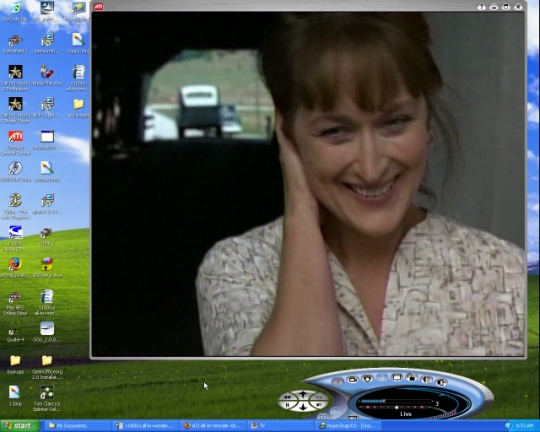
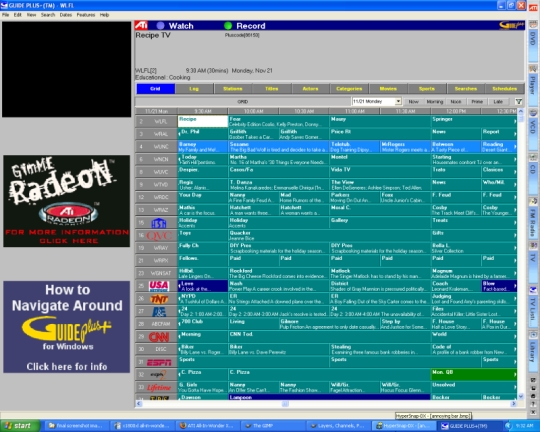
The interface is the same as it was for the X1800 XL A-I-W, with a TV player which works much like a television tuner, allowing you to browse cable channels and do other things like set parental controls. The Gemstar GUIDE Plus+ is back, which is a program that comes with the card and allows you to download show schedules and record upcoming programs for later viewing on your PC. You can also pause and resume live TV at anytime while you are watching, which gives the All-In-Wonder a similar feel to something like TiVo for the PC.
There is also a feature called Thruview, which is essentially a way to watch TV in the background while typing or web browsing on your computer. Thruview is enabled through the media player options, and changes the opacity of the video playback so that it appears to be playing in the background. This "see-through" effect can be enabled full screen or be limited to a box that can be resized. We talked before about how this effect can be slightly annoying, and our sentiments haven't changed. While it is an interesting idea and some people might have use for this feature, we find it to be distracting and too faint to be of any real use.
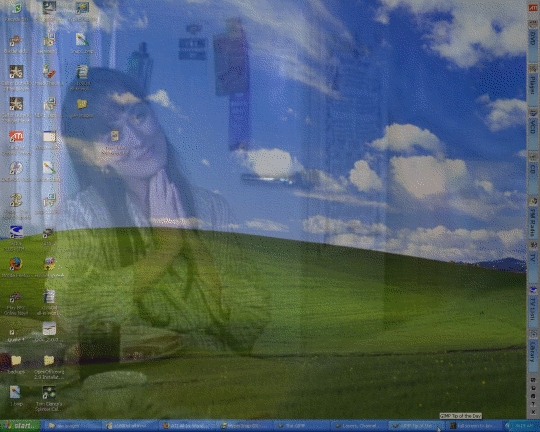
Another small annoying thing that is back with the A-I-W 2006 is the toolbar that installs itself with the media players and starts up with windows along the right edge of your screen. The toolbar isn't really necessary, as all of the programs listed are available in the start menu, and the fact that it's there taking up any space at all rubs us the wrong way. But the toolbar is harmless and simple enough to disable from automatic startup if you don't like it. If you spend a little bit of time looking around at install time, the toolbar can be skipped altogether (which is our recommendation).

Other small features we should mention are the ability to record or take screen shots of anything you are watching at anytime, and view or export the files later on for editing. There is also a DVD and CD player included, as well as an FM Radio tuner if you feel like recording or listening to the radio on your computer.
These are all features that were available with the X1800 XL A-I-W, and ATI seems to be staying with what works for the A-I-W 2006. As we mentioned in the last All-In-Wonder review, of all the features included here, ease of use is at the top of the list. We didn't see any lag or glitches in video playback or recording, and the interfaces are straightforward and helpful for getting the desired settings. We still like the switch from Pinnacle to Adobe for the bundled video editing software, but again, unlike the X1800 XL A-I-W the A-I-W 2006 only comes with Premier Elements and not Photoshop.
The multimedia aspects of the A-I-W 2006 are what take the center stage over its gaming capabilities. While it is capable of providing decent gameplay in a lot of games, we don't see the kind of over-the-top graphical performance as we did with the X1800 XL A-I-W. We do however see the same excellent multimedia features which reflect the quality ATI has put into their A-I-W products.
Video Playback and Recording is the biggest feature here, and again we find that the card is incredibly easy to install and setup for this. The card has an input for your Cable or Satellite system and once it's plugged in, a simple setup adjustment had us instantly watching live tv on our system.
The interface is the same as it was for the X1800 XL A-I-W, with a TV player which works much like a television tuner, allowing you to browse cable channels and do other things like set parental controls. The Gemstar GUIDE Plus+ is back, which is a program that comes with the card and allows you to download show schedules and record upcoming programs for later viewing on your PC. You can also pause and resume live TV at anytime while you are watching, which gives the All-In-Wonder a similar feel to something like TiVo for the PC.
There is also a feature called Thruview, which is essentially a way to watch TV in the background while typing or web browsing on your computer. Thruview is enabled through the media player options, and changes the opacity of the video playback so that it appears to be playing in the background. This "see-through" effect can be enabled full screen or be limited to a box that can be resized. We talked before about how this effect can be slightly annoying, and our sentiments haven't changed. While it is an interesting idea and some people might have use for this feature, we find it to be distracting and too faint to be of any real use.
Another small annoying thing that is back with the A-I-W 2006 is the toolbar that installs itself with the media players and starts up with windows along the right edge of your screen. The toolbar isn't really necessary, as all of the programs listed are available in the start menu, and the fact that it's there taking up any space at all rubs us the wrong way. But the toolbar is harmless and simple enough to disable from automatic startup if you don't like it. If you spend a little bit of time looking around at install time, the toolbar can be skipped altogether (which is our recommendation).
Other small features we should mention are the ability to record or take screen shots of anything you are watching at anytime, and view or export the files later on for editing. There is also a DVD and CD player included, as well as an FM Radio tuner if you feel like recording or listening to the radio on your computer.
These are all features that were available with the X1800 XL A-I-W, and ATI seems to be staying with what works for the A-I-W 2006. As we mentioned in the last All-In-Wonder review, of all the features included here, ease of use is at the top of the list. We didn't see any lag or glitches in video playback or recording, and the interfaces are straightforward and helpful for getting the desired settings. We still like the switch from Pinnacle to Adobe for the bundled video editing software, but again, unlike the X1800 XL A-I-W the A-I-W 2006 only comes with Premier Elements and not Photoshop.
Originally published at https://www.anandtech.com/show/1903 (Wayback Machine).