
GEEKOM AS 6 (ASUS PN53) Review: Ryzen 9 6900HX Packs Punches in a Petite Package
Power Consumption and Thermal Characteristics
The power consumption at the wall was measured with a 4K display being driven through the HDMI port of the system. In the graph below, we compare the idle and load power of the GEEKOM AS 6 (ASUS PN53) with other systems evaluated before. For load power consumption, we ran the AIDA64 System Stability Test with various stress components, as well as our custom stress test with Prime95 / Furmark, and noted the peak as well as idling power consumption at the wall.
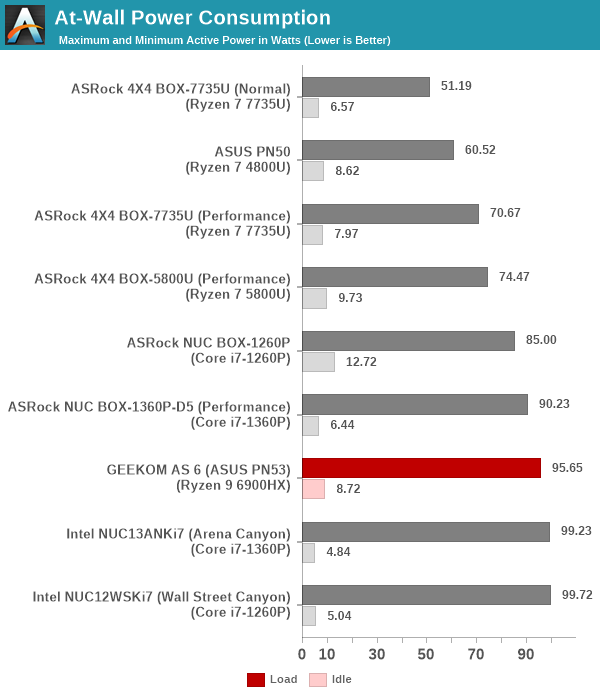
The peak numbers are consistent with the TDP and suggested PL1 / PL2 values for the processors in the systems, and do not come as any surprise. The idle power consumption numbers are more interesting, as there is more scope for BIOS optimizations as well as board design itself to affect that. In general, Intel's own NUC systems are well-optimized - the RPL-P Arena Canyon NUC idles at 4.84W. The GEEKOM AS 6 is similar to other AMD systems at around 9W. The presence of a number of bridge chips in the main and daughterboards may also be a contributor to this relatively high number.
Stress Testing
Our thermal stress routine is a combination of Prime95, Furmark, and Finalwire's AIDA64 System Stability Test. The following 9-step sequence is followed, starting with the system at idle:
- Start with the Prime95 stress test configured for maximum power consumption
- After 30 minutes, add Furmark GPU stress workload
- After 30 minutes, terminate the Prime95 workload
- After 30 minutes, terminate the Furmark workload and let the system idle
- After 30 minutes of idling, start the AIDA64 System Stress Test (SST) with CPU, caches, and RAM activated
- After 30 minutes, terminate the previous AIDA64 SST and start a new one with the GPU, CPU, caches, and RAM activated
- After 30 minutes, terminate the previous AIDA64 SST and start a new one with only the GPU activated
- After 30 minutes, terminate the previous AIDA64 SST and start a new one with the CPU, GPU, caches, RAM, and SSD activated
- After 30 minutes, terminate the AIDA64 SST and let the system idle for 30 minutes
Traditionally, this test used to record the clock frequencies - however, with the increasing number of cores in modern processors and fine-grained clock control, frequency information makes the graphs cluttered and doesn't contribute much to understanding the thermal performance of the system. The focus is now on the power consumption and temperature profiles to determine if throttling is in play.


The cTDP of the processor is evident in the reported STAPM power numbers. This 'skin-temperature aware power management' number has a slow rise towards the 35W number even as the package power peaks at 65W for around 8s, with another level at 54W for around 4 minutes, before reaching a stable plateau at 35W.
The core temperature is kept south of 90C during the 54W package power duration. Once the STAPM reaches 35W, throttling takes effect and the package power goes down. The core temperature stabilizes around 75C, pointing to a very effective thermal solution. The SSD thermal solution is also very good, with the thermal pad and the metal frame combining to keep it under 50C even under disk stress. The only hot spot under stress seems to be the DIMMs which stabilize around 81C and 78C. Form-factor limitations do not allow a heat sink for the SODIMMs, but this is something that may need addressing with active airflow over the memory modules in the future, or even vertical placement of the SODIMMs with additional air gap between the modules.
Originally published at https://www.anandtech.com/show/18964/geekom-as-6-asus-pn53-review-ryzen-9-6900hx-packs-punches-in-a-petite-package (Wayback Machine).