
DFI NF4 SLI-DR Expert – Can the best get better?
- Posted in
- Motherboards
DFI NF4 SLI-DR Expert: Overclocking
The 3500+ Winchester used in this review had previously run at 500 MHz FSB with extreme stability on the SLI-D. This was illustrated here. To reach that plateau on the SLI-D, it was necessary to boot into Windows at 425 MHz FSB and then utilize ClockGen to escalate to 500 MHz FSB as the board would not boot into Windows at any setting higher than 425 MHz FSB.
In contrast, the Expert had booted into Windows all the way to 510 MHz FSB. At that point, ClockGen was used to rise to the CPU’s limit of 512 MHz FSB.
It is worth pointing out that the board is only the vehicle to allow you the ability to overclock your CPU. The CPU’s ability to overclock, whether aiming for a top overclock or HTT overclock, or even a top 1:1 memory overclock, will be the over-riding factor in one’s success. Other factors, including the integrated memory controller of the A64, also contribute to the processors overclocking abilities.
Case in point is the difference between the 4000+ San Diego and the 3500+ Winchester. The 4000+ would clock the FSB easily to 400 MHz on the SLI-DR Expert, but no further, whereas the 3500+ attained an additional 112 MHz FSB. Too many times, one will blame the board when in fact the CPU is the main contributing factor.
| DFI LP UT NF4 SLI-DR Expert Overclocking Testbed | |
| Processor: | AMD A64 4000+ San Diego core AMD A64 3500+ Winchester core |
| CPU Voltage: | 1.41V- 1.73V |
| Cooling: | Custom watercooling setup: Lytron 6848G4 Modular watercooling system feeding a Swiftech MCW6000 waterblock |
| Power Supply: | PC Power and Cooling Turbo-Cool 510 SLI |
| Memory: | 2x256MB Corsair CMX256A-3200LL BH-5 2x256MB G.skill PC4400LE 2x512MB Corsair CMX512-3200XL 2x1GB Corsair CMX1024-4000PT 4x512MB OCZ PC4800EL Elite Platinum Ed. |
| Hard Drive: | Hitachi Deskstar 7200RPM 160 GB SATA |
| Maximum OC: (Standard Ratio) |
246x12 (5x LDT) 2952MHz (+18.7%) |
| Maximum FSB: (Lower Ratio) |
512Mhz x 5 (2.5x LDT) (2561MHz, 2 DIMMs in DC mode @ 256Mhz 2.5-3-3-8 1T) (+156% Bus Overclock) |
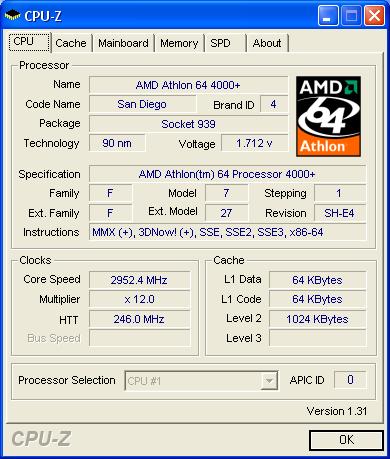

Click to enlarge.
CPU-Z validation link
Compared to this reviewer’s experience with the original SLI-D, the Expert version is a superior overclocking platform. With DFI’s wide range of voltage options and overclocking settings, the board excels in assisting the enthusiast to get the most from any CPU. In the illustration of the Top Overclock, the 4000+ San Diego was used, watercooled, and had reached a highest clock of 2950 MHz in the original SLI-D. The Expert took this CPU to the same limit.The 3500+ Winchester used in this review had previously run at 500 MHz FSB with extreme stability on the SLI-D. This was illustrated here. To reach that plateau on the SLI-D, it was necessary to boot into Windows at 425 MHz FSB and then utilize ClockGen to escalate to 500 MHz FSB as the board would not boot into Windows at any setting higher than 425 MHz FSB.
In contrast, the Expert had booted into Windows all the way to 510 MHz FSB. At that point, ClockGen was used to rise to the CPU’s limit of 512 MHz FSB.
It is worth pointing out that the board is only the vehicle to allow you the ability to overclock your CPU. The CPU’s ability to overclock, whether aiming for a top overclock or HTT overclock, or even a top 1:1 memory overclock, will be the over-riding factor in one’s success. Other factors, including the integrated memory controller of the A64, also contribute to the processors overclocking abilities.
Case in point is the difference between the 4000+ San Diego and the 3500+ Winchester. The 4000+ would clock the FSB easily to 400 MHz on the SLI-DR Expert, but no further, whereas the 3500+ attained an additional 112 MHz FSB. Too many times, one will blame the board when in fact the CPU is the main contributing factor.
Originally published at https://www.anandtech.com/show/1874 (Wayback Machine).