
Intel NUC 12 Pro Wall Street Canyon Kits Review: Alder Lake in UCFF Avatar
- Posted in
- Systems
- Intel
- Fanless
- NUC
- Passive Cooling
- UCFF
- Mini-PC
- Alder Lake-P
- NUC12
- Wall Street Canyon
- Bleu Jour
HTPC Credentials
The 2022 Q4 update to our system reviews brings an updated HTPC evaluation suite for systems. After doing away with the evaluation of display refresh rate stability and Netflix streaming evaluation, the local media playback configurations have also seen a revamp. This section details each of the workloads processed on the Intel NUC12WSKi7 (Wall Street Canyon) as part of the HTPC suite.
YouTube Streaming Efficiency
YouTube continues to remain one of the top OTT platforms, primarily due to its free ad-supported tier. Our HTPC test suite update retains YouTube streaming efficiency evaluation as a metric of OTT support in different systems. Mystery Box's Peru 8K HDR 60FPS video is the chosen test sample. On PCs running Windows, it is recommended that HDR streaming videos be viewed using the Microsoft Edge browser after putting the desktop in HDR mode.
| YouTube Streaming Statistics | |||
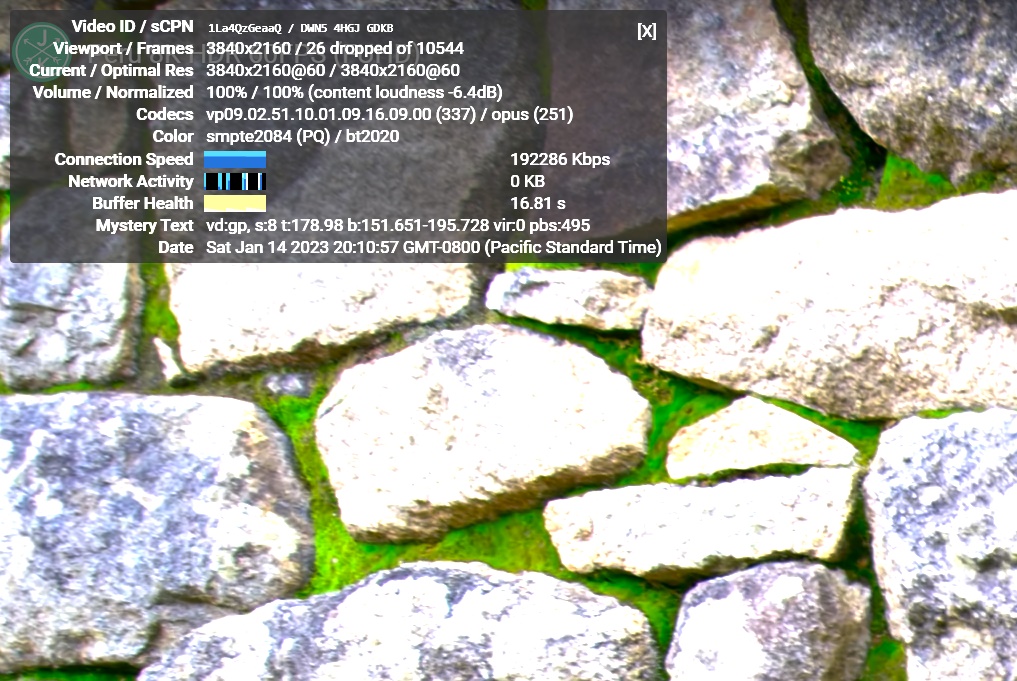
The GPU in the NUC 12 Pro kits supports hardware decoding of VP9 Profile 2, and we see the stream encoded with that codec being played back. The streaming is perfect, thanks to the powerful GPU and hardware decoding support - even in the thermally throttled Bleu Jour Meta 12. The dropped frames observed in the statistics above are due to mouse clicks involved in bringing up the overlay.
The streaming efficiency-related aspects such as GPU usage and at-wall power consumption are also graphed below.
| YouTube Streaming Efficiency | |||
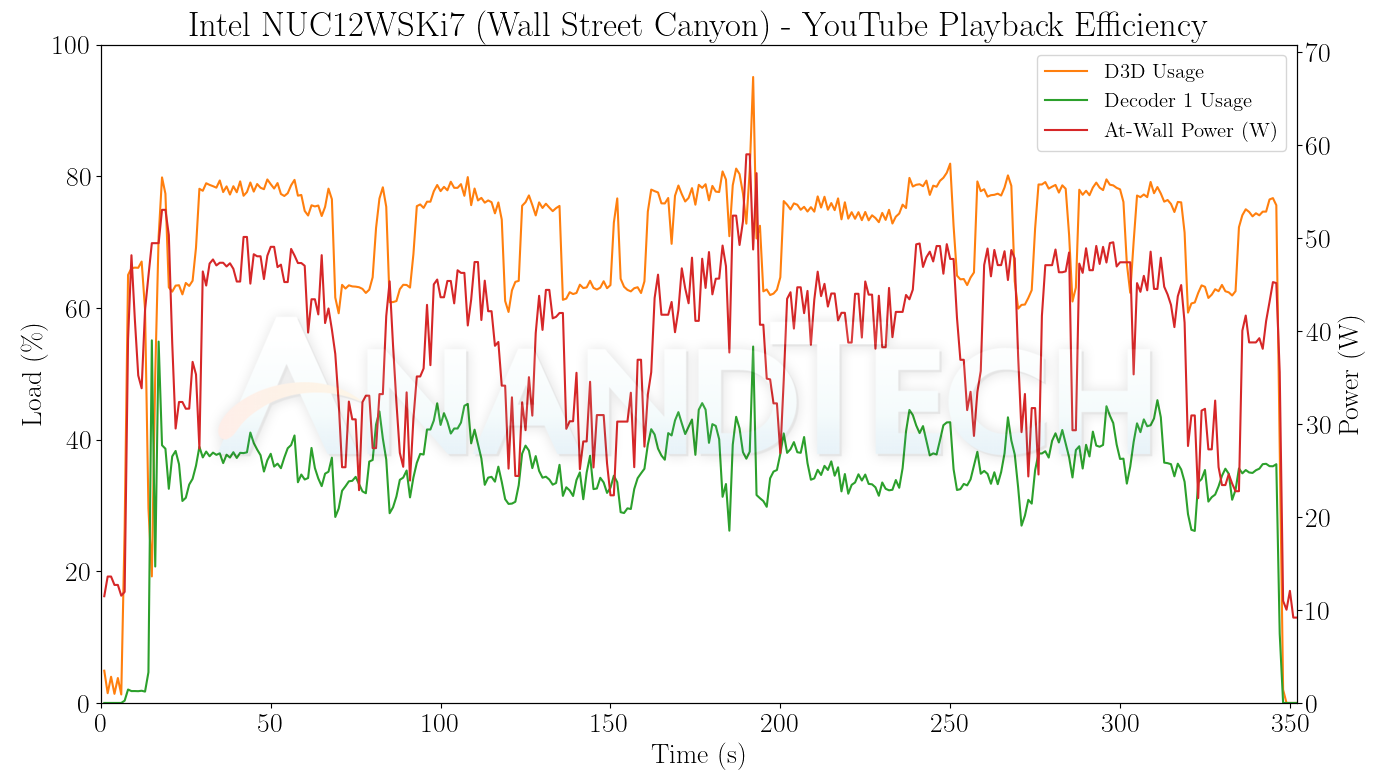
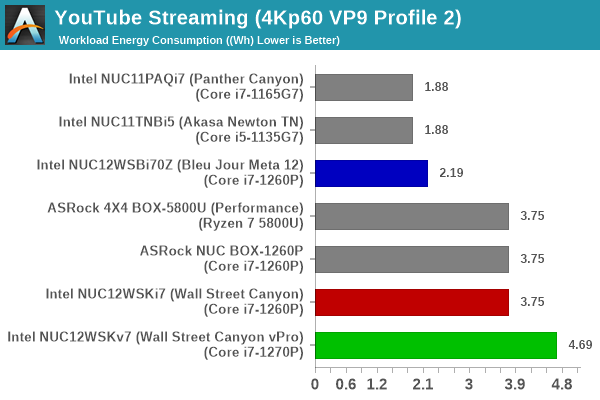
Ordinarily, we would expect the playback profile to be similar for all three systems, but it turns out that the Bleu Jour Meta 12 has the best playback profile of all - except during the activation of the overlays, there is no D3D usage and only the decoder engine is active. The low power consumption numbers also reflect themselves in the energy consumption graphed above.
Hardware-Accelerated Encoding and Decoding
The transcoding benchmarks in the systems performance section presented results from evaluating the QuickSync encoder within Handbrake's framework. The capabilities of the decoder engine are brought out by DXVAChecker.

Video Decoding Hardware Acceleration in the NUC 12 Pro Kits
The iGPU in the NUC 12 Pro kits support hardware decode for a variety of codecs including AVC, JPEG, HEVC (8b and 10b, 4:2:0 and 4:4:4), and VP9 (8b and 10b, 4:2:0 and 4:4:4). AV1 decode support is also present. This is currently the most comprehensive codec support seen in the PC space.
Local Media Playback
Evaluation of local media playback and video processing is done by playing back files encompassing a range of relevant codecs, containers, resolutions, and frame rates. A note of the efficiency is also made by tracking GPU usage and power consumption of the system at the wall. Users have their own preference for the playback software / decoder / renderer, and our aim is to have numbers representative of commonly encountered scenarios. Our Q4 2022 test suite update replaces MPC-HC (in LAV filters / madVR modes) with mpv. In addition to being cross-platform and open-source, the player allows easy control via the command-line to enable different shader-based post-processing algorithms. From a benchmarking perspective, the more attractive aspect is the real-time reporting of dropped frames in an easily parseable manner. The players / configurations considered in this subsection include:
- VLC 3.0.18
- Kodi 20.0rc2
- mpv 0.35 (hwdec auto, vo=gpu-next)
- mpv 0.35 (hwdec auto, vo=gpu-next, profile=gpu-hq)
Fourteen test streams (each of 90s duration) were played back from the local disk with an interval of 30 seconds in-between. Various metrics including GPU usage, at-wall power consumption, and total energy consumption were recorded during the course of this playback.
All our playback tests were done with the desktop HDR setting turned on. It is possible for certain system configurations to automatically turn on/off the HDR capabilities prior to the playback of a HDR video, but, we didn't take advantage of that in our testing.
| VLC Playback Efficiency | |||
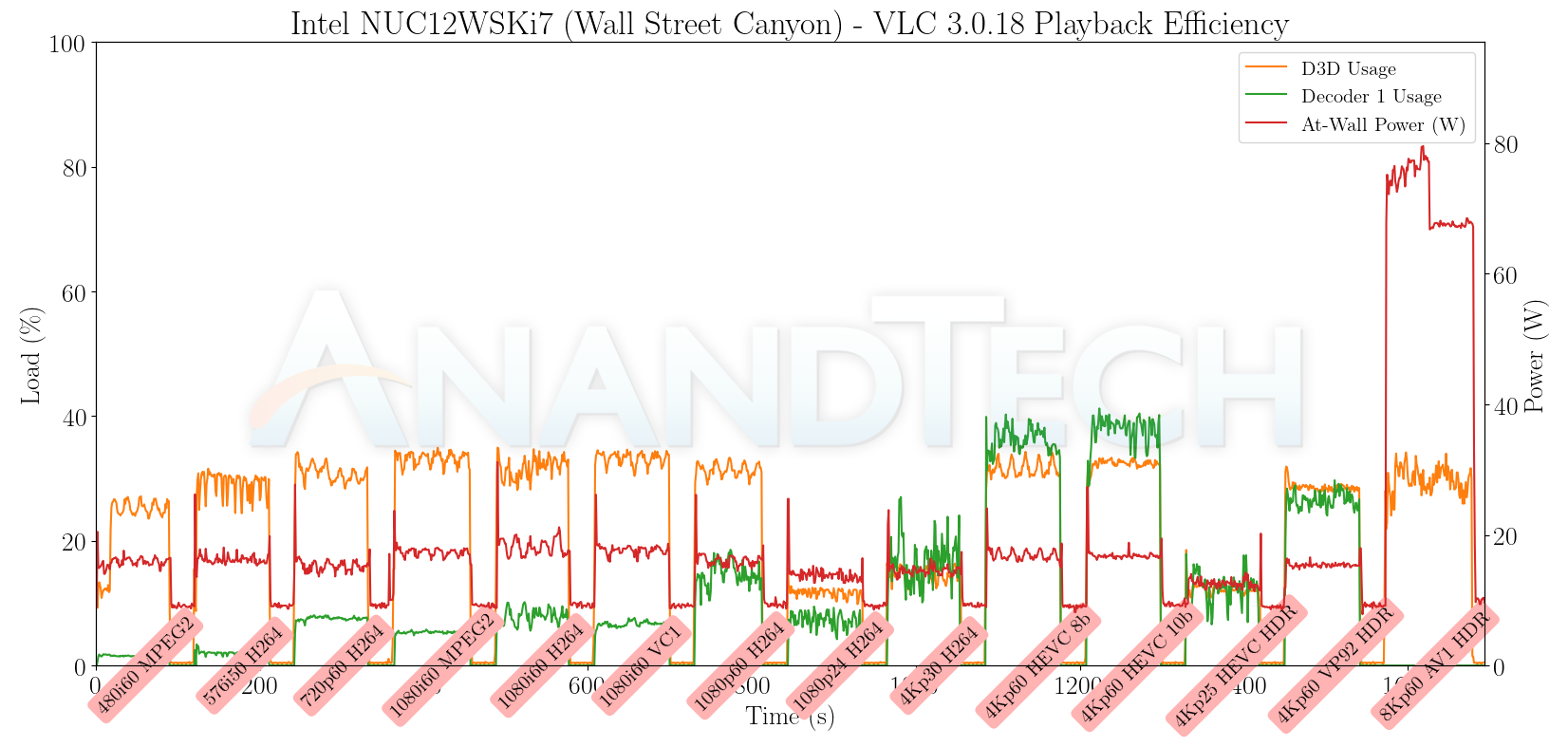
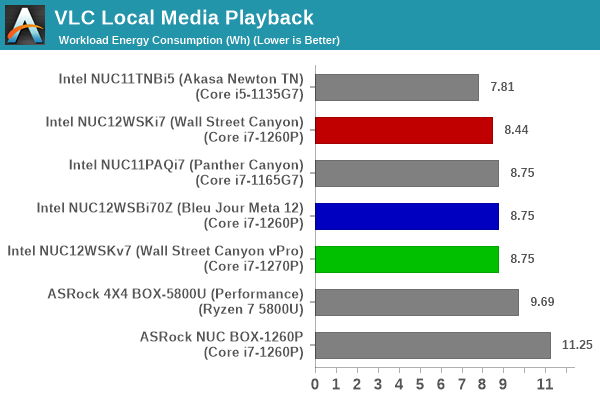
VLC is unable to take advantage of the AV1 hardware-accelerated decode, but is otherwise good with the other codecs. Energy consumption is at 8.75 Wh for the two actively-cooled NUC 12 Pro kits, but that is with the AV1 clip playing back like a slideshow and getting terminated after 90 seconds without playback completion.
| Kodi Playback Efficiency | |||
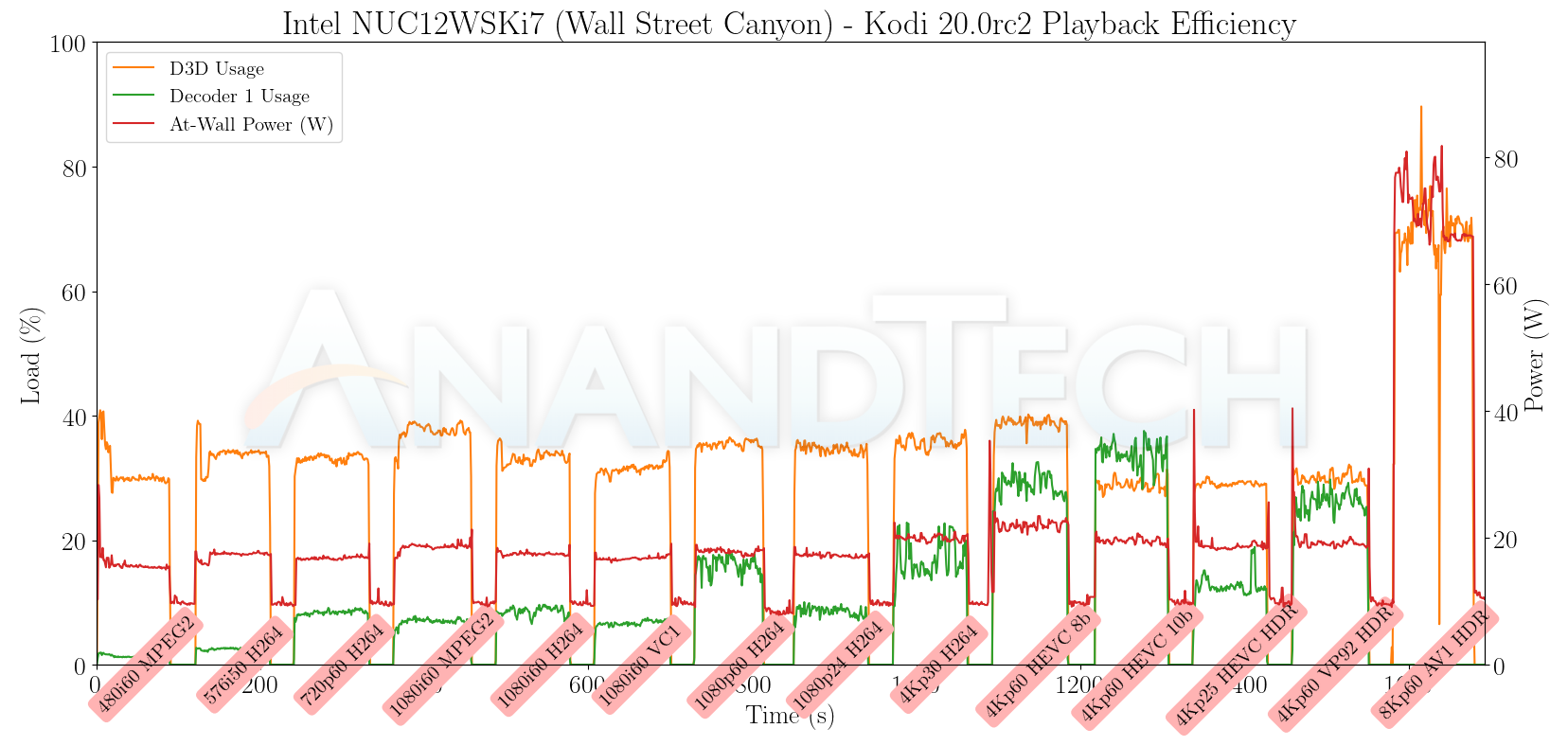
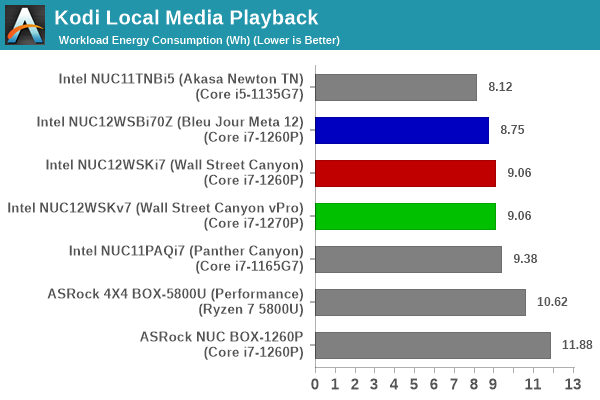
The hardware-acceleration decode status is the same as that of VLC, and the energy consumption numbers are slightly higher for Kodi.
| mpv 0.35 Playback Efficiency | |||
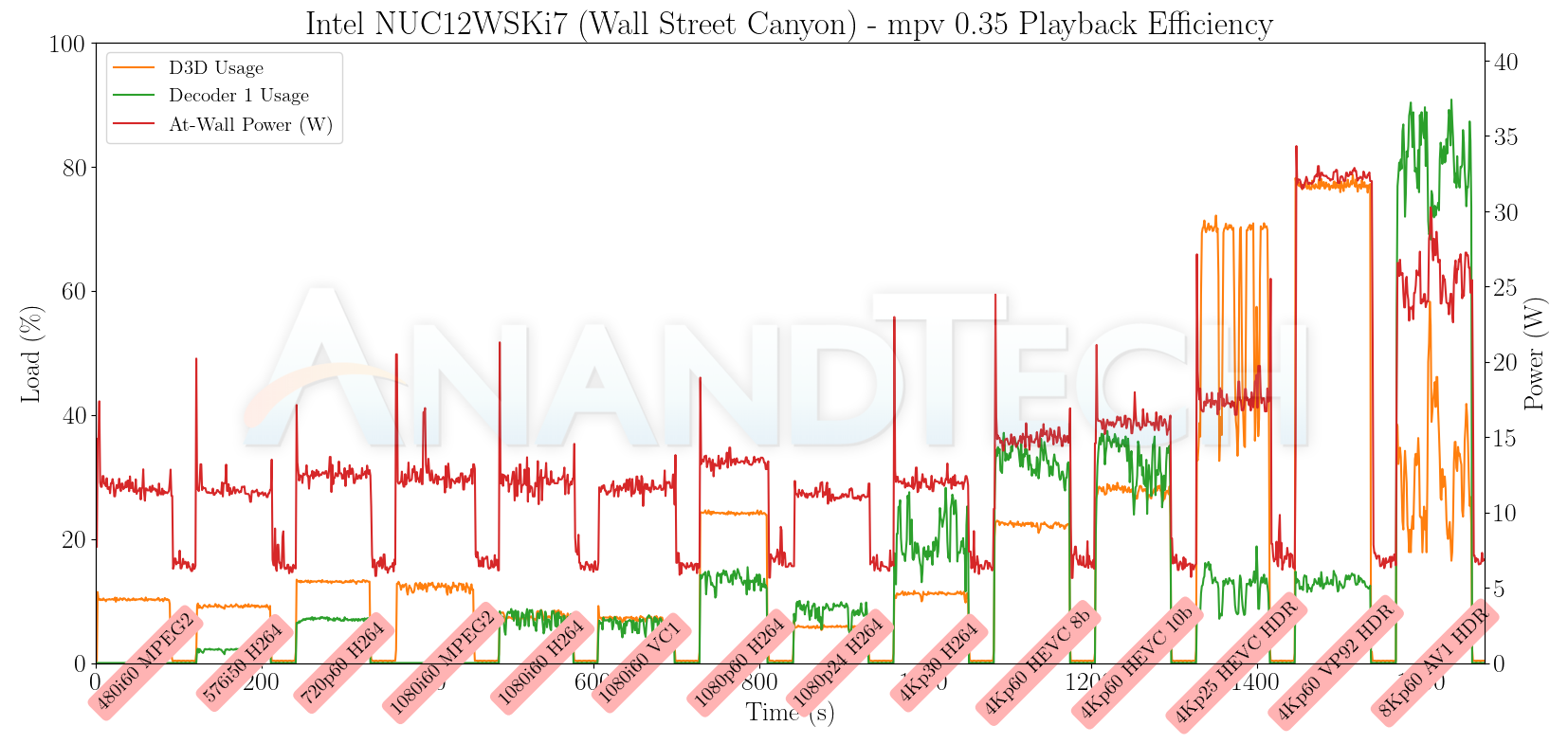
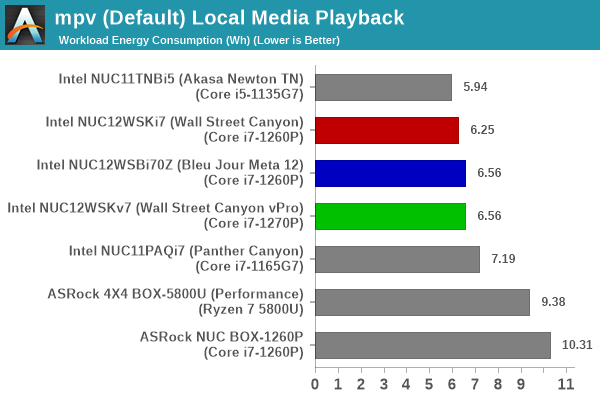
mpv playback with the gpu-next video output driver is the most energy efficient of the lot. We also have hardware accelerated decode for AV1. However, the playback for that clip still has issues, with approximately 60% of the frames getting dropped in the video output (the decoder itself doesn't drop any frames). This may warrant investigation by the mpv / gpu-next developers and/or Intel's driver team. It does appear to be a software issue that can be resolved in the long run.

| mpv 0.35 (GPU-HQ) Playback Efficiency | |||
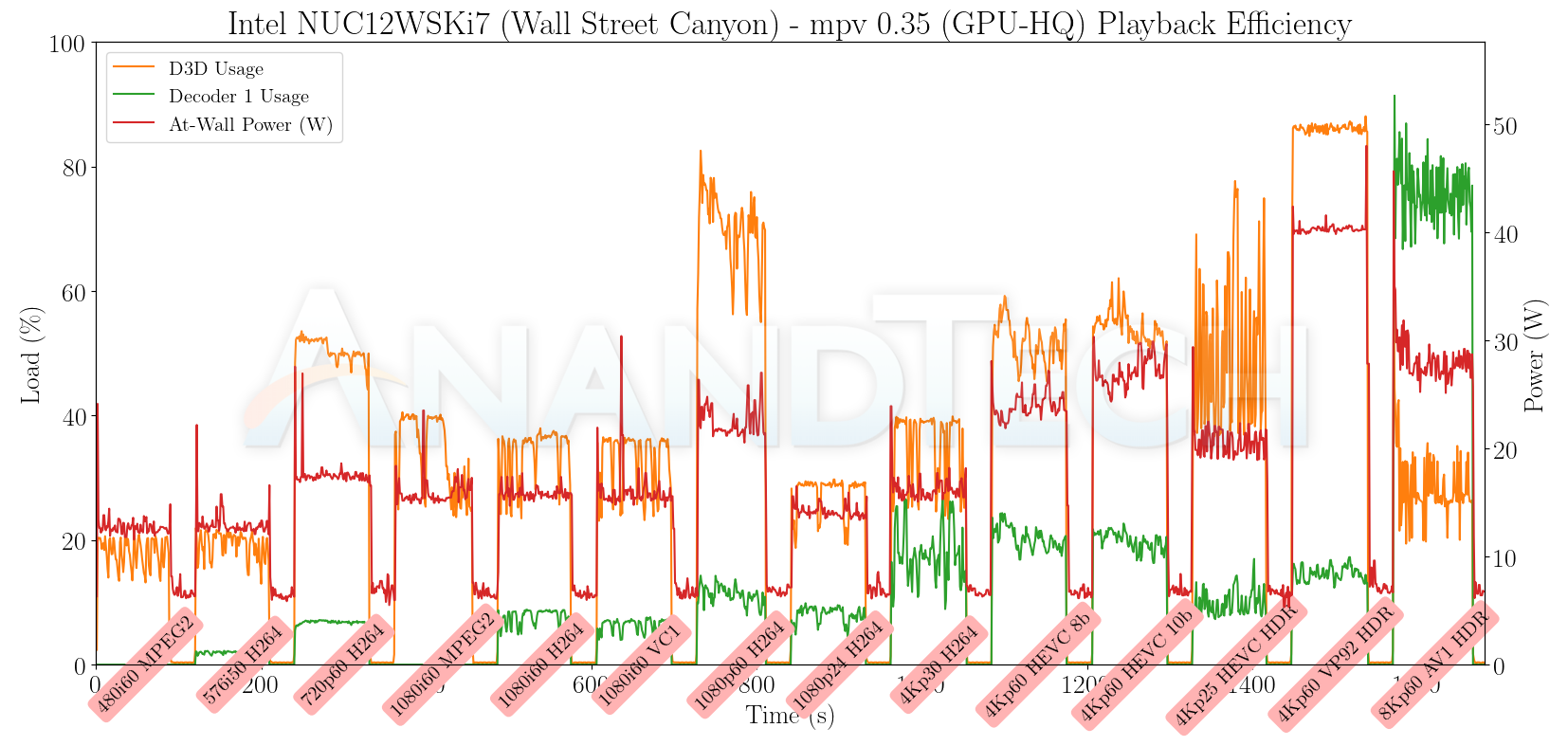
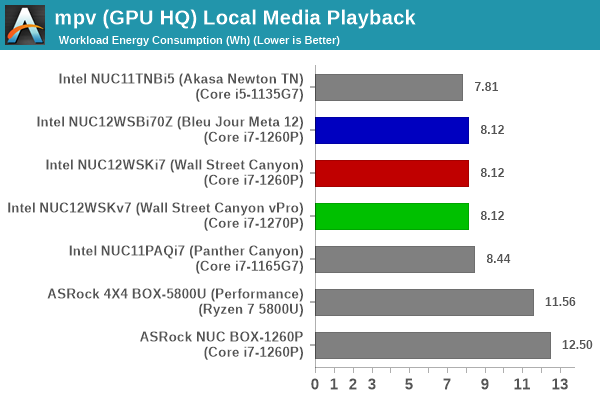
Activating the GPU shaders for video post processing (using GPU-HQ) does drive up the energy consumption numbers a bit, but the dropped frames statistics remain similar to the default profile case. Only the AV1 video output suffers from frames getting dropped.
Originally published at https://www.anandtech.com/show/18729/intel-nuc-12-pro-wall-street-canyon-kits-review-alder-lake-in-ucff-avatar (Wayback Machine).