
Asus A8R-MVP: Mainstream Rocket
- Posted in
- Motherboards
Audio Performance
For audio testing, we used Rightmark 3D Sound CPU utilization test, which is the same benchmark run in our earlier nForce4 SLI and Ultra roundups. This benchmark measures the overhead or CPU utilization required by a codec or hardware audio chip. We tested performance using the latest version 2.1. Since we found that Version 2.1 yields different results from the earlier 1.24, we have only included test results with version 2.1.
It is very important to point out that the ATI chipset motherboards have the necessary hooks to deliver Azalia High Definition audio. Those who have been complaining about the poor AC'97 audio present on most AMD boards should be very pleased to find Azalia HD on the ATI chipset boards. The nForce4 family does not offer the necessary chipset hooks to support HD Azalia audio.
Ethernet Performance
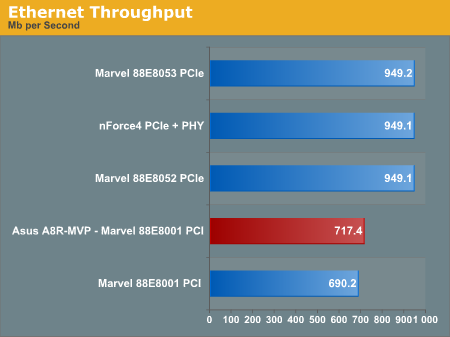
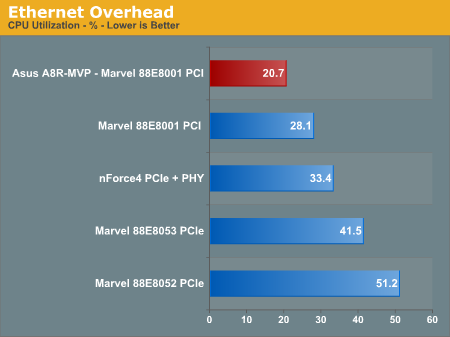
The one area where the Asus A8R-MVP is mildly disappointing is in their choice of an Ethernet controller. Instead of using a PCIe LAN that is capable of providing full 1 Gb bandwidth, Asus used a PCI solution that will be limited in maximum speed by the PCI bus. In practical terms, the PCI bus caps out about 700 Mb/s compared to the 950Mb/s capability of a 1 Gigabit PCIe solution. Since most broadband Ethernet connections barely tax 10Mb/s, this really only matters to those who do sustained high-speed transfer of very large files over a true 1Gb network - probably less than 1% of users. Still, you should be aware that PCIe Gigabit Ethernet is always a better solution.
The Windows 2000 Driver Development Kit (DDK) includes a useful LAN testing utility called NTttcp. We used the NTttcp tool to test Ethernet throughput and the CPU utilization of the various Ethernet Controllers used on the AMD motherboards.
We set up one machine as the server; in this case, an Intel box with an Intel CSA Gigabit LAN connection. Intel CSA has a reputation for providing fast throughput and this seemed to be a reasonable choice to serve our Gigabit LAN clients. At the server side, we used the following Command Line as suggested by the VIA whitepaper on LAN testing:
For audio testing, we used Rightmark 3D Sound CPU utilization test, which is the same benchmark run in our earlier nForce4 SLI and Ultra roundups. This benchmark measures the overhead or CPU utilization required by a codec or hardware audio chip. We tested performance using the latest version 2.1. Since we found that Version 2.1 yields different results from the earlier 1.24, we have only included test results with version 2.1.
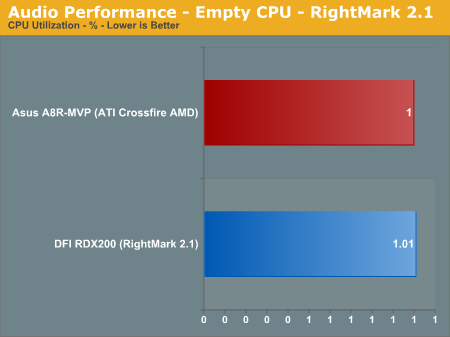
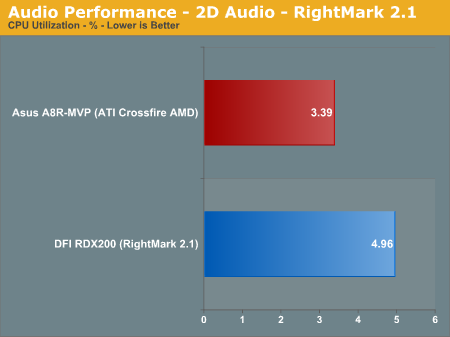
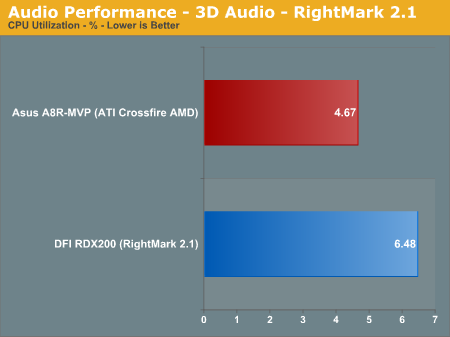
It is very important to point out that the ATI chipset motherboards have the necessary hooks to deliver Azalia High Definition audio. Those who have been complaining about the poor AC'97 audio present on most AMD boards should be very pleased to find Azalia HD on the ATI chipset boards. The nForce4 family does not offer the necessary chipset hooks to support HD Azalia audio.
Ethernet Performance
The one area where the Asus A8R-MVP is mildly disappointing is in their choice of an Ethernet controller. Instead of using a PCIe LAN that is capable of providing full 1 Gb bandwidth, Asus used a PCI solution that will be limited in maximum speed by the PCI bus. In practical terms, the PCI bus caps out about 700 Mb/s compared to the 950Mb/s capability of a 1 Gigabit PCIe solution. Since most broadband Ethernet connections barely tax 10Mb/s, this really only matters to those who do sustained high-speed transfer of very large files over a true 1Gb network - probably less than 1% of users. Still, you should be aware that PCIe Gigabit Ethernet is always a better solution.
The Windows 2000 Driver Development Kit (DDK) includes a useful LAN testing utility called NTttcp. We used the NTttcp tool to test Ethernet throughput and the CPU utilization of the various Ethernet Controllers used on the AMD motherboards.
We set up one machine as the server; in this case, an Intel box with an Intel CSA Gigabit LAN connection. Intel CSA has a reputation for providing fast throughput and this seemed to be a reasonable choice to serve our Gigabit LAN clients. At the server side, we used the following Command Line as suggested by the VIA whitepaper on LAN testing:
Ntttcps -m 4,0,‹client IP› -a 4 -l 256000 -n 30000On the client side (the motherboard under test), we used the following Command Line:
Ntttcpr -m 4,0,‹server IP› -a 4 -l 256000 -n 30000At the conclusion of the test, we captured the throughput and CPU utilization figures from the client screen.
Originally published at https://www.anandtech.com/show/1871 (Wayback Machine).