
Asus P5N32-SLI: Dual x16 - What Dreams Are Made On . . .
- Posted in
- Motherboards
ASUS P5N32-SLI Deluxe: Features
Asus did an excellent job with the color coordination of the various peripheral slots and connectors. The DIMM module slots' color coordination is correct for dual channel setup. The memory modules can be changed with a full size video card in the first PCI Express x16 slot. The power plug placement favors standard ATX case design and the power cable management is very good. Asus places the eight-pin 12V auxiliary power connector at the top of the CPU socket area, but out of the way of any aftermarket cooling solutions.
The nForce4 SATA II ports are located conveniently below the primary IDE connector and feature the new clamp and latch design. Asus did not include the new cable designs in their accessory kit, which greatly enhance the security of the SATA connections. When cables are attached to the top SATA II ports with a 7800GTX installed in the second PCI Express x16 slot, there is a tight fit. I would highly recommend installing the cables before the video card.
The nForce4 USB connectors and TI 1394a Firewire connectors are located below the battery and the adaptor connectors are a tight fit when utilizing the bottom PCI slot. The CMOS reset is a traditional jumper design located next to the BIOS chip and below the SATA II connectors that proved to be inconvenient at times.
In between the two x16 PCI Express slots is the PCI Express x4 slot along with one of the PCI Express x1 slots. The 4-pin 12V EZ plug is also located in this area and has the capability of creating cable clutter when utilized with an SLI setup. However, the full two slot spacing in between the x16 PCI Express slots leaves ample room for upgrading the cooling solutions on a pair of SLI cards. This additional room also provides better air-flow management and allowed our 7800GTX SLI configuration to run up to 4c cooler based upon the NVIDIA control panel temperature utility when compared to other motherboards in the same case and ambient conditions.
The Northbridge and Southbridge chipsets along with the MOFSETs are passively cooled with an excellent copper heat pipe system that does not interfere with any installed peripherals. In fact, this system kept the chipsets cool enough that additional chipset voltage was not a factor in our overclocking tests.
The only oddity in the area is the red Silicon Image 3132 SATA II connector located right above the first PCI Express x1 slot. The location of this connector is not ideal, but is required due to the second Silicon Image 3132 SATA II connector being located on the back I/O panel.
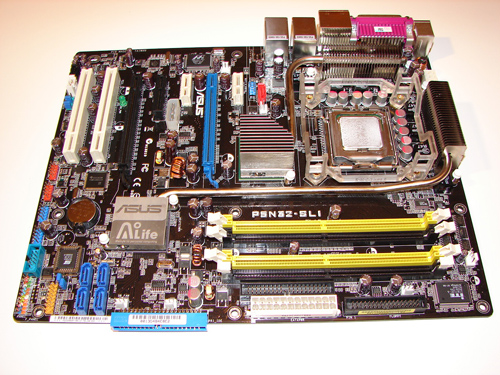
Asus did an excellent job with the color coordination of the various peripheral slots and connectors. The DIMM module slots' color coordination is correct for dual channel setup. The memory modules can be changed with a full size video card in the first PCI Express x16 slot. The power plug placement favors standard ATX case design and the power cable management is very good. Asus places the eight-pin 12V auxiliary power connector at the top of the CPU socket area, but out of the way of any aftermarket cooling solutions.
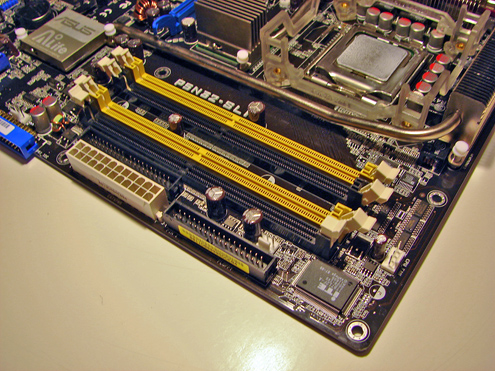
The nForce4 SATA II ports are located conveniently below the primary IDE connector and feature the new clamp and latch design. Asus did not include the new cable designs in their accessory kit, which greatly enhance the security of the SATA connections. When cables are attached to the top SATA II ports with a 7800GTX installed in the second PCI Express x16 slot, there is a tight fit. I would highly recommend installing the cables before the video card.
The nForce4 USB connectors and TI 1394a Firewire connectors are located below the battery and the adaptor connectors are a tight fit when utilizing the bottom PCI slot. The CMOS reset is a traditional jumper design located next to the BIOS chip and below the SATA II connectors that proved to be inconvenient at times.
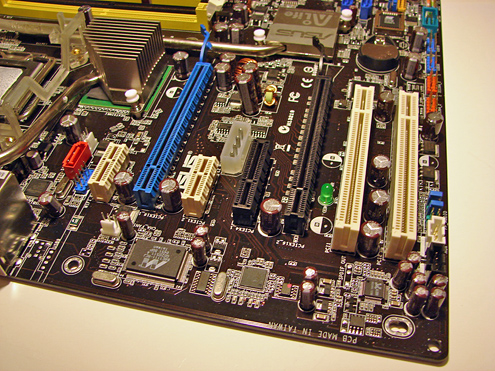
In between the two x16 PCI Express slots is the PCI Express x4 slot along with one of the PCI Express x1 slots. The 4-pin 12V EZ plug is also located in this area and has the capability of creating cable clutter when utilized with an SLI setup. However, the full two slot spacing in between the x16 PCI Express slots leaves ample room for upgrading the cooling solutions on a pair of SLI cards. This additional room also provides better air-flow management and allowed our 7800GTX SLI configuration to run up to 4c cooler based upon the NVIDIA control panel temperature utility when compared to other motherboards in the same case and ambient conditions.
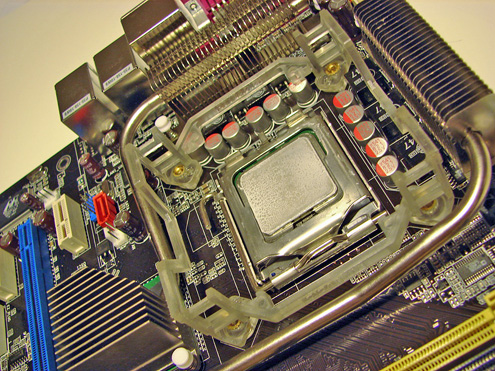
The Northbridge and Southbridge chipsets along with the MOFSETs are passively cooled with an excellent copper heat pipe system that does not interfere with any installed peripherals. In fact, this system kept the chipsets cool enough that additional chipset voltage was not a factor in our overclocking tests.
The only oddity in the area is the red Silicon Image 3132 SATA II connector located right above the first PCI Express x1 slot. The location of this connector is not ideal, but is required due to the second Silicon Image 3132 SATA II connector being located on the back I/O panel.
Originally published at https://www.anandtech.com/show/1836 (Wayback Machine).