
Asus P5N32-SLI: Dual x16 - What Dreams Are Made On . . .
- Posted in
- Motherboards
Ethernet Performance
The current motherboard test suite includes LAN performance measurements. All of these boards utilize PCI Express controllers with the only difference being the supplier of the core logic.
The Windows 2000 Driver Development Kit (DDK) includes a useful LAN testing utility called NTttcp. We used the NTttcp tool to test Ethernet throughput and the CPU utilization of the various Ethernet Controllers used on the nForce4 Ultra motherboards.
We set up one machine as the server; in this case, an Intel box with an Intel CSA Gigabit LAN connection. Intel CSA has a reputation for providing fast throughput and this seemed a reasonable choice to serve our Gigabit LAN clients.
At the server side, we used the following Command Line as suggested by the VIA whitepaper on LAN testing:
All standard Ethernet tests were performed with standard frames and the NVIDIA Active Armor suite disabled unless otherwise noted. Gigabit Ethernet supports Jumbo frames as well and will provide a further reduction in CPU overhead.
We added a further test scenario in which ActiveArmor was enabled on the Asus P5N32-SLI Deluxe board via the new 6.82 platform driver set. The throughput numbers increased by almost 3% while the CPU utilization dropped by over 7% with the standard settings enabled in the application. We also enabled Jumbo frames with ActiveArmor resulting in an increase in throughput numbers by 5% while the CPU utilization dropped by over 12%. We will be adding this benchmark testing to our standard test suite along with providing more information regarding the NVIDIA firewall solution in the near future. I highly recommend that if you have a NF4 based board, you should utilize ActiveArmor in its current configuration.
The current motherboard test suite includes LAN performance measurements. All of these boards utilize PCI Express controllers with the only difference being the supplier of the core logic.
The Windows 2000 Driver Development Kit (DDK) includes a useful LAN testing utility called NTttcp. We used the NTttcp tool to test Ethernet throughput and the CPU utilization of the various Ethernet Controllers used on the nForce4 Ultra motherboards.
We set up one machine as the server; in this case, an Intel box with an Intel CSA Gigabit LAN connection. Intel CSA has a reputation for providing fast throughput and this seemed a reasonable choice to serve our Gigabit LAN clients.
At the server side, we used the following Command Line as suggested by the VIA whitepaper on LAN testing:
Ntttcps - m 4 ,0, -a 4 - l 256000 - n 30000On the client side (the motherboard under test), we used the following Command Line:
Ntttcpr - m 4 ,0, -a 4 - l 256000 - n 30000At the conclusion of the test, we captured the throughput and CPU utilization figures from the client screen.
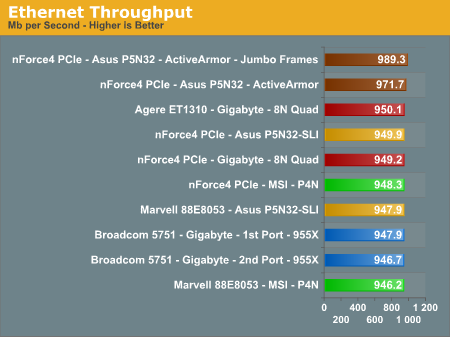
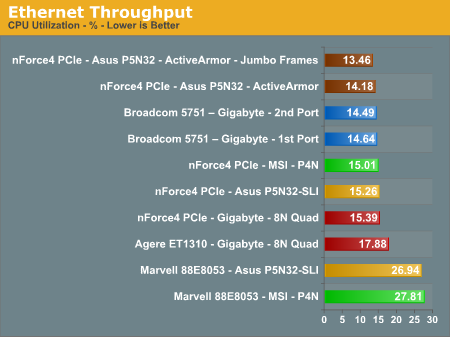
All standard Ethernet tests were performed with standard frames and the NVIDIA Active Armor suite disabled unless otherwise noted. Gigabit Ethernet supports Jumbo frames as well and will provide a further reduction in CPU overhead.
We added a further test scenario in which ActiveArmor was enabled on the Asus P5N32-SLI Deluxe board via the new 6.82 platform driver set. The throughput numbers increased by almost 3% while the CPU utilization dropped by over 7% with the standard settings enabled in the application. We also enabled Jumbo frames with ActiveArmor resulting in an increase in throughput numbers by 5% while the CPU utilization dropped by over 12%. We will be adding this benchmark testing to our standard test suite along with providing more information regarding the NVIDIA firewall solution in the near future. I highly recommend that if you have a NF4 based board, you should utilize ActiveArmor in its current configuration.
Originally published at https://www.anandtech.com/show/1836 (Wayback Machine).