
Entry Level Buyer's Guide, October 2005
- Posted in
- Guides
Gaming CPU and Motherboard Recommendations
The major change from the office configurations is going to be a move to discrete graphics, and in all instances, we're really interested in a motherboard that can overclock decently. You don't have to overclock, sure, but if you want higher performance from games and you can't afford a mid-range processor, a 25% or more overclock will certainly help. We've allocated an extra $250 for gaming purposes, and while the lion's share of that will go towards a good graphics card, an extra $40 or so on the motherboard and processor can also prove useful.
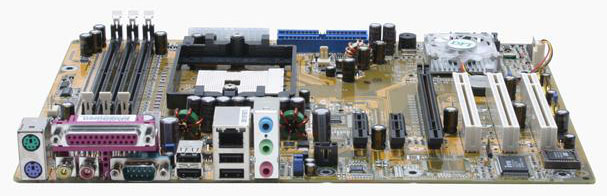
AMD Gaming Motherboard: DFI Infinity nF4X
Price: $77 shipped
AMD Gaming CPU: Sempron 64 (754) 3000+ - 128KB, 1.80 GHz Palermo
Price: $75 shipped (Retail)
Total: $152
The king of socket 754 overclocking is still the DFI LanParty UT nF3 250Gb. Unfortunately, there's a problem with that board: it's AGP only. If you already have a good AGP card and have been holding off upgrading, it might be worth considering - for example, an upgrade from an Athlon XP or older P4 system might benefit. A hybrid AGP/PCIe board like the ASRock would probably be a better choice, though - if only you could find such a board for socket 754. MSI makes the Neo3-F that has PCIe and the AGP-like AGR slot, but performance and compatibility of the AGR slot is not as good as what we would like. If you have a high-end AGP card, it will be a definite bottleneck, and if you have a low-end AGP card (9800 Pro or slower) and care about gaming, it's probably time to upgrade anyway.
In the end, most people will be better served by a PCIe-only motherboard, and happily, DFI has recently released their Infinity nF4X for socket 754 with options that nearly match the LanParty UT nF3. There are a few other boards that might work as well, including the ASUS K8N4-E Deluxe, EPoX EP-8NPA7I, and the Abit NV8. Since the Infinity 4X is the cheapest of the bunch and manages to overclock well, it gets our pick. Incidentally, if you want integrated Firewire, you only get one choice: the ASUS K8N4-E Deluxe. You could also go out and buy a Firewire card for the same $20, but then you're filling up one of three PCI slots.
For the processor, we remain in the same position as on the office computer: upgrading to Athlon 64 costs enough that you'd be better off moving to socket 939. For overclocking, we don't want to go lower than a 9X multiplier, but the 10X chips like the Sempron 3300+ and 3400+ are too expensive to justify. We're left with the choice between the 3000+ and the 3100+, with the 3100+ generally running about 5% faster due to the added L2 cache. As you can already see from our above selection, we chose the 3000+.
The total for motherboard and CPU comes to $152. Your best bet for a substantial performance upgrade would be to go with the motherboard and CPU that we used in our recent Venice Overclocking Guide. The DFI Infinity nF4 with a socket 939 Athlon 64 3000+ (retail) will cost about $240. The extra $88 will definitely get you to the point where the GPU will be your performance bottleneck, but you can get about the same performance from the Sempron 3000+. An ATI X800 Pro was basically CPU limited at resolutions starting at 1024x768 in our testing, whether we used a Venice 3000+ or a Palermo 3100+. (We'll have an article covering this in more detail soon; for now, you'll have to accept that statement without concrete numbers.)
Intel Office Motherboard: Gigabyte GA-8I945P-G
Price: $113 shipped
Intel Gaming CPU: Celeron D 331 - 256KB, 2.66 GHz Prescott
Price: $79 shipped (Retail)
Total: $192
As with the AMD configuration, we want a board that has some potential for overclocking. Whether or not you choose to use that potential is up to you, but the default CPU speeds for budget processors are pretty limiting. Gigabyte has done a fairly good job of catering to the performance and overclocking enthusiast, so we've upgraded from the ASUS Xpress 200 motherboard to a Gigabyte 945P motherboard. The change gets us four DDR2 DIMM slots, a robust set of overclocking options in the BIOS, and support for dual core Pentium D processors. It's doubtful that the Pentium D will ever reach the point where you would use it to upgrade this budget system, but once Presler launches in early 2006, we could see prices drop to the point where it would only be a $160 purchase. Regardless, we're more comfortable with Intel chipsets when overclocking than ATI chipsets - at least for the currently shipping models.
The CPU choice remains with the Celeron D 331, for price/performance reasons. Should you be interested in upgrading the CPU for more performance, the next chip that we would even consider would have to bear the Pentium name. The Pentium 506 runs at the same speed as the Celeron D 331, but it has four times the L2 cache and will end up around 10 to 15% faster (sometimes more) in almost every benchmark. Unfortunately, what we really want is a Pentium that still has HyperThreading support enabled, and those chips start at $160 instead of $110. We would recommend either living with the moderate performance of the Celeron D 331, or saving your pennies until you can afford a mid-range CPU and motherboard.
Overclocking of Pentium and Celeron D chips that have a default 533 FSB is somewhat interesting. The 20X multiplier is so high that Northbridge, RAM, and FSB limitations rarely come into play. What's needed is a BIOS that allows the user to modify the RAM speed to at least DDR-400, if not DDR-266. Using DDR2-533 RAM in combination with the 533FSB setting results in a 1:2 ratio (CPU:RAM), your RAM will likely move beyond its limit when overclocking. Dropping to the DDR-400 setting gives a 2:3 ratio, and this will allow up to a 178 MHz CPU bus speed without going out of spec on the RAM. If your CPU can handle that, you should end up with a respectable 3.56 GHz clock speed, and as with the overclocked AMD system, you will be largely bottlenecked by the GPU at that point. Note that in either case, the RAM will continue to run at a faster speed than the FSB, so you shouldn't encounter problems with asynchronous memory speeds.
The major change from the office configurations is going to be a move to discrete graphics, and in all instances, we're really interested in a motherboard that can overclock decently. You don't have to overclock, sure, but if you want higher performance from games and you can't afford a mid-range processor, a 25% or more overclock will certainly help. We've allocated an extra $250 for gaming purposes, and while the lion's share of that will go towards a good graphics card, an extra $40 or so on the motherboard and processor can also prove useful.
 |
 |
| Click images to enlarge. | |
AMD Gaming Motherboard: DFI Infinity nF4X
Price: $77 shipped
AMD Gaming CPU: Sempron 64 (754) 3000+ - 128KB, 1.80 GHz Palermo
Price: $75 shipped (Retail)
Total: $152
The king of socket 754 overclocking is still the DFI LanParty UT nF3 250Gb. Unfortunately, there's a problem with that board: it's AGP only. If you already have a good AGP card and have been holding off upgrading, it might be worth considering - for example, an upgrade from an Athlon XP or older P4 system might benefit. A hybrid AGP/PCIe board like the ASRock would probably be a better choice, though - if only you could find such a board for socket 754. MSI makes the Neo3-F that has PCIe and the AGP-like AGR slot, but performance and compatibility of the AGR slot is not as good as what we would like. If you have a high-end AGP card, it will be a definite bottleneck, and if you have a low-end AGP card (9800 Pro or slower) and care about gaming, it's probably time to upgrade anyway.
In the end, most people will be better served by a PCIe-only motherboard, and happily, DFI has recently released their Infinity nF4X for socket 754 with options that nearly match the LanParty UT nF3. There are a few other boards that might work as well, including the ASUS K8N4-E Deluxe, EPoX EP-8NPA7I, and the Abit NV8. Since the Infinity 4X is the cheapest of the bunch and manages to overclock well, it gets our pick. Incidentally, if you want integrated Firewire, you only get one choice: the ASUS K8N4-E Deluxe. You could also go out and buy a Firewire card for the same $20, but then you're filling up one of three PCI slots.
For the processor, we remain in the same position as on the office computer: upgrading to Athlon 64 costs enough that you'd be better off moving to socket 939. For overclocking, we don't want to go lower than a 9X multiplier, but the 10X chips like the Sempron 3300+ and 3400+ are too expensive to justify. We're left with the choice between the 3000+ and the 3100+, with the 3100+ generally running about 5% faster due to the added L2 cache. As you can already see from our above selection, we chose the 3000+.
The total for motherboard and CPU comes to $152. Your best bet for a substantial performance upgrade would be to go with the motherboard and CPU that we used in our recent Venice Overclocking Guide. The DFI Infinity nF4 with a socket 939 Athlon 64 3000+ (retail) will cost about $240. The extra $88 will definitely get you to the point where the GPU will be your performance bottleneck, but you can get about the same performance from the Sempron 3000+. An ATI X800 Pro was basically CPU limited at resolutions starting at 1024x768 in our testing, whether we used a Venice 3000+ or a Palermo 3100+. (We'll have an article covering this in more detail soon; for now, you'll have to accept that statement without concrete numbers.)
 |
 |
| Click images to enlarge. | |
Intel Office Motherboard: Gigabyte GA-8I945P-G
Price: $113 shipped
Intel Gaming CPU: Celeron D 331 - 256KB, 2.66 GHz Prescott
Price: $79 shipped (Retail)
Total: $192
As with the AMD configuration, we want a board that has some potential for overclocking. Whether or not you choose to use that potential is up to you, but the default CPU speeds for budget processors are pretty limiting. Gigabyte has done a fairly good job of catering to the performance and overclocking enthusiast, so we've upgraded from the ASUS Xpress 200 motherboard to a Gigabyte 945P motherboard. The change gets us four DDR2 DIMM slots, a robust set of overclocking options in the BIOS, and support for dual core Pentium D processors. It's doubtful that the Pentium D will ever reach the point where you would use it to upgrade this budget system, but once Presler launches in early 2006, we could see prices drop to the point where it would only be a $160 purchase. Regardless, we're more comfortable with Intel chipsets when overclocking than ATI chipsets - at least for the currently shipping models.
The CPU choice remains with the Celeron D 331, for price/performance reasons. Should you be interested in upgrading the CPU for more performance, the next chip that we would even consider would have to bear the Pentium name. The Pentium 506 runs at the same speed as the Celeron D 331, but it has four times the L2 cache and will end up around 10 to 15% faster (sometimes more) in almost every benchmark. Unfortunately, what we really want is a Pentium that still has HyperThreading support enabled, and those chips start at $160 instead of $110. We would recommend either living with the moderate performance of the Celeron D 331, or saving your pennies until you can afford a mid-range CPU and motherboard.
Overclocking of Pentium and Celeron D chips that have a default 533 FSB is somewhat interesting. The 20X multiplier is so high that Northbridge, RAM, and FSB limitations rarely come into play. What's needed is a BIOS that allows the user to modify the RAM speed to at least DDR-400, if not DDR-266. Using DDR2-533 RAM in combination with the 533FSB setting results in a 1:2 ratio (CPU:RAM), your RAM will likely move beyond its limit when overclocking. Dropping to the DDR-400 setting gives a 2:3 ratio, and this will allow up to a 178 MHz CPU bus speed without going out of spec on the RAM. If your CPU can handle that, you should end up with a respectable 3.56 GHz clock speed, and as with the overclocked AMD system, you will be largely bottlenecked by the GPU at that point. Note that in either case, the RAM will continue to run at a faster speed than the FSB, so you shouldn't encounter problems with asynchronous memory speeds.
Originally published at https://www.anandtech.com/show/1820 (Wayback Machine).