
Abit NI8 SLI: nVidia SLI for the Intel Gamer
- Posted in
- Motherboards
ABIT NI8 SLI: Feature Set
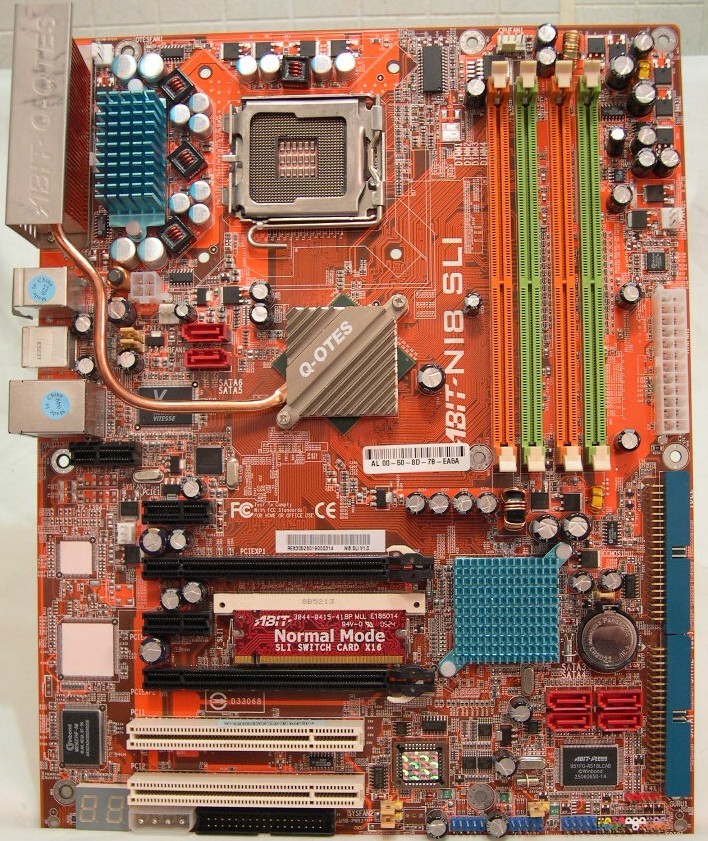
The Silicon Image 3132 controlled SATA 5 + 6 ports are in a very precarious position, located just left of the C19 Northbridge. If you plan on using these as part of your setup, you had best plan on buying extra long cables and developing a routing scheme to keep them clear of other components.
The floppy connector is also not in the most useable position, particularly if you have a mid-mounted floppy drive. Again, a longer than supplied cable in most cases would be necessary. IDE and floppy connectors don't belong on the PCB's bottom, and if at all possible, they should be on the right edge of the PCB as was common practice in the past. It just lends to a cleaner installation with less cabling clutter. The trend lately has been to place them on the bottom of the PCB due in part to other component positioning on the mainboard.
Cable routing is the 4-pin Molex next to the floppy connector is also a concer. Unless you have a non-standard case layout with the power supply at the bottom, getting power to the Molex connector will create a bit of a cabling nightmare. The ATX12V connector is also between the CPU socket and NB, but this is a common location and presents less of a problem than some of the other component positions.
The last concern in the notable omission of any Firewire ports on this board, This is a feature you will find on almost every other board in the Abit's Premium class at about a $200 price point. With so many devices being produced that use this specification it is a real puzzle that it was not considered as part of the NI8 SLI specifications.
The placement of all remaining components such as IDE and SATA 1-4, 24pin main power connector etc. are very accessible. Most users will be able to cope with the layout concerns we've mentioned, but they are still less than ideal.
| Abit NI8 SLI | |
| CPU Interface | Supports Socket 775 for Intel® Pentium 4 / Pentium 4 EE / Pentium D / Pentium XE / Celeron D processors Supports Intel® Hyper-Threading / XD-bit / EM64T Technology Enhanced Intel SpeedStep Technology |
| Chipset | NVIDIA C19/ MCP-04 NVIDIA Gigabit Ethernet with NVIDIA Firewall Supports NV SATA 3G RAID |
| Bus Speeds | Supports 1066/800MHz FSB |
| Memory Speeds | 400Mhz-1300Mhz in 1 Mhz increments |
| PCIe Speeds | Asynchronous - Fixed at 100 Adjustable from 100Mhz-148.4 Mhz |
| PCI | Fixed at 33Mhz |
| Core Voltage | Auto, 1.3875V to 1.55V in 0.025V increments |
| DRAM Voltage | Auto, 1.75V to 2.3V in .05V increments |
| FSB Frequency | 100Mhz-325Mhz in 1 Mhz increments |
| HyperTransport Multiplier | Auto, 1X to 5X |
| C19 Northbridge Voltage | 1.4V, no adjustments |
| Memory Slots | Four 240-pin DIMM sockets Supports dual channel DDR2 667 non-ECC un-buffered memory Supports maximum memory capacity up to 8GB |
| Expansion Slots | 2 PCIe x16 2 PCIe x1 2 PCI Slots |
| Onboard SATA II/RAID | 4 SATA II Drives by NVIDIA MCP-04 (RAID 0, 1, Raid 0+1) 2 SATA II 3Gbps Drives by Silicon Image 3231 (Raid 0/1 NCQ) |
| Onboard IDE | Two Ultra DMA ATA133/100/66/33 connectors |
| Onboard USB 2.0 | 3 USB 2.0 headers |
| Onboard LAN | NVIDIA Gigabit Ethernet NVIDIA Secure Networking Engine |
| Onboard Audio | 7.1 Channel AudioMAX card |
| BIOS Revision | Award (8/24/2005) |
Click to enlarge.
The Silicon Image 3132 controlled SATA 5 + 6 ports are in a very precarious position, located just left of the C19 Northbridge. If you plan on using these as part of your setup, you had best plan on buying extra long cables and developing a routing scheme to keep them clear of other components.
The floppy connector is also not in the most useable position, particularly if you have a mid-mounted floppy drive. Again, a longer than supplied cable in most cases would be necessary. IDE and floppy connectors don't belong on the PCB's bottom, and if at all possible, they should be on the right edge of the PCB as was common practice in the past. It just lends to a cleaner installation with less cabling clutter. The trend lately has been to place them on the bottom of the PCB due in part to other component positioning on the mainboard.
Cable routing is the 4-pin Molex next to the floppy connector is also a concer. Unless you have a non-standard case layout with the power supply at the bottom, getting power to the Molex connector will create a bit of a cabling nightmare. The ATX12V connector is also between the CPU socket and NB, but this is a common location and presents less of a problem than some of the other component positions.
The last concern in the notable omission of any Firewire ports on this board, This is a feature you will find on almost every other board in the Abit's Premium class at about a $200 price point. With so many devices being produced that use this specification it is a real puzzle that it was not considered as part of the NI8 SLI specifications.
The placement of all remaining components such as IDE and SATA 1-4, 24pin main power connector etc. are very accessible. Most users will be able to cope with the layout concerns we've mentioned, but they are still less than ideal.
Originally published at https://www.anandtech.com/show/1813 (Wayback Machine).