
USB Flash Drive Roundup - 10/2005
- Posted in
- Memory
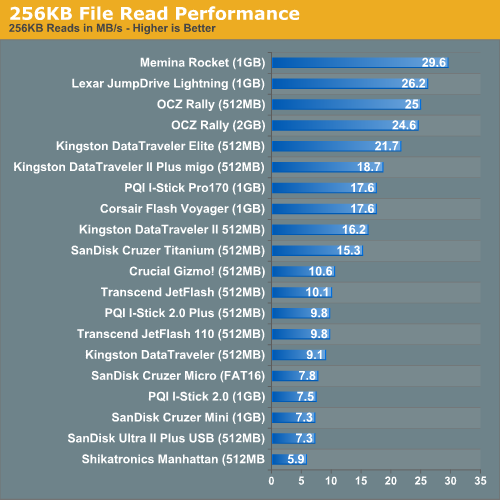
256KB File Read Performance
Read performance continues to go up as we look at 256KB files; all drives get faster, but some simply get faster than others.
The second tier of performance is once again led by Kingston's DataTraveler II+ and PQI's I-Stick Pro170, with SanDisk's Cruzer Titanium bringing up the rear.
The third and fourth performance tiers once again populate the 10MB/s and below area.
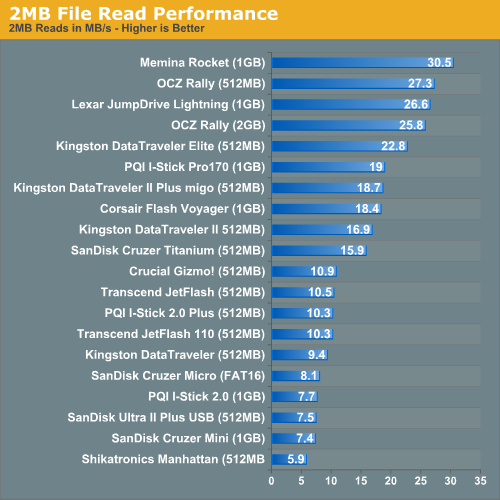
2MB File Read Performance
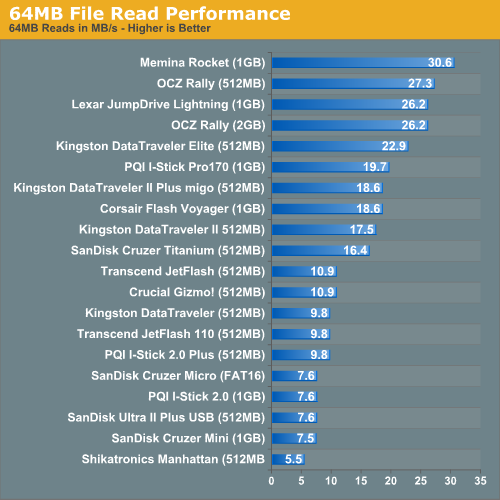
64MB File Read Performance
By the time that we've reached the 64MB test, these drives have all pretty much achieved their transfer peaks. While they all were horrendously slow at small file reads, by the time we made it to 64MB files, their performance truly peaked.
PQI's I-Stick Pro170 leads the second performance tier, averaging 19.7MB/s.
But, despite how consistent the standings were as we tested varying file sizes, the show is far from over. At this point, we're only looking at one half of the spectrum. In order to have data to read from these drives, you have to first write to them. And this is where things get complicated...
Read performance continues to go up as we look at 256KB files; all drives get faster, but some simply get faster than others.
The second tier of performance is once again led by Kingston's DataTraveler II+ and PQI's I-Stick Pro170, with SanDisk's Cruzer Titanium bringing up the rear.
The third and fourth performance tiers once again populate the 10MB/s and below area.
2MB File Read Performance
64MB File Read Performance
By the time that we've reached the 64MB test, these drives have all pretty much achieved their transfer peaks. While they all were horrendously slow at small file reads, by the time we made it to 64MB files, their performance truly peaked.
PQI's I-Stick Pro170 leads the second performance tier, averaging 19.7MB/s.
But, despite how consistent the standings were as we tested varying file sizes, the show is far from over. At this point, we're only looking at one half of the spectrum. In order to have data to read from these drives, you have to first write to them. And this is where things get complicated...
Originally published at https://www.anandtech.com/show/1807 (Wayback Machine).