
USB Flash Drive Roundup - 10/2005
- Posted in
- Memory
Lexar JumpDrive Lightning
Lexar's only entry in this roundup is their top of the line JumpDrive Lightning. The high end Lightning drive is only available in two sizes: 1GB and 2GB.
The only downside to Lexar's drive is that the flash controller that Lexar uses does not have a hardware encryption engine, thus there is a significant performance penalty for reading/writing to your secure partition. The table below displays read/write speed for various file sizes to a Secure as well as a Public partition on the Lexar drive.
As you can see, reads are noticeably slower to the secure partition, as are writes, especially at smaller file sizes. In many cases, the performance of reading/writing to the secure partition is far less than half of working with the public partition. It's a major downside to the security benefits that Lexar offers.
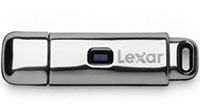
The Lexar drive is a bit more stylish than what Kingston has to offer, but the downside to that is, of course, that it shows fingerprints and smudges much like an iPod. Lexar includes a polishing cloth to remove the blemishes, which although it works very well, it is still a pain that you have to do it. The case of the JumpDrive Lightning adds significant weight to the unit, which is another expense that you pay in order to support the style of the drive.
If you purchase the drive from Lexar's online store, you can get a free engraving on the unit itself, which is a nice option that's offered.
Lexar's only entry in this roundup is their top of the line JumpDrive Lightning. The high end Lightning drive is only available in two sizes: 1GB and 2GB.
The only downside to Lexar's drive is that the flash controller that Lexar uses does not have a hardware encryption engine, thus there is a significant performance penalty for reading/writing to your secure partition. The table below displays read/write speed for various file sizes to a Secure as well as a Public partition on the Lexar drive.
| 0.5KB | 32KB | 256KB | 2048KB | 65536KB | ||||||
| Read | Write | Read | Write | Read | Write | Read | Write | Read | Write | |
| Secure | 984 | 4 | 14809 | 279 | 16990 | 1903 | 17033 | 4881 | 17476 | 8738 |
| Public | 1000 | 69 | 19099 | 3507 | 26176 | 11750 | 26624 | 14131 | 26214 | 15292 |
As you can see, reads are noticeably slower to the secure partition, as are writes, especially at smaller file sizes. In many cases, the performance of reading/writing to the secure partition is far less than half of working with the public partition. It's a major downside to the security benefits that Lexar offers.
The Lexar drive is a bit more stylish than what Kingston has to offer, but the downside to that is, of course, that it shows fingerprints and smudges much like an iPod. Lexar includes a polishing cloth to remove the blemishes, which although it works very well, it is still a pain that you have to do it. The case of the JumpDrive Lightning adds significant weight to the unit, which is another expense that you pay in order to support the style of the drive.
If you purchase the drive from Lexar's online store, you can get a free engraving on the unit itself, which is a nice option that's offered.
| Lexar JumpDrive Lightning | |
| Sizes Available | 512MB - 2GB |
| Lanyard Included | No |
| USB Extension Cable Included | No |
| Data Encryption | Yes (Windows only) |
| Password Protection | Yes (Windows Only) |
| Secure + Public Partitions Simultaneously Accessible | Yes |
| Flash Controller | ? |
| Flash Memory | ? |
| Warranty | Lifetime Limited |
Originally published at https://www.anandtech.com/show/1807 (Wayback Machine).