
GeForce 7800 GT: XFX Overclocked
- Posted in
- GPUs
Performance Tests
We ran benchmarks on the 7800 GT with the same system that we used for the 7800 GTX tests:MSI K8N Neo4 Platinum/SLI motherboard
AMD Athlon 64 FX-55 Processor
1 GB OCZ 2:2:2:6 DDR400 RAM
Seagate 7200.7 120 GB Hard Drive
OCZ 600 W PowerStream Power Supply
We'll also be testing the card's performance in the three games that we've been using: Battlefield 2, Doom 3, and Halflife 2. We'll be testing all three games at 1600x1200 with and without AA. We chose this as our resolution because it reflects what is most used by people who get a 7800 GT, given that most cost-effective LCD monitors still don't support resolutions much higher than this.
Since this is our first 7800 GT article, and we don't have any other versions to compare the XFX 7800 GT with yet, we'll be looking at how the GT compares to the 7800 GTX reference card. Because we were able to overclock our XFX 7800 GT a little bit higher than the reference 7800 GTX, we can see how significant it is to have one more vertex and 4 more pixel pipelines.
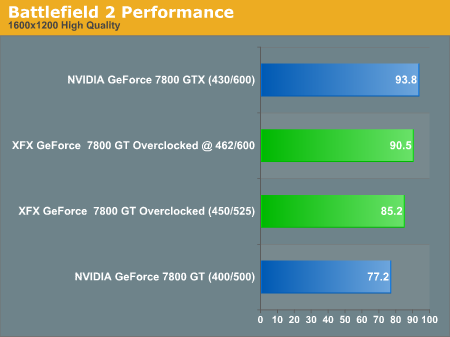
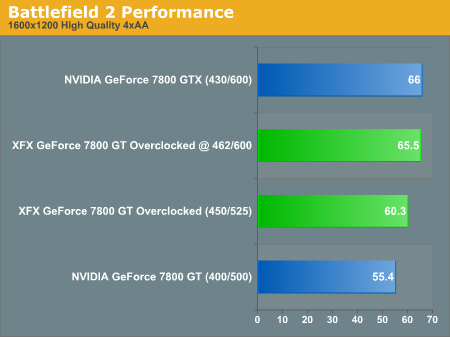
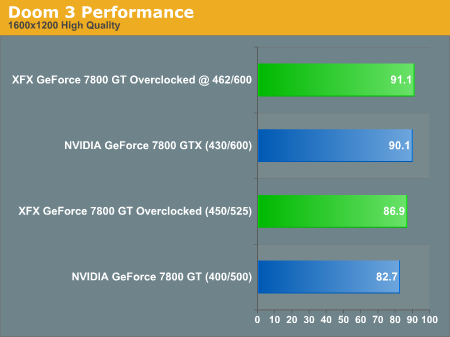
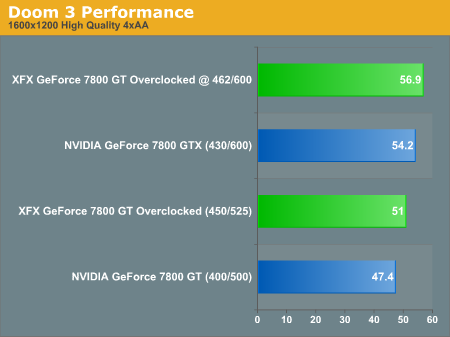
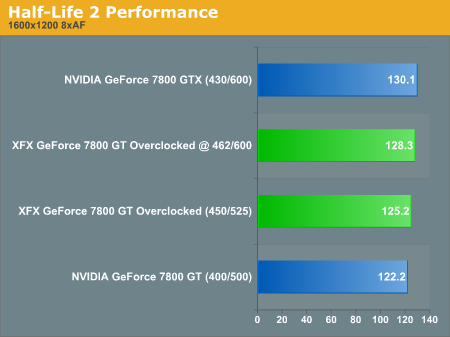
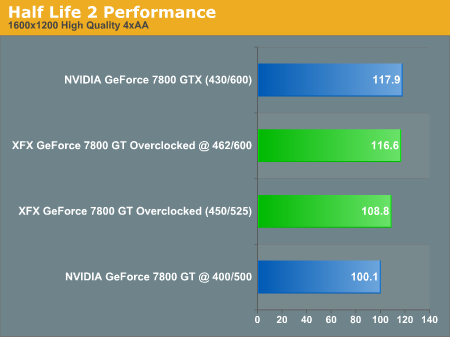
When we tested the XFX GeForce 7800 GT Overclocked, we found the numbers to be much closer to those of the 7800 GTX. On the 7800 GT, BF2 still has about a 10% decrease in fps from the GTX, which might be noticeable during game play. But the other differences were small enough not to make much difference.
As you can see when we overclocked our 7800 GT to 462MHz and 1.2GHz, we managed to match and even slightly surpass (in Doom 3) the framerates of the GTX. This is significant, but we aren't quite sure if we'll be able to see the same results on other 7800 GTs. These numbers really show us how there isn't a very big difference at all in G70 performance with one less vertex and four less pixel pipelines at 1600x1200 and lower; all the more reason to save $100 and go with the GT if a very large expensive LCD isn't in your computer room or within your budget.
Originally published at https://www.anandtech.com/show/1777 (Wayback Machine).