
The MSI Titan GT77 Review: Desktop-Class Core i9-12900HX Tested
Titan GT77 Design
MSI’s Titan lineup has, from time to time, offered some of the quirkiest and outlandish designs around. But the Titan GT77 is a purposeful departure from that. MSI has equipped the laptop with some LED bling, but overall it is a very restrained look, especially by Titan standards.
For what RGB lighting there is, the Steelseries Engine allows the user to configure the lighting for the rear logo and rear venting. And, of course, there is per-key RGB backlighting on the keyboard. But for a gaming notebook, this is all very subdued. With the desktop-class processor installed, MSI is clearly targeting this at not just gaming, but also as a mobile workstation. The all-black finish and simple styling means that this device will fit in at the office just as much as it will at a LAN party.

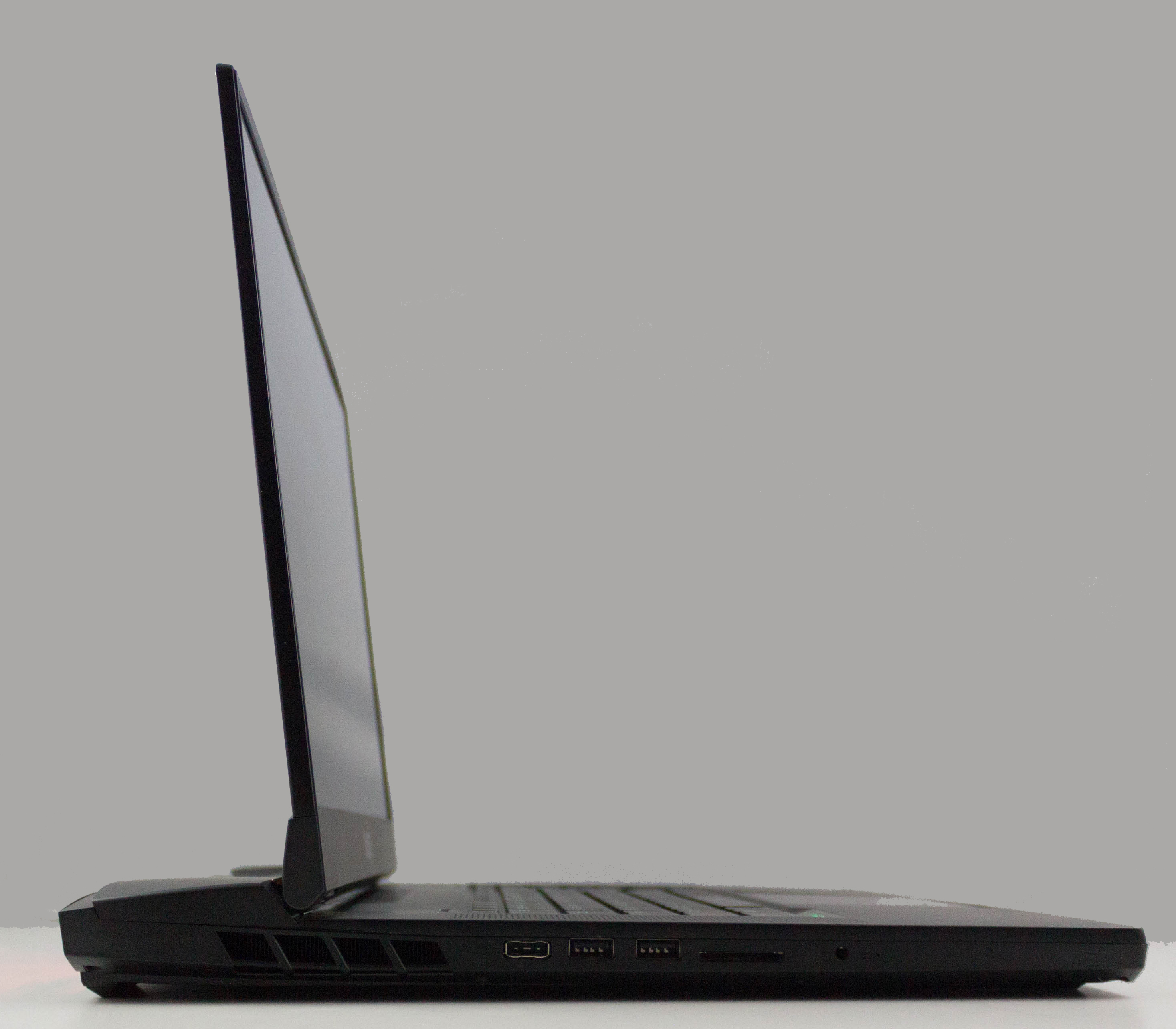
The display is surrounded by relatively thin bezels on the top and the sides, the sole exception being at the bottom. Atypically for most PC laptops, the display is hinged slightly forward of the rear vent in order to accommodate the extra cooling required for this notebook.
For a 17.3-inch desktop-replacement notebook, the chassis is relatively compact and lightweight. At just 23 mm (0.90 inches) thick, the Titan GT77 is far more portable than the older 18.4-inch GT80 Titan, which was a whopping 49 mm thick (1.93-inches). This is not ultra-light either at 3.3 kg (7.3 lbs), but again compared to an older desktop-replacement like the 4.5 kg (9.9 lbs) GT80 Titan, it is much more reasonable. The Titan GT77 is a bit thinner and only slightly heavier than the Raider GE76 with Alder Lake. MSI has done a great job on the packaging.
MSI’s gaming notebooks generally feature SteelSeries-designed keyboards and the Titan GT77 is no exception. But what is exceptional is the keyboard fitted to this notebook. The SteelSeries keyboard in this new Titan is a mechanical keyboard featuring Cherry MX switches, and while not being able to feature the same throw as an stand-alone keyboard, the key feel is superb with excellent actuation.
Being a 17.3-inch notebook there is room for a number pad, unlike on most 15.6-inch designs, but the number pad is a typical half-width offering. MSI has installed the laptop's speakers on the side of the keyboard, so there is no way to stretch this out any further. If you use the number pad a lot, you may need an external one. Another quirk of this keyboard is that the Fn key is located on the right side of the keyboard near the arrow keys, unlike most notebooks which put it on the left. It does take some getting used to.
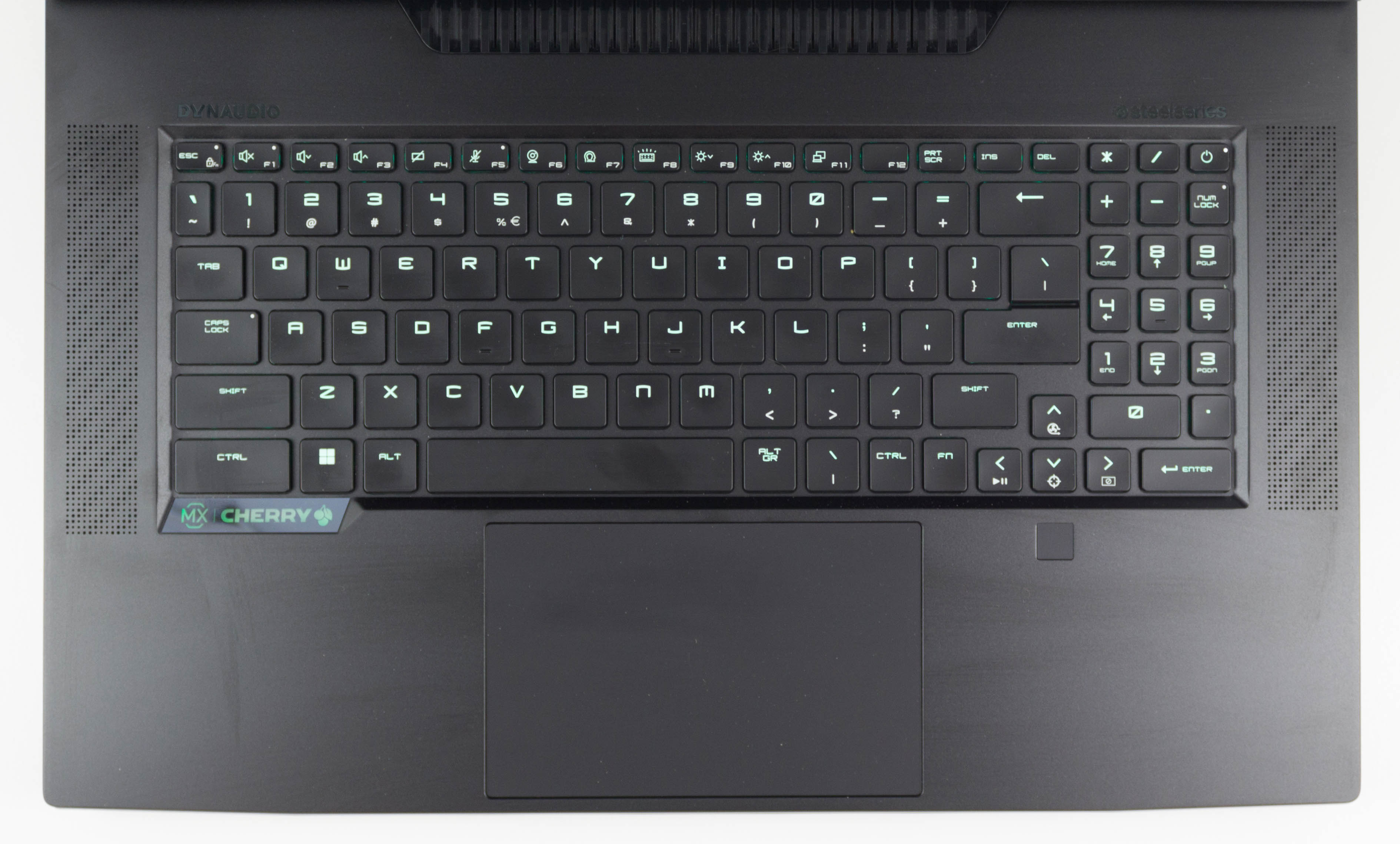
The good part of the Fn key ties into the keyboard backlighting. Thanks to the per-key RGB lighting, when you press the Fn key all of the keys go dark except the ones impacted by the Fn key, which then light up red making it very easy to find the function you are after. This is one of the reasons why per-key RGB is so useful. You can set specific keys to a distinct color to make finding them much quicker. If you use the PrtScr button often, as an example, you can set it to red to make it quicker to find. The SteelSeries engine works well and allows custom configurations to be set up and quickly swapped to when needed.
MSI’s trackpad is also excellent. The all-glass trackpad is large and very smooth. It registers taps well and the size makes it very easy to work with, without being so large as to get in the way. If you are gaming that probably will not matter as you will still want to use an external mouse, but for those that like using a trackpad, the Titan will not disappoint.
Desktop-replacement style notebooks like this Titan GT77 often come with a wide-range of ports and MSI has included many as well. One oddity in the design is that, with the cooling all being housed at the rear of the device, there are no ports or other connectivity on the rear at all. If you are going to use this mostly on a desk, the power and other connections are all on the side which may not be ideal for cable management. The power connector is a rectangular socket unlike the older devices which used barrel connections that were prone to becoming loose over time. And while the power connector appears to be very robust on the connection side, it would have been nice to see it with a 90° at the connection to make managing the hefty power cable a bit easier.


The right side features the 2.5G Ethernet jack, HDMI 2.0, mini DisplayPort, two Thunderbolt 4-capable USB Type-C ports, and a USB 3.2 Gen2 Type-A port. The left side houses the power connector, two more USB 3.2 Gen2 Type-A ports, a SD Express card reader, and the headset jack.
The design and feel of the MSI Titan GT77 is very well executed. Despite this being a desktop-class notebook, it is relatively compact and lightweight. The restrained design language should help it appeal to a wider range of buyers, and the Cherry MX keyboard is really a masterclass. The only real quibble is cable management, but the cooling solution interferes with the possibility of offering connections on the rear of the device.
Originally published at https://www.anandtech.com/show/17549/the-msi-titan-gt77-review-desktopclass-core-i912900hx-tested (Wayback Machine).