
The MSI MPG Z690 Carbon WIFI (DDR5) Motherboard Review: A Decent Mid-Ranged Z690
Overclocking
When it comes to overclocking on Intel's 12th generation processors, Alder Lake has a new yet important variable to consider. This is because not all of its cores are equal. Intel's latest Alder Lake processors feature a hybrid design with P-cores (performance) and E-cores (efficiency). Focusing on the Core i9-12900K, it has 8 P-Cores, 8 E-cores, and 24 threads in total. While Hyperthreading isn't a new technology, the hybrid nature of Alder Lake combining two different types of CPU core is. The basic idea is that the P-cores do much of the front-loaded heavy lifting, the grunt work, so to speak, while the E-cores assist in the background with high-threaded workloads with a much lower overall power draw than the P-cores.
Having personally taken some time to investigate overclocking ability with the Core i9-12900K before diving into motherboard reviews, I found that the P-cores offer much more in terms of performance. In contrast, the E-cores don't have as much headroom or scalability as the P-cores. Fundamentally when paired with a Z690 motherboard, both the P-core and E-cores are unlocked. This gives two areas for users to consider when it comes to overclocking.
Another point of note when overclocking with Alder Lake, like with 11th gen and 10th gen, performance out of the box on both sets of cores are squeezed out via turbo, e.g., the P-Core Turbo on the Core i9-12900K is 5.2 GHz, while the E-Core turbo is 3.9 GHz. Make no mistake about it, Alder Lake is power-hungry, even more so from personal experience when overclocking than was the case with 11th gen Rocket Lake. This means adequate power being made available from a reliable and quality power supply is needed, as well as good quality and premium cooling such as AIOs, or even custom water cooling.
Experience with the MSI MPG Z690 Carbon WIFI
Looking at the overclocking functionality of the MSI MPG Z690 Carbon WIFI, all of the overclocking options can be found within the OC section of the Advanced mode in the firmware. MSI offers plenty of CPU overclocking options, including separate P-Core and E-Core ratio multiplier controls, CPU AVX ratio offsetting, as well as CPU Ring Ratio, and integrated graphics ratio multipliers. In terms of voltages, MSI also includes an extensive list of voltages including CPU VCore, iGPU (CPU GT) voltages, as well as individual P-Core and E-Core VCore voltage options.

When it comes to memory overclocking, MSI also provides plenty of options for overclocking the frequency, adjusting Intel's Geared memory mode in either 1:1, 1:2, or 1:4 ratios, as well as lots of primary, secondary, and tertiary latencies to customize. For fine-tuning of the board's power profiling, MSI includes multiple levels of loadline calibration (LLC) profiles, with levels that can increase or decrease CPU VCore VDroop depending on the complexity and intensity of the workload. It should be noted that Level 4 is typically the sweet spot for balancing CPU VCore voltage, power, and stability while ensuring less frequent/softer spikes in voltage.
Overall the MSI Click BIOS 5 firmware has pretty much everything a typical user could need to overclock their Intel 12th Gen Core processor, memory kit, and even integrated graphics on supported processors.
Overclocking Methodology
Our overclocking methodology is as follows. We select the automatic overclock options and test for stability with the Intel XTU 2.0 benchmark and Prime95 to simulate high-end workloads. These stability tests aim to catch any immediate causes for memory or CPU errors.
For manual overclocks, based on the information gathered from the previous testing, start off at a nominal voltage and CPU multiplier, and the multiplier is increased until the stability tests are failed. The CPU voltage is increased gradually until the stability tests are passed. The process is repeated until the motherboard reduces the multiplier automatically (due to safety protocol) or the CPU temperature reaches a stupidly high level (105ºC+). Our testbed is not in a case, which should push overclocks higher with fresher (cooler) air.
Note: For the purposes of overclocking in our Z690 reviews, we will only be focusing on the P-cores (performance) as these simply scale better. The E-core (efficiency) will subsequently be set at 3.9 GHz throughout the entirety of our Z690 motherboard reviews.
Overclocking Results
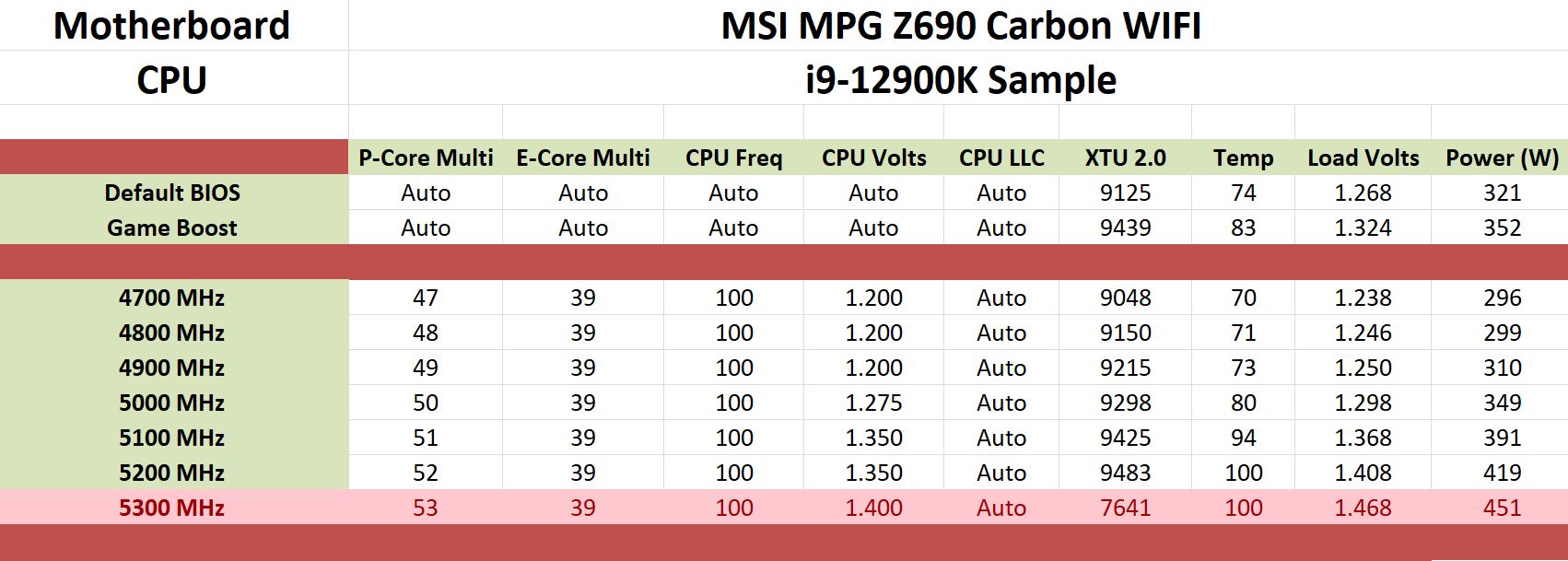
Focusing on the overclocking performance using our Core i9-12900K with the MSI MPG Z690 Carbon WIFI, we observed pretty decent performance on the whole. Using the board at default settings as our baseline, MSI's Game Boost profile does improve performance somewhat, with very economical power (if you can consider 352 W economical) consumption when compared to default settings. The caveat to using Game Boost is it does run on the hot side, as we reported temperatures of 83°C with our premium 360 mm AIO cooler; this is still well within the rated specifications, however.
Switching to manual overclocking, and we managed to achieve a maximum stable overclock of 5.2 GHz on the P-Cores of our Core i9-12900K processor at 1.35 V. This translated to a maximum load VCore of 1.408 which is a considerable amount of VDroop, despite using the automatic option on the LLC profile selector menu. This also hit 100C and did thermal throttle a little, but not as much as 5.3 GHz at 1.40 V, which did run stable but was not economical from a power consumption (over 450 W) nor a heat point of view. Going from 4.7 GHz to 5.1 GHz, we saw an incremental increase in XTU 2.0 performance, with pretty consistent and tight VDroop all-around.
Originally published at https://www.anandtech.com/show/17548/the-msi-mpg-z690-carbon-wifi-ddr5-motherboard-review (Wayback Machine).