
SFF Roundup, Socket 939 Systems
- Posted in
- Systems
Overclocking
We did our best to run all of the systems through some overclocking attempts. In order to conclude that an overclock was successful, we ran our gaming benchmarks, AutoGK, and 3DMark03. 3DMark03 was set to loop continuously and in most instances, we would leave the system running for over 12 hours. Overclocking is always something of a hit and miss proposition, so just because we reached a specific overclock (or didn't as the case may be) doesn't give us any statistical significance. What we offer here, then, is our impression of the overclocking abilities of the various systems.Socket 939 systems are very interesting as overclocking platforms. This is largely due to the relatively low entry price - the 3000+ Venice cores are going for under $150 now - as well as the large amount of headroom available. It is not uncommon to get as much as a 40% increase in clock speed out of the 3000+, but it does require a base Hypertransport speed of 280 MHz or more. In order to run at such high bus speeds, the BIOS and motherboard must be designed well. All of the systems in this roundup include at least basic overclocking support, and while we started with a 2.4 GHz 3800+ processor, the downward unlocked multipliers allow us to verify the maximum attainable bus speed. That's our primary focus for overclocking, and it determines whether we feel enthusiasts looking to get high-end performance for low-end prices will find a system to be suitable or not.
While we are including a "maximum CPU overclock" result, take the numbers with a grain of salt, as we didn't thoroughly investigate every possible combination of settings that might lead to a slightly better overclock. If a unit can reach a high CPU bus speed setting, you'll have plenty of options for reaching a good overclock.
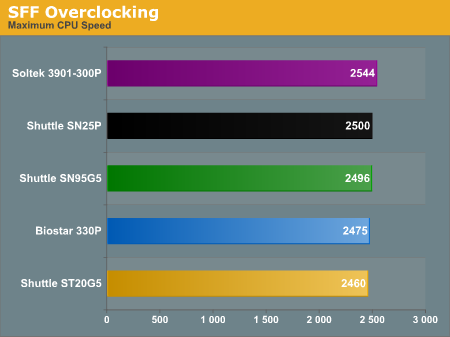
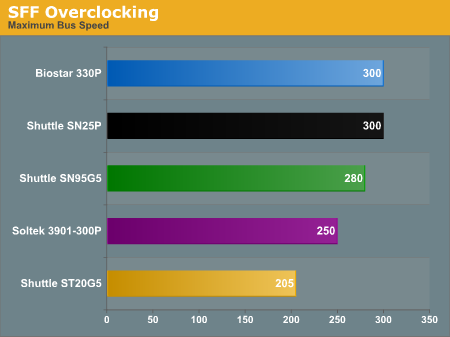
The ST20G5 is on the other end of the spectrum, with virtually non-existent overclocking support. Whether this was caused by the chipset, the BIOS, or something else is anyone's guess, but for now, we would simply say to forget about any overclocking attempts if you buy the ST20G5. We'll see if we can get any better results with an updated BIOS or different processor in Part 2, but while we could POST and boot Windows at up to 225 MHz CPU bus speeds, certain benchmarks would always crash the system. Without overclocking, however, we experienced no stability issues with the ST20G5 at all.
It's interesting to note that the old Shuttle SN95G5 is one of the top overclockers, and we were able to use 1T timings at all bus speeds. We were able to run the SN95G5 at a 275 MHz bus with a 9X multiplier to reach 2475 MHz, and we were also able to reach its maximum 280 MHz bus with an 8X multiplier. While 280*9 is 2.52 GHz and we've been able to run this particular 3800+ at up to 2.54 GHz in other systems, that particular combination was not stable for the SN95G5.
The Soltek comes in second to last for overclocking, reaching its maximum 250 MHz bus, but only when setting the RAM to DDR333. On the other hand, using the 12X CPU multiplier, we were actually able to get the highest CPU speed of any of these systems from the Soltek. We only wish that the Soltek had support for higher CPU bus speeds than 250 MHz.
Note: The use of a HyperTransport bus combined with an integrated memory controller can make talk of overclocking on Athlon 64 systems a bit confusing. In practice, a 250 MHz CPU bus with a 4X HyperTransport multiplier would have the same HyperTransport bus speed as a 200 MHz CPU bus with a 5X HT multiplier. The difference is that the CPU bus speed also influences the RAM speed. Another interesting option is the use of different DRAM ratios, which are really estimates of a CPU ratio. Our 3800+ running at stock speeds has a 200 MHz CPU bus with a 12X CPU multiplier and a 5X HT multiplier, and we can run 2-2-2-7-1T RAM timings on these systems. For all practical purposes, running the 3800+ with a 240 MHz bus and a 10X CPU multiplier with a 4X HT multiplier results in the same CPU clock speed of 2.4GHz and also keeps the RAM at DDR400. However, as the ST20G5 shows, just because they're the same speed in practice doesn't mean that all motherboards and chipsets will actually function properly at higher CPU bus speeds.
Originally published at https://www.anandtech.com/show/1754 (Wayback Machine).