
SFF Roundup, Socket 939 Systems
- Posted in
- Systems
Soltek QBIC 3901A-300P
Overview
Soltek has been making computer products for nearly a decade now, and while they started like most companies with motherboards, they have since branched out into the graphics card and small form factor markets. The Soltek QBIC EQ3901-300P has been out for almost as long as the SN95G5. It is currently available in several variations, the only difference being the external appearance. We're looking at the brushed aluminum model (the EQ3901A). The EQ3901M has a mirrored front panel while the Mania series goes for more eye-catching colors like yellow and red.Aesthetics
 |
 |
 |
| Click on images to enlarge. | ||
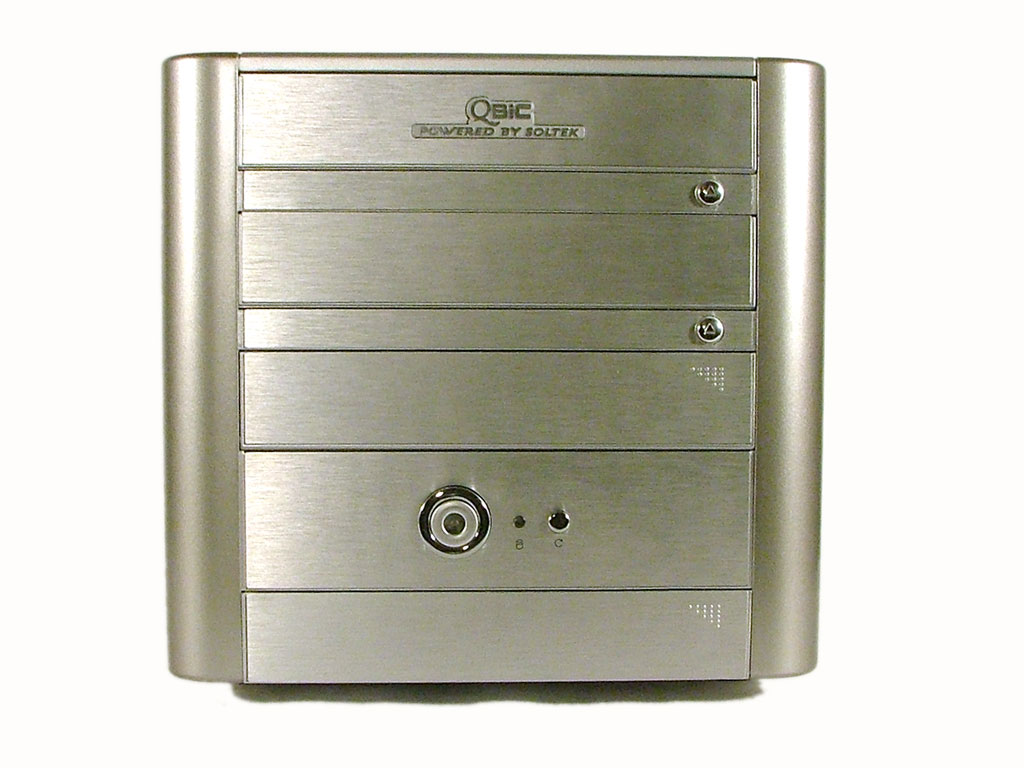
The exterior of the QBIC is pretty typical of a SFF design. We personally prefer the brushed aluminum finish, but others might like the "bling" of the Mania models. This one is relatively subdued in appearance and would fit in with a more conservative décor. The front panel is composed of plastic, but Soltek has chosen to cover most of it with thin aluminum sheets to match the rest of the case. There isn't a whole lot in the way of front panel lighting, as the only sources are the power button and the HDD activity LEDs. The buttons provide chrome accents, and a Soltek badge takes up advertising space on the top 5.25" door.
Overall, we like the looks. In fact, we've seen the models with a mirrored finish as well as the Mania series, and the unadorned aluminum is our favorite of the Soltek offerings. Some people may prefer the more conspicuous designs, of course, and if you like what we have to say about the remainder of the EQ3901A, get whichever one you like most.
Features
|
Soltek EQ3901A-300P
|
||
| Dimension | (w)215 mm x (h)200 mm x (d)340 mm | |
| CPU Support | AMD Socket 939 up to FX-57/X2 4800+ | |
| Memory Support | PC1600/PC2100/PC2700/PC3200 up to 2GB; 2 DIMM slots | |
| Motherboard | SL-B9D-FGR (proprietary) VIA K8T800 Pro 1X-5X (200-1000MHz) HyperTransport 8-bit/8-bit to 16-bit/16-bit HT Width |
|
| Expansion Slots | 1 x AGP 8X; 1 x PCI | |
| Power Supply | 300W APFC Power Supply 5 x 4-pin Molex; 2 x 4-pin FDD; 1 x SATA 1 x 4-pin ATX12V; 1 x 20-pin ATX |
|
| Internal Connections | 2 x SATA; 2 x IDE; 1 x FDD; 1 x LPT | |
| Audio | Realtek ALC850 7.1 channel | |
| LAN | 1 x 10/100/1000 Mbps | |
| Drive Bays | 1 x 3.5 External 1 x 3.5 Internal (HDD) 2 x 5.25 External (CD/DVD) |
|
| Front I/O | 2 x USB 2.0 1 x IEEE1394 (6pin) MIC, Head-phone, S/PDIF Optical Out Power & Reset buttons Power on & HDD LED indicators |
|
| Rear I/O | 4 x USB 2.0 1 x IEEE1394 (6pin) PS/2 KB, PS/2 Mouse 2 x COM (Serial) ports RJ-45 LAN Port (10/100/1000Mbps) Line-in, Center/Sub, L/R Front, L/R Side, L/R Rear |
|
| Overclocking | CPU 200-250; CPU Ratio 4X-Max; Vcc 0.800-1.700V; DDR Auto, 2.65-2.95V; AGP 1.5-1.8V |
|
| Extras | IcyQ cooling | |
| Full Image Set | Soltek EQ3901A-300P Pictures (3.8MB) | |
| Manufacturer Link | Soltek EQ3901-300Pro | |
Like all of the other units in this roundup, the standard features are all present. Firewire, USB, GbE, and audio are included, as well as IDE and SATA support. Somewhat unique is that this is the only 939 SFF to use a VIA chipset, the K8T800 Pro with the VT8237 South Bridge. Due to the integrated memory controller in the Athlon 64, we don't expect to see any major variations in performance, but we do feel that the NVIDIA chipsets are still the more robust options. Overclocking and memory support simply tend to be a bit better with the nForce chipsets. That caveat aside, the Soltek is still a reasonable option. Let's take a closer look at the specifics.
 |
 |
| Click on images to enlarge. | |
We've mentioned the pros and cons of AGP vs. PCIe graphics in numerous articles, and our basic feeling is that AGP systems remain attractive for upgraders, but we wouldn't recommend spending a lot of money on a new system without moving to PCIe. Looking at the price of the Soltek 3901 (around $250 if you can find it), though, you could actually get a moderate graphics card and the case for less than many other SFF setups. The long term prospects for AGP aren't very good - new cards may lag a few months behind their PCIe counterparts, and the cost (due to the use of bridge chips) may be slightly higher; worse is that NVIDIA has so far made no move to provide a 7800 card with AGP support.
The real questions then are how long you plan to keep your system and how far you want to upgrade it. With the new Athlon 64 X2 chips now available, a socket 939 system has the potential to last several years. AGP may be more of a hindrance over such a lengthy period of time, but it's difficult to estimate the rate of transition from AGP, given the huge installed base of systems. It's hard to imagine NVIDIA and ATI totally abandoning AGP users and forcing them to upgrade motherboards, but NVIDIA at least isn't going out of their way to support AGP with the G70 - yet. Marketing loves to talk about the bandwidth advantage that PCIe has over AGP, but so far, it's mostly a theoretical advantage.

Click to enlarge.
Closing up with the audio solution, Soltek has chosen a Realtek 8 channel setup, including ample connections for running 7.1 along with a microphone/line-in connection. S/PDIF optical out is also available, although the port is located on the front of the PC, which isn't our preferred location. The lack of S/PDIF IN may be a problem for some people, and if so, you will either want a different SFF, or you can purchase a card like the Turtle Beach Catalina 8. As for the quality of the audio, the front headphone port was once again guilty of having noticeable static. The rear ports were fine, and the static on the front port wasn't as bad as that on the ST20G5, but users interested in using headphones will be disappointed. The audio was also standard AC'97 audio rather than HD audio, although as we saw with the ST20G5, having HD audio doesn't necessarily mean it will sound better.

Click to enlarge.
Originally published at https://www.anandtech.com/show/1754 (Wayback Machine).