
Intel NUC11TNBi5 and Akasa Newton TN Fanless Case Review: Silencing the Tiger
Setup Notes and Platform Analysis
Our review sample of the Intel NUC11TNKi5 came with all necessary components pre-installed, and we carried them over to the Newton TN build - we only had to load up the OS to start our evaluation process. Prior to that, we took some time to look into the BIOS interface. The video below presents the entire gamut of available options for the Tiger Canyon NUC.
Intel's mini-PCs have the most comprehensive and configurable UEFI / BIOS among all the ones that we have evaluated over the last several years. The Tiger Canyon NUC is no exception. The home screen shows the BIOS version, processor details, and installed memory capacity and speed right away - this is of great help in checking whether the installed SODIMMs are operating at the desired speeds. Under the 'Advanced' section, we have options to enable various SATA and M.2 NVMe ports, and disable the disk activity LED if needed. Different USB ports and headers can be selectively enabled or disabled. iSCSI volumes can be mounted in the boot stage, and the network settings can be configured for network boot when needed. The HDMI / DisplayPort audio can be disabled, if necessary. Thunderbolt support is also controllable via the BIOS, as are a bunch of other features.
One of the most useful features in the lineup of Intel NUCs targeting the professional / business use-cases is the display emulation option under 'Advanced > Video'. This is useful for scenarios involving headless operation and digital signage installations, as it allows set up of a virtual display when no display is connected (virtual display emulation), or makes the OS think that a previously connected display is still connected to the display output (persistent display emulation).
The 'Cooling' section provides an overview of current temperatures and fan speeds, and allows fine grained control of the fan operation - including the sensors to which it responds, and the temperatures at which different actions need to trigger. In the 'Performance' section, users can control hyperthreading support, selectively enable or disable cores, and control various performance options like Turbo Boos and SpeedStep. The memory timings can also be finely controlled. Various password options including TCG Opal configuration can be activated from the 'Security' section. Virtualization support and VT-d are also enabled or disabled from this section.
The 'Power' section allows users to optimize the system for balanced performance, or low power operation, or for maximum performance. In the last case, Intel's Dynamic Power Technology can also be configured for energy efficiency. Further customization is possible by allowing for different sustained and burst mode package power limits (PL1 and PL2), as well as the package power time window. Secondary power settings allow for configuration of LED behavior in different sleep states, as well as allowing support for waking up via different peripheral interfaces. PCIe ASPM support is also controllable from this section. The 'Boot' section allows configuration of secure boot, boot priorities, POST screen configuration, etc. A boot override option here is probably the only update we would like in the BIOS - a shortcut to rebooting and pressing F10 repeatedly in order to choose a temporary boot device.
Intel's documentation provides a block diagram for the Tiger Canyon NUC board. It gives insights into the distribution of high-speed I/O lanes.
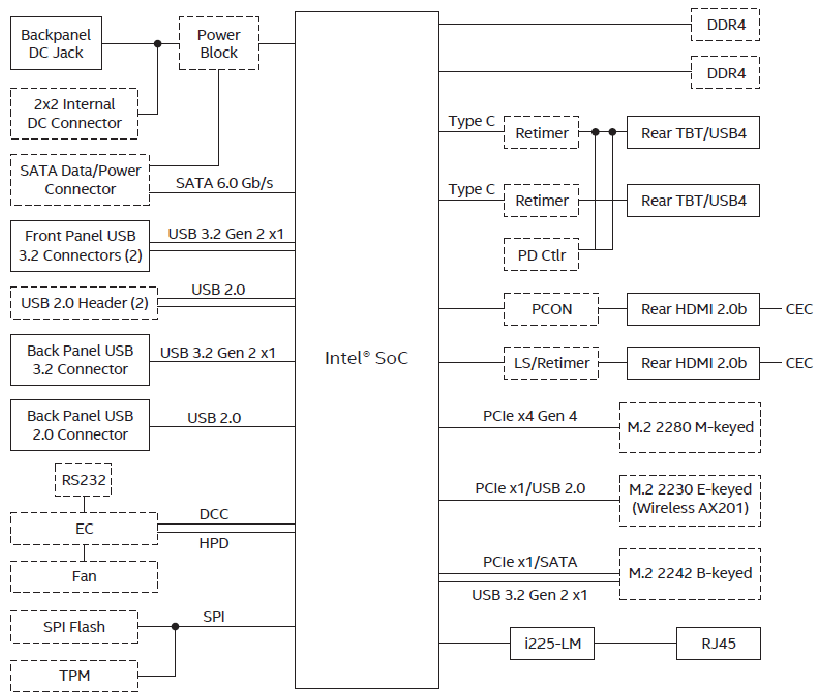
The PCIe 4.0 x4 lanes servicing the M.2 NVMe SSD and the two Thunderbolt 4 ports are directly off the processor die. A single PCIe 3.0 x1 lane from the Tiger Point-LP PCH is used to connect the Intel I225-LM controller. The AX201 WLAN controller hooks up via the CNVi interface in the PCH. The front USB 3.2 Gen 2 ports are from the processor, while the USB 2.0 and USB 3.2 Gen 2 ports in the rear are from the PCH.
In addition to the comparison between the actively-cooled and passively-cooled versions of the NUC11TNBi5, we also consider some of the other passively cooled PCs reviewed earlier, as well as a few other recent UCFF systems. In the table below, we have an overview of the various systems that we are comparing.
| Comparative PC Configurations | ||
| Aspect | Intel NUC11TNBi5 (Akasa Newton TN) | |
| CPU | Intel Core i5-1135G7 Tiger Lake 4C/8T, 2.4 - 4.2 GHz Intel 10nm SuperFin, 8MB L2, 28W (PL1 = 28W, PL2 = 64W) |
Intel Core i5-1135G7 Tiger Lake 4C/8T, 2.4 - 4.2 GHz Intel 10nm SuperFin, 8MB L2, 28W (PL1 = 28W, PL2 = 64W) |
| GPU | Intel Iris Xe Graphics (80EU @ 1.30 GHz) |
Intel Iris Xe Graphics (80EU @ 1.30 GHz) |
| RAM | Kingston 9905744-035.A00G DDR4-3200 SODIMM 22-22-22-52 @ 3200 MHz 2x16 GB |
Kingston 9905744-035.A00G DDR4-3200 SODIMM 22-22-22-52 @ 3200 MHz 2x16 GB |
| Storage | Samsung 980 PRO MZ-V8P500B/AM (2500 GB; M.2 2280 PCIe 4.0 x4 NVMe;) (1xxL V-NAND Gen 6 3D TLC; Samsung Elpis S4LV003 Controller) |
Samsung 980 PRO MZ-V8P500B/AM (2500 GB; M.2 2280 PCIe 4.0 x4 NVMe;) (1xxL V-NAND Gen 6 3D TLC; Samsung Elpis S4LV003 Controller) |
| Wi-Fi | 1x 2.5 GbE RJ-45 (Intel I225-LM) Intel Wi-Fi 6 AX201 (2x2 802.11ax - 2.4 Gbps) |
1x 2.5 GbE RJ-45 (Intel I225-LM) Intel Wi-Fi 6 AX201 (2x2 802.11ax - 2.4 Gbps) |
| Price (in USD, when built) | (Street Pricing on June 6th, 2022) US $440 + $150 + $130 + $95 = $815 (as configured, no OS) |
(Street Pricing on June 6th, 2022) US $440 + $150 + $130 + $95 = $815 (as configured, no OS) |
The NUC11TNKi5 and the NUC11TNBi5 (Akasa Newton TN) share the same configuration except for the pricing. The ASUS PN51-E1 slots in as a comparison point for what a mid-range Renoir can deliver (since we are comparing against a mid-range TGL-U part). It is a relevant comparison point for the NUC11TNKi5 from a price viewpoint, given they are both actively cooled. The ASUS PN50 and ASRock Industrial 4X4 BOX-4800U make up the high-end actively-cooled Renoir systems.
We also have results from a recent re-benchmarking session of the ASRock Industriall NUC BOX-1165G7. It uses the latest BIOS (P1.40), but modifies the default options to better reflect usage in a home / business scenario (ASRock Industrial stated that they had optimized the BIOS defaults for industrial deployment). 'Advanced > CPU Configuration > CPU Operation Mode' was changed from default 'Normal Mode' (PL1 = 28W / PL2 = 28W) to 'Performance Mode' (PL1 = 38W / PL2 = 55W), 'Advanced > CPU Configuration > CPU C-States Support' was changed from default 'Disabled' to 'Enabled', 'CPU C States Support > Enhanced Halt State (C1E)' set to 'Enabled', 'CPU C States Support > Package C State Support' set to 'Auto', and 'CPU C States Support > CFG Lock' left at 'Disabled'.
The OnLogic HX500 is a representation for Intel's previous generation in a fanless avatar. Even though it utilizes a desktop CPU with a 35W TDP, it makes sense to include it in the comparisons as Tiger Lake-U includes fine-grained power management with boosts up to 64W to make it competitive against real desktop CPUs.
The Akasa Turing / Bean Canyon configuration is also included in the benchmarks to identify improvements that consumers can see for similarly priced systems when upgrading after a couple of generations. Results from a Core i5 Comet Lake-U system (the Minisforum UM850) are also included. Finally, we have Supermicro's SM-E100-12T-H - another TGL-U representation, albeit at a much lower package power limit.
Originally published at https://www.anandtech.com/show/17502/intel-nuc11tnbi5-and-akasa-newton-tn-fanless-case-review-silencing-the-tiger (Wayback Machine).