
Intel Celeron 300A
- Posted in
- CPUs
You knew it was coming, how far can the next-generation Celeron's be overclocked? If you recall, the limiting factor in the overclocking of Pentium II's was determined to be the L2 cache. According to that theory, adding L2 cache to a Celeron would diminish its overclocking capabilities and therefore ruin its potential as a high end processor, however there is a key difference between the new Celeron's and the Pentium II's: the placement of the L2 cache.
While the Pentium II keeps its cache a safe distance away on the processor card, cooling the L2 cache becomes a bit of a problem since your heatsink/fan combo never actually makes contact with the surface of the cache. In essence, all you are doing is cooling the casing around the Pentium II's processor card. With the Celeron, the L2 cache is included on the die, so you are not only cooling the processor with your fan, but you're also cooling the integrated 128KB of L2 cache. The modified theory here is that if the processor can be pushed to a certain limit...why can't the cache be pushed that high too?
The Limits
With BX boards flooding the market it is often difficult to remember that there are other motherboards based on older chipsets in the hands of a large population of tweakers. If you have anything below a Pentium II 333, and happen to be looking for a cheap processor upgrade, then this next section is definitely for you.
The Celeron 300A became the choice processor for the AnandTech Overclocking Test Bed, as the 333MHz part is still an unproven soul it will take at least another week or two before production on the 333 reaches a point where it becomes a better overclocking alternative than the 300A. In any case, with the 300A, you are pretty much restricted by the clock multiplier lock as far as overclocking goes. The best case scenario is that you have a motherboard with the 100MHz FSB setting, however not everyone has that luck, in which case you just need a board with a working 75 or 83MHz FSB setting. It would be best to run some stability tests on your motherboard, if possible, at those two overclocked speeds before pursuing any Celeron 300A upgrade with the intentions of overclocking.
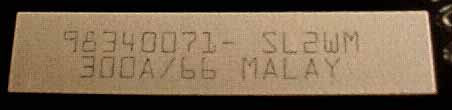
It's time for the shocker, how far can the Celeron 300A be pushed? Using two different chips, one purchased from Azzo Computers and the other from TC Computers, the highest achievable speed was a whopping 450MHz running each processor at the 100MHz FSB x 4.5 at the standard 2.0v core voltage setting. Of course the intermediate settings, 75 x 4.5 and 83 x 4.5, were tackled without a problem, but the 450MHz limit of the chip seems to be a comfortable level for a chip that retails for under $200. Running both chips at 112MHz x 4.5 proved to be unsuccessful as Winstone would often crash during its initial test run, upping the core voltage selection to 2.2v didn't enhance stability to a noticable degree, so for now the chip seems to be our favorite at 450MHz. As far as stability is concerned, the Celeron 300A system ran rock solid at 450MHz for a continuous 24 hour day running Business Winstone 98 in a single loop(with the Task Switching tests disabled as they do cause a known crash with Windows 98 on all systems). Is that enough proof? For purposes of authenticity, the markings on the two Celeron CPU's used are as follows:
Azzo Computers 300A 98340078- SL2WM |
TC Computers 300A 98340071- SL2WM |
Going back to the ability to run the processors at 75MHz x 4.5 and 83MHz x 4.5, this allows the processors to be used in high performance low end systems as well. Considering Micro ATX boards based on the 440EX chipset are retailing for well under $100 now, most of which do have 83MHz FSB settings, you can get an easy 375MHz Pentium II level of performance for under $300 provided that your peripherals work at 83MHz. Not too shabby, but let's take a look at some comparative benchmarks to make the final decision.
Originally published at https://www.anandtech.com/show/174 (Wayback Machine).