
The MSI MEG Z690 Unify (DDR5) Motherboard Review: The All-Black Option
BIOS
The MSI MEG Z690 Unify is using the familiar Click BIOS 5 UEFI firmware, which we've seen over numerous generations of MSI's motherboards on both AMD and Intel platforms. Focusing on the overall theme and GUI, it has a primarily black background, with elements of red highlights, and white and grey text. MSI includes two different modes, the basic mode for novices, and the advanced mode for the experienced.
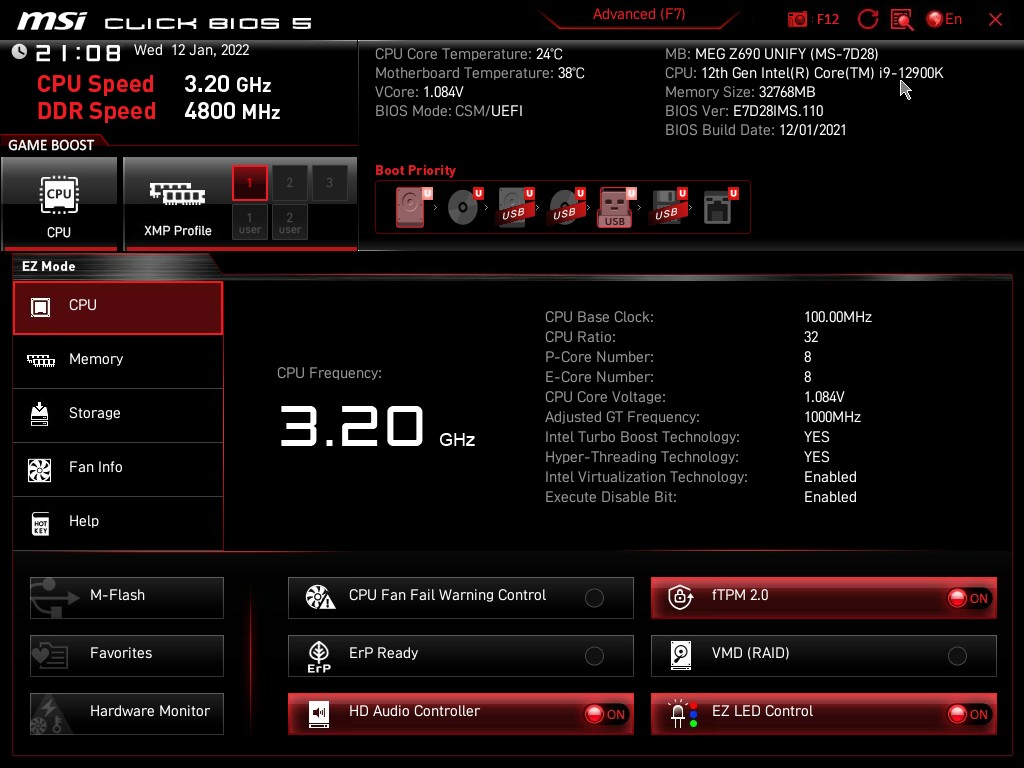
Entering the firmware for the first time which can be accessed during POST by pressing the Del or F2 keys, brings users to the basic mode. Within the basic mode, users can make basic and key alterations to the settings, including enabling X.M.P 3.0 profiles on compatible DDR5 memory kits, enabling or disabling the HD audio codec, enabling or disabling fTPM 2.0 for installing Windows 11, as well as getting a basic list of information on the processor, memory, storage, and installed fans.

Within the Advanced mode, users will find a whole host of customizable settings, from chipset-related settings, all the way to all of the board's overclocking functions. All of the board's overclocking settings can be found under the OC menu, with the firmware allowing users to alter and tweak Alder Lake-specific P-Core, E-Core, Cache, and memory-related settings such as frequency, and extensive options for latencies.

One of the most interesting features in the firmware from MSI is the ability to select between three different cooling profiles. Each of the profiles is relevant to the type of cooling installed and allows a different level of power to the processor. The boxed cooler or low-end air coolers limits TDP to 241 W to prevent thermally overpowering the cooler, while the tower air cooler profile which is more for the larger air coolers such as Noctua's NH-D15 has a maximum TDP of 288 W. The water cooling profile completely removes power limits to the board, with a maximum output of up to 4096 W. It's impressive and completely theoretical, but it does allow the board to put as much power into the processor as it requires.


The MSI Click BIOS 5 firmware is easy to navigate and offers plenty for novice and advanced users alike. We've become accustomed to this firmware over the years, and aside from the Z690 chipset and Intel Alder Lake specific features, not much has changed. It's intuitive, responsive to our keyboard and mouse, and is stable with no issues encountered when testing.
Software
One of the current trends in motherboard software is to bundle everything into one larger software application. Not only does this make everything relevant easy to find, but it reduces the number of applications and shortcuts on the desktop. Virtually all of MSI's software barring audio for the MEG Z690 Unify is available to use, or download and install via the MSI Center application.

Inside of the MSI Center software which acts as a central hub to all of its other key applications which offers a wide variety of different functionality. Some of the most notable applications include the Mystic Light RGB utility, which allows users to customize any additional devices that may be connected, the System Diagnosis panel which shows storage disk and memory usage, and allows users to free up disk space at the click of a button. The Smart Priority panel allows users to assign priority to applications and games, or allow the AI (assisted intelligence) to decide for itself.

There is also the Live Update screen where users can update the board's drivers to the latest versions, along with a dedicated Hardware Monitor which shows a detailed display of temperatures, current voltages from an array of sensors. There is also MSI's True Color, which allows users to customize the visual experience based on some useful user profiles such as EyeRest, Game, Movie, as well as the option to customize and create their own profile.


MSI also includes a custom skinned version of the system monitoring CPU-Z utility, although the version available at the time of writing from the MSI website is v1.97. The CPU-Z utility itself is on v1.99, so we recommend downloading this at present from the official CPUID website. MSI also includes the Nahimic audio software which allows users to enhance the auditory experience for both gaming, films, and surround sound, although the Realtek Audio Console can also be downloaded directly from the Microsoft store.
There are plenty of applications available for users to access some of MSI's specific software features, although there is no overclocking software provided. Instead, MSI relies on using Intel's own XTU software and benchmarking tool.
Originally published at https://www.anandtech.com/show/17206/the-msi-meg-z690-unify-motherboard-review-ddr5 (Wayback Machine).