
The GIGABYTE Z690 Aorus Master Mobo Review: 10GbE Rounds Out A Premium Board
- Posted in
- Motherboards
- Intel
- Gigabyte
- DDR5
- Alder Lake
- 12th Gen Core
- Z690
- LGA1700
- Core i9-12900K
- Z690 Aorus Master
BIOS
The GIGABYTE Z690 Aorus Master is using its typical Aorus themed UEFI BIOS, which we've seen many times over the last few years. The GUI uses orange highlights, with a primarily black background and white text. It uses an orange highlight to depict which option is selected. The GIGABYTE UEFI firmware also has two modes for users to choose between, the 'Easy' mode and the 'Advanced' mode.
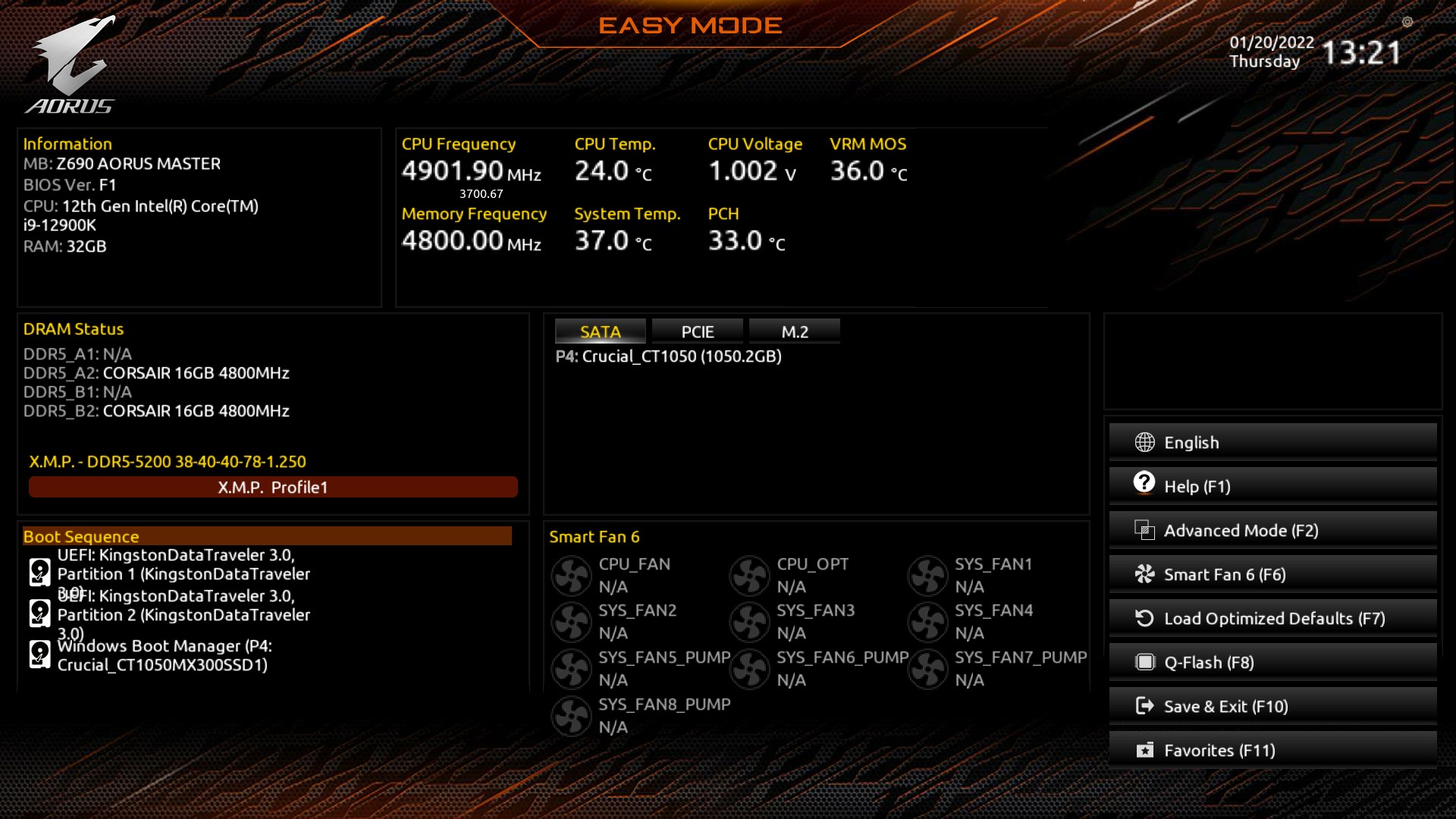
Upon entering the firmware for the first time, which can be accessed by pressing either the Del or F2 Key during post, it will revert to the Easy mode. Users can see a basic list of hardware installed within the Easy mode, including information on the processor, memory, and fans installed onto the 4-pin headers. Users can also enable X.M.P 3.0 profiles on supported kits of memory, see basic information on temperatures from different sensors such as CPU and VRMs, and view current CPU VCore voltage.

Users can access the Advanced mode by pressing the F2 Key. The Advanced mode opens up a whole host of settings and customizable options for users to tweak, fine-tune, and overclock their system. All of the board's overclocking settings can be found within the 'Tweaker' menu, with various options for overclocking the CPU, memory, and integrated graphics on supported Alder Lake CPUs.
The Advanced mode also allows users to customize the chipset-related settings, enable or disable non-critical controllers such as networking and audio, and access various platform and power management settings. By pressing the F6 Key within the firmware, users can access GIGABYTE's Smart Fan 6 utility, where the 4-pin fan headers can be assigned fan profiles or sync fan settings across all of the headers.


Overall, GIGABYTE UEFI firmware is easy to use, it's responsive to our USB keyboard and mouse. It has a large variety of customizable settings for users to sink their teeth into. There are plenty of avenues available to increase overall system performance, including extensive memory tweaking options, as well as plenty of options for overclocking both the P and E-cores on Intel's Alder Lake processors.
Software
When it comes to software, each vendor has its own software suite designed to energize and supplement its hardware offerings. GIGABYTE includes a wide variety of software applications, including its EasyTune software for overclocking within Windows and its System Information Viewer (SIV) utility for monitoring temperatures, voltages, and it also features its Smart Fan 6 automatic fan tuning utility.

As many vendors include with its motherboards, GIGABYTE has its own overclocking utility called EasyTune. The EasyTune software allows users to overclock the processor within Windows, including CPU frequency and allows users to customize primary voltages related to the CPU such as CPU VCore and CPU VCCIN. Users can even change the memory frequency ratio and customize the primary latency timings, although users doing this will need to restart their PC for settings to take effect.

The System Information Viewer (SIV) utility allows users to monitor system temperatures, voltages, and other things such as CPU core frequency. It also includes its Smart Fan 6 automatic fan tuner which optimizes fan speeds based on temperature and fan RPM, as well as the ability for users to create their own fan profile curves. Users can also set temperature and voltage alerts from a variety of integrated sensors throughout the board and various voltages from CPU VCore, CPU VCCIN, and on the 12 V, 5 V, and 3.3 V rails incoming from the power supply.


Other utilities within GIGABYTE's software bundle include its @BIOS utility, which allows users to flash the board's firmware to the latest, either from a file or via GIGABYTE's web server. The Aorus Game Boost is an application that allows users to 'optimize' system processes, while the RGB Fusion 2.0 software allows users to customize the integrated and attached RGB LED strips with various lighting effects and a color wheel.
Overall the software bundle with the GIGABYTE Z690 Aorus Master is befitting of a premium motherboard. As we've highlighted many times over the years, we wish motherboard vendors would bundle audio software as standard and not force users to download them from the Microsoft Store.
Originally published at https://www.anandtech.com/show/17199/the-gigabyte-z690-aorus-master-motherboard-review-all-around-premium (Wayback Machine).