
ATI's Next Three Months Of Catalyst
- Posted in
- GPUs
Catalyst 5.6
This month, ATI is focused on broadening compatibility and improving performance.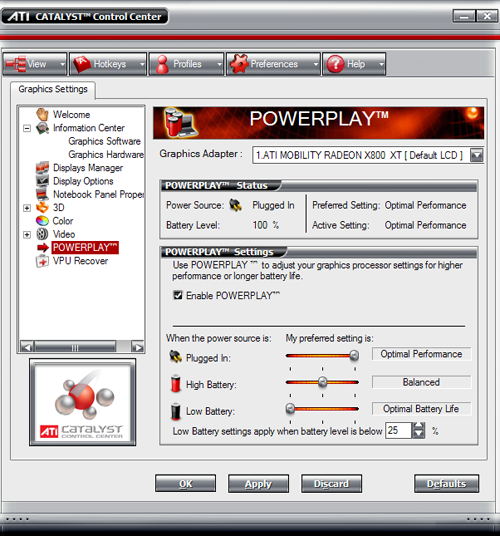
From this release on, ATI will be offering the lasted Catalyst software for their mobile GPUs as well as their desktop solutions. Rather than require mobile OEMs to certify and release their own drivers all the time, ATI will take the reins. Unfortunately, ATI must limit the notebook PCs on which their driver will install. OEMs that focus mainly on the business computing side of the market would rather have all their clients running exactly the same software configuration and don't want to allow end users to download and install their own drivers. In these cases, working with stability is the only important concern. The result is that, even though ATI's driver will work with any of their current generation mobility parts, they will only allow the driver to be installed on a select few systems that have opted in to the process. This will mainly include companies that focus on gaming notebooks.
Improving the CCC itself was also a goal of the 5.6 release. There have been some performance enhancements as well as some interface tweaks. The new driver loads faster than the 5.5, but there is still a noticeable pause before the window pops up. Navigating the menus and options is much smoother, and almost all the laggy behavior has disappeared. This fix has been necessary from the beginning, and we are happy to see that ATI has made progress here.
On the interface side, the cursor now changes on the display manager section to show how to use the interface. For example, a mouse with the right button flashing will appear if a right click menu is available for something. The drag-and-drop interface is easy to use, but unless people know what they need to do, it isn't very useful. ATI has also enhanced their system tray context menu to allow just about any setting to be accessed. This makes simple adjustments easy to make without loading up the entire UI. Also added is the information window, which provides software version and hardware details. The Linux install process has also been greatly simplified and automated.
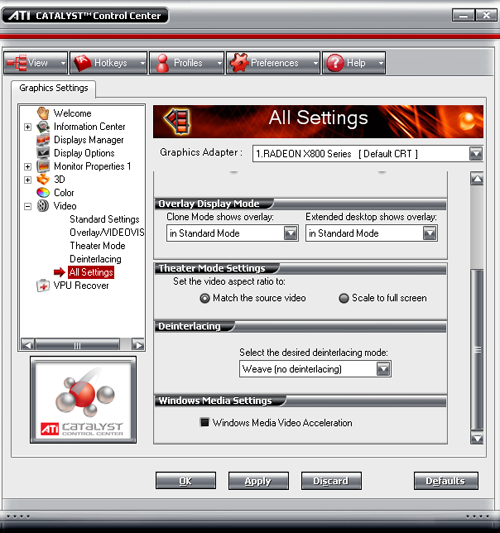
From a feature set standpoint, we see a couple of new things in this release. Video settings have been added that allow real-time previews of video in a side-by-side comparison. This is helpful for adjusting the deinterlace settings. Unfortunately, only one example is given and it's difficult to show the benefits of the different methods without showing specific videos that respond better to one than the other.
It will now also be easier to view video on a secondary display in full screen. Before users were required to run in clone mode in order to watch full screen video this way, but now, it will be possible in extended desktop mode as well.
ATI has also been touting some performance enhancements this time around. We've heard that there should be a general improvement in OpenGL performance and that Doom 3 would specifically benefit. ATI showed us a list of games including Doom 3 and Call of Duty that showed performance gains. The most significant gain was in Lock On: Modern Air Combat, which benefited from Catalyst AI enabling texture compression with "no visual impact" on cloud textures. We didn't verify the results that ATI had with Lock On, but we did test a few games from our suite just to see what would happen. Here's what we ended up with:
| Radeon X800 XL @ 1600x1200 noAA/AF | ||||
| Doom 3 | Half Life 2 | Wolf: ET | Splinter Cell: CT | |
| Catalyst 5.5 | 50.2 | 104 | 95.3 | 39.9 |
| Catalyst 5.6 | 50.2 | 104.1 | 96 | 39.9 |
We also ran these numbers with 4xAA and 8xAF enabled. They were even closer in performance than what these numbers show. Needless to say, we weren't very impressed with the performance improvement (or lack thereof). It is possible that we could see a bigger performance improvement as CPU overhead becomes more of a factor (in other words, if ATI decreased the CPU load of their driver, we might see low res performance increase). We just feel that if a performance gain isn't going to show under most conditions (not the least of which is heavy load), then it doesn't have a very large impact on user experience.
Originally published at https://www.anandtech.com/show/1707 (Wayback Machine).