
Kingston XS2000 Portable SSDs Review: USB 3.2 Gen 2x2 Goes Mainstream
AnandTech DAS Suite - Benchmarking for Performance Consistency
Our testing methodology for portable SSDs takes into consideration the usual use-case for such devices. The most common usage scenario is transfer of large amounts of photos and videos to and from the unit. Other usage scenarios include the use of the unit as a download or install location for games and importing files directly from it into a multimedia editing program such as Adobe Photoshop. Some users may even opt to boot an OS off an external storage device.
The AnandTech DAS Suite tackles the first use-case. The evaluation involves processing five different workloads:
- AV: Multimedia content with audio and video files totalling 24.03 GB over 1263 files in 109 sub-folders
- Home: Photos and document files totalling 18.86 GB over 7627 files in 382 sub-folders
- BR: Blu-ray folder structure totalling 23.09 GB over 111 files in 10 sub-folders
- ISOs: OS installation files (ISOs) totalling 28.61 GB over 4 files in one folder
- Disk-to-Disk: Addition of 223.32 GB spread over 171 files in 29 sub-folders to the above four workloads (total of 317.91 GB over 9176 files in 535 sub-folders)
Except for the 'Disk-to-Disk' workload, each data set is first placed in a 29GB RAM drive, and a robocopy command is issue to transfer it to the external storage unit (formatted in exFAT for flash-based units, and NTFS for HDD-based units).
robocopy /NP /MIR /NFL /J /NDL /MT:32 $SRC_PATH $DEST_PATH
Upon completion of the transfer (write test), the contents from the unit are read back into the RAM drive (read test) after a 10 second idling interval. This process is repeated three times for each workload. Read and write speeds, as well as the time taken to complete each pass are recorded. Whenever possible, the temperature of the external storage device is recorded during the idling intervals. Bandwidth for each data set is computed as the average of all three passes.
The 'Disk-to-Disk' workload involves a similar process, but with one iteration only. The data is copied to the external unit from the CPU-attached NVMe drive, and then copied back to the internal drive. It does include more amount of continuous data transfer in a single direction, as data that doesn't fit in the RAM drive is also part of the workload set.
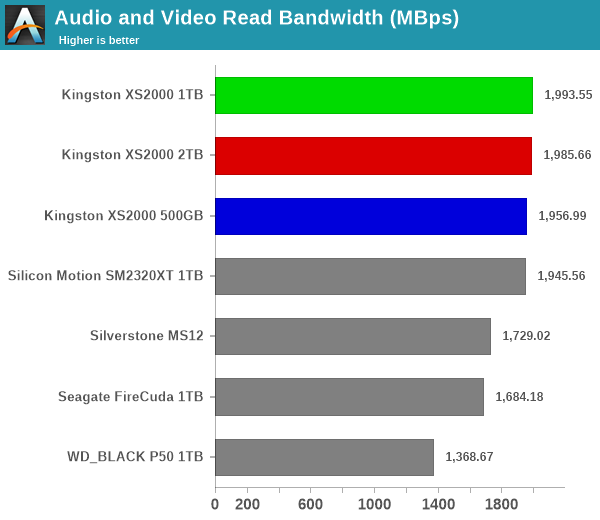
All the read workloads see the three XS2000 units land at the top of the charts. However, write workloads present a different story. The 2TB version performs the best of the three, and all of them land in the middle of the charts. However, the 2TB version emerges on top for the disk-to-disk write workload, while the 500GB version has extremely poor performance for the same workload. This points to a significantly large SLC cache in the 2TB version, and an extremely small one in tthe 500GB SKU.
Power users may want to dig deeper to understand the limits of each device. To address this concern, we also instrumented our evaluation scheme for determining performance consistency.
Performance Consistency
Aspects influencing the performance consistency include SLC caching and thermal throttling / firmware caps on access rates to avoid overheating. This is important for power users, as the last thing that they want to see when copying over 100s of GB of data is the transfer rate going down to USB 2.0 speeds.
In addition to tracking the instantaneous read and write speeds of the DAS when processing the AnandTech DAS Suite, the temperature of the drive was also recorded. In earlier reviews, we used to track the temperature all through. However, we have observed that SMART read-outs for the temperature in NVMe SSDs using USB 3.2 Gen 2 bridge chips end up negatively affecting the actual transfer rates. To avoid this problem, we have restricted ourselves to recording the temperature only during the idling intervals. The graphs below present the recorded data.
| AnandTech DAS Suite - Performance Consistency | |
| TOP: | BOTTOM: |
 |
|
 |
|
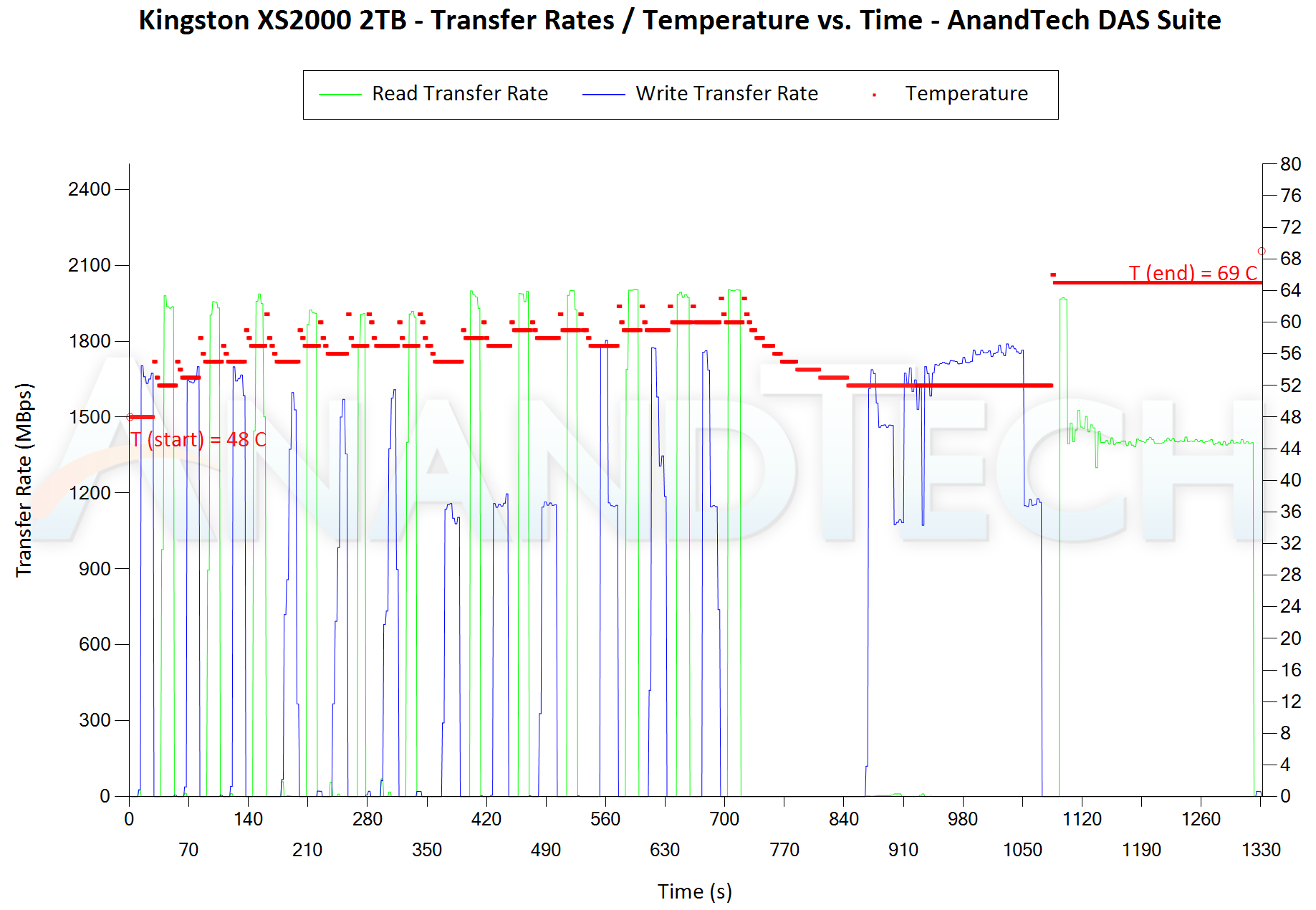
The first three sets of writes and reads correspond to the AV suite. A small gap (for the transfer of the video suite from the internal SSD to the RAM drive) is followed by three sets for the Home suite. Another small RAM-drive transfer gap is followed by three sets for the Blu-ray folder. This is followed up with the large-sized ISO files set. Finally, we have the single disk-to-disk transfer set. The 2TB version exhibits perfect consistency between different passes, while the 500GB version starts showing consistency problems in the second suite itself.
The thermal performance of the XS2000 enclosure is excellent, with the temperatures staying well south of 75C throughout the workload for all SKUs. Of particular interest is the comparison of the SM2320 reference design (1TB) against the XS2000 SKU of the same capacity. While the reference design without any thermal solution landed up around 86C at the end of the test (completing it in around 2040s), the XS2000 seems to trigger a bit of thermal throttling in the disk-to-disk workload segment. While the temperature remained in check, the write workload took around 3 extra minutes to complete. This is also reflected in the disk-to-disk write bandwidth graph of the previous subsection, with the reference design landing at around 325MBps compared to the XS2000 1TB's 275MBps.
Originally published at https://www.anandtech.com/show/17052/kingston-xs2000-portable-ssds-review-usb-32-gen-2x2-goes-mainstream (Wayback Machine).