
The ASRock X570S PG Riptide Motherboard Review: A Wave of PCIe 4.0 Support on A Budget
Overclocking Ryzen 3000
Experience with the ASRock X570S PG Riptide
Despite AMD's Ryzen 5000's presence on the current market and support for these across various AM4 chipsets, we do all of our AM4 testing with the Ryzen 7 3700X processor for consistency. Overclocking can yield many benefits in performance, but at the drawback of extra heat and power. This is a consequence of adding more CPU VCore. (It should also be noted that right now I do not have a 5950X for motherboard testing, but as we've used this 3700X for so many AM4 boards in the past, we know its characteristics quite well - an overclocking motherboard should also be able to push other CPUs than just the flagships too).
Most power delivery is over-engineered to support the latest processors, however hot they run. This is a continuance of CPU vendors constantly pushing default and turbo clocks, pushing the silicon to its limits. Anyone looking to overclock will need to consider more aggressive cooling types such as hefty premium AIOs.
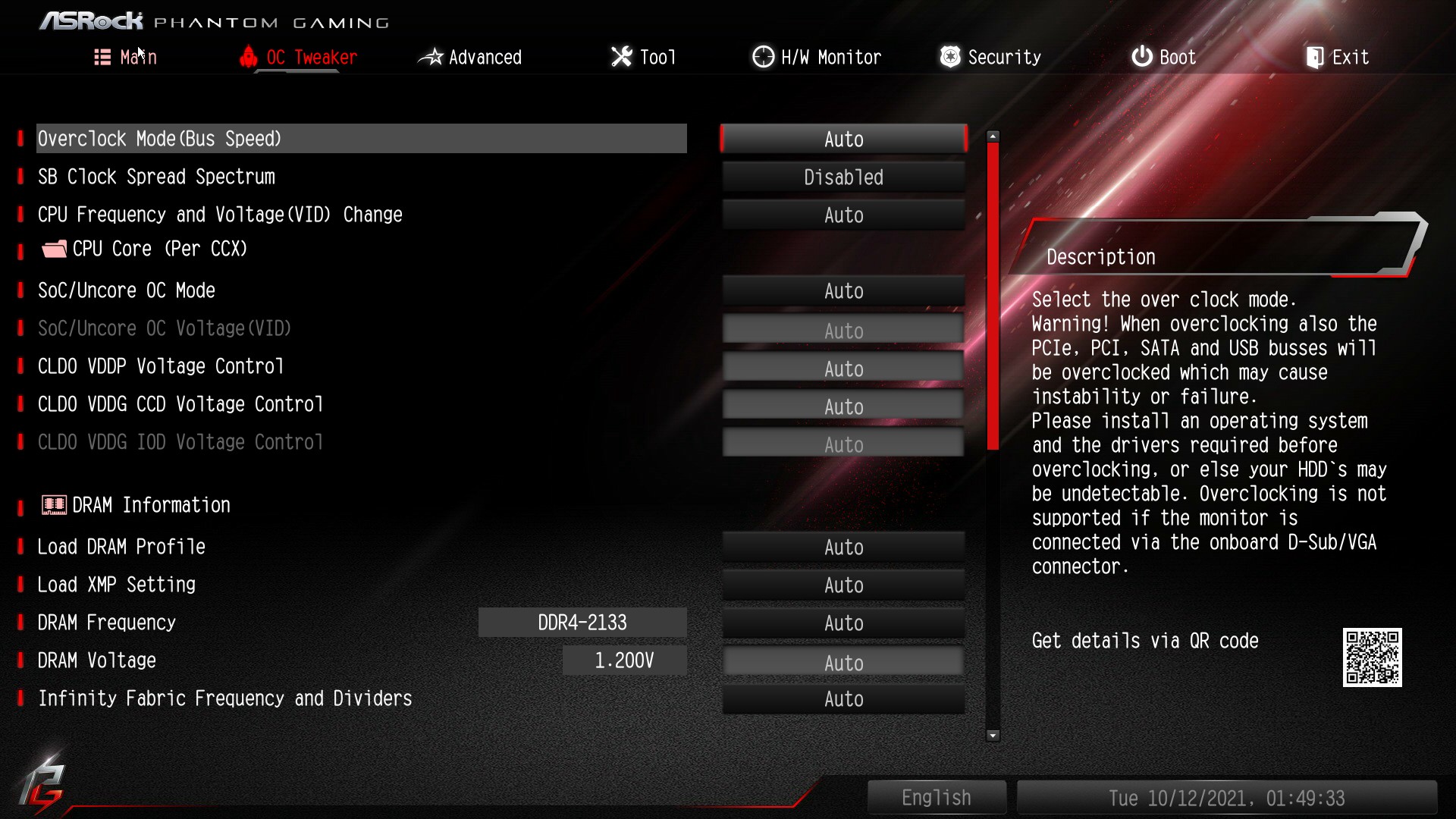
All of ASRock's overclocking options can be found within the OC Tweaker section of the firmware, with plenty of options to overclock the processor, memory, and integrated graphics on Ryzen APUs. ASRock has all the options present in a long list, with some sub-sections for things like memory latencies and power options. Users looking to overclock the CPU can do so by setting the CPU Frequency and CPU VCore voltage which is located third from the top in the above BIOS image. Other options include setting the Loadline Calibration level for more aggressive or conservative VDroop on the CPU VCore, although users could leave this on automatic.
There's also plenty of options to overclock memory including latency timing options, as well as the ability to just simply enable X.M.P 2.0 profiles on compatible kits of memory. When overclocking the memory on Ryzen, users can adjust the Infinity Fabric Clock speed (FCLK) with the best results achieved by setting a 2:1 ratio in terms of the memory speed, e.g, DDR4-3600 at an FCLK of 1800 MHz.
Overclocking with the ASRock X570S PG Riptide is simple to do. There are fewer options than expected when compared to more premium models, but for the price point, there's plenty to like from an overclocking point of view here.
Overclocking Methodology
Our standard overclocking methodology is as follows. We select the automatic overclock options and test for stability with POV-Ray and OCCT to simulate high-end workloads. These stability tests aim to catch any immediate causes for memory or CPU errors.
For manual overclocks, based on the information gathered from the previous testing, start off at a nominal voltage and CPU multiplier. The multiplier is increased until the stability tests are failed. The CPU voltage is increased gradually until the stability tests are passed. The process is repeated until the motherboard reduces the multiplier automatically (due to safety protocol) or the CPU temperature reaches a stupidly high level (105ºC+). Our testbed is not in a case, which should push overclocks higher with fresher (cooler) air.
We use and overclock with the Ryzen 7 3700X on AM4 for consistency to compare with previous models in our previous overclocking testing.
Overclocking Results
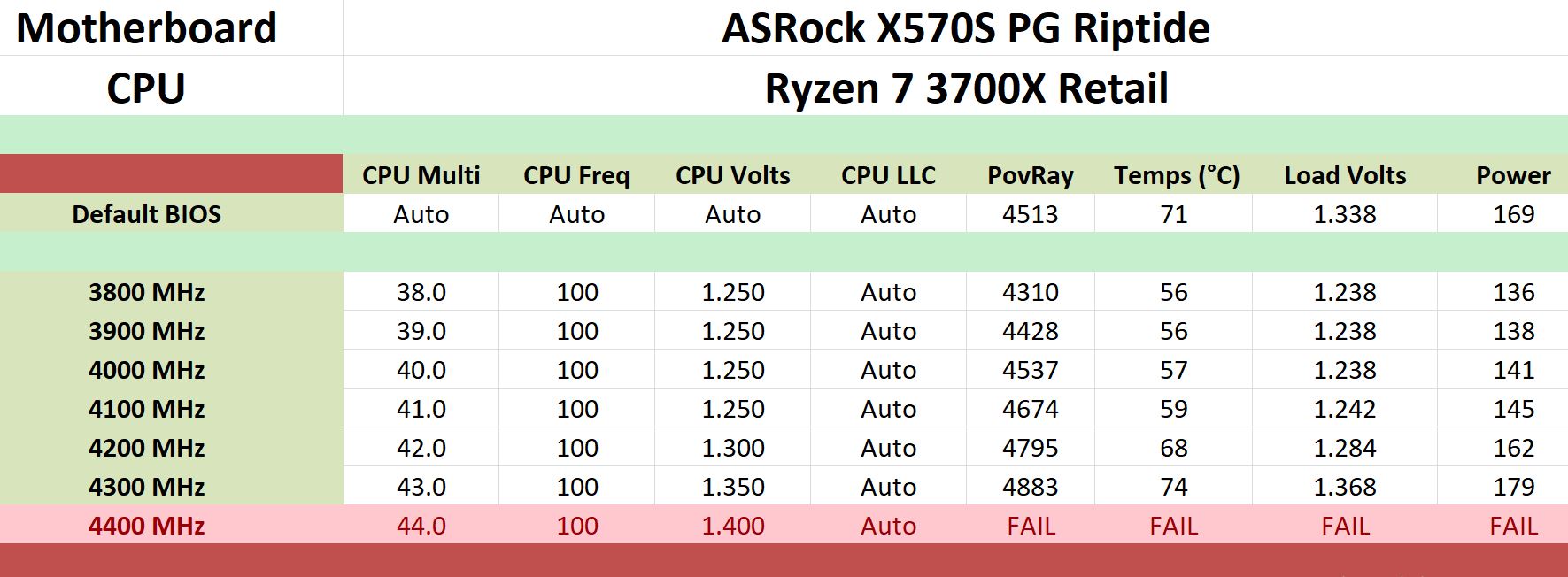
Overclocking our AMD Ryzen 7 3700X with the ASRock X570S PG Riptide showed that despite its price tag, it has plenty about it. The PG Riptide has no preset overclocking profiles for us to test, but it performed well in our frequency testing from 3.8 GHz to 4.3 GHz. We managed to achieve a maximin stable overclock of 4.3 GHz at 1.350 V on the CPU VCore, which is quite formidable for a board such as this.
Going from 3.8 GHz to 4.3 GHz, we observed relatively tight CPU VCore VDroop at full-load, and this was consistent throughout all of our testing. This is because when users change the CPU VCore within the firmware, it automatically sets the Loadline Calibration level to the highest level which is Level 1. As we went up every 100 MHz stepping in our testing, so did the performance in POV-Ray which is consistent with other results from other models we've tested with the same hardware configuration.
Overall overclocking on the ASRock X570S PG Riptide surprised us a little, as it performs just as well as other models both around the same price point and models above it in the stack.
Originally published at https://www.anandtech.com/show/16973/the-asrock-x570s-pg-riptide-motherboard-review (Wayback Machine).