
The ASRock X570S PG Riptide Motherboard Review: A Wave of PCIe 4.0 Support on A Budget
System Performance
Not all motherboards are created equal. On the face of it, they should all perform the same and differ only in the functionality they provide - however, this is not the case. The obvious pointers are power consumption, but also the ability for the manufacturer to optimize USB speed, audio quality (based on audio codec), POST time and latency. This can come down to the manufacturing process and prowess, so these are tested.
Power Consumption
Power consumption was tested on the system while in a single ASUS GTX 980 GPU configuration with a wall meter connected to the Thermaltake 1200W power supply. This power supply has ~75% efficiency > 50W, and 90%+ efficiency at 250W, suitable for both idle and multi-GPU loading. This method of power reading allows us to compare the power management of the UEFI and the board to supply components with power under load, and includes typical PSU losses due to efficiency. These are the real-world values that consumers may expect from a typical system (minus the monitor) using this motherboard.
While this method for power measurement may not be ideal, and you feel these numbers are not representative due to the high wattage power supply being used (we use the same PSU to remain consistent over a series of reviews, and the fact that some boards on our testbed get tested with three or four high powered GPUs), the important point to take away is the relationship between the numbers. These boards are all under the same conditions, and thus the differences between them should be easy to spot.
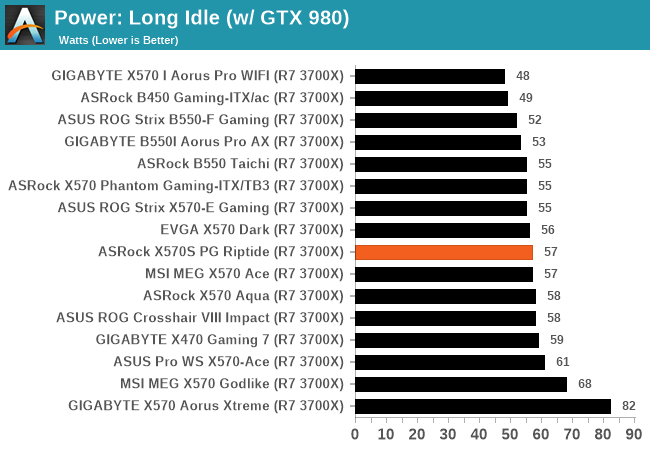
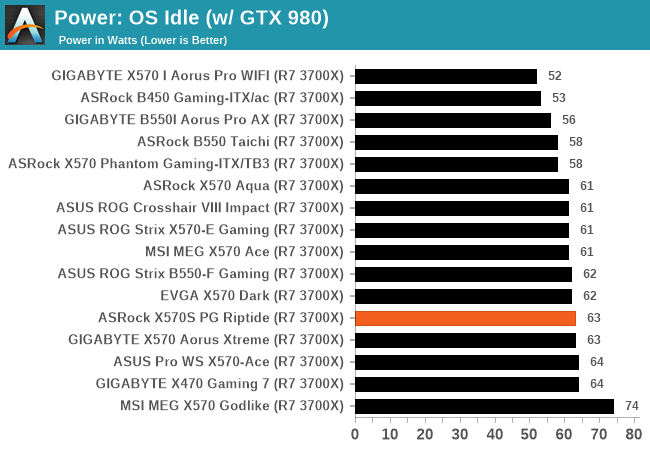
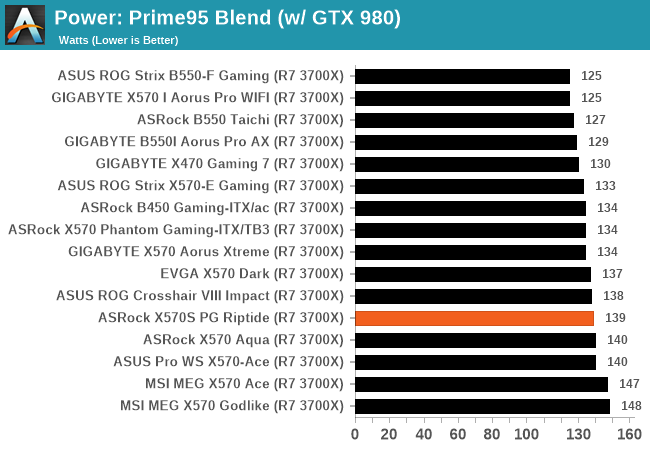
In our power testing, the ASRock X570S PG Riptide performed well with a peak output in our testing of 139 W, with middle-of-the-road power consumption in both long idle and idle power states.
Non-UEFI POST Time
Different motherboards have different POST sequences before an operating system is initialized. A lot of this is dependent on the board itself, and POST boot time is determined by the controllers on board (and the sequence of how those extras are organized). As part of our testing, we look at the POST Boot Time using a stopwatch. This is the time from pressing the ON button on the computer to when Windows starts loading. (We discount Windows loading as it is highly variable given Windows-specific features.)
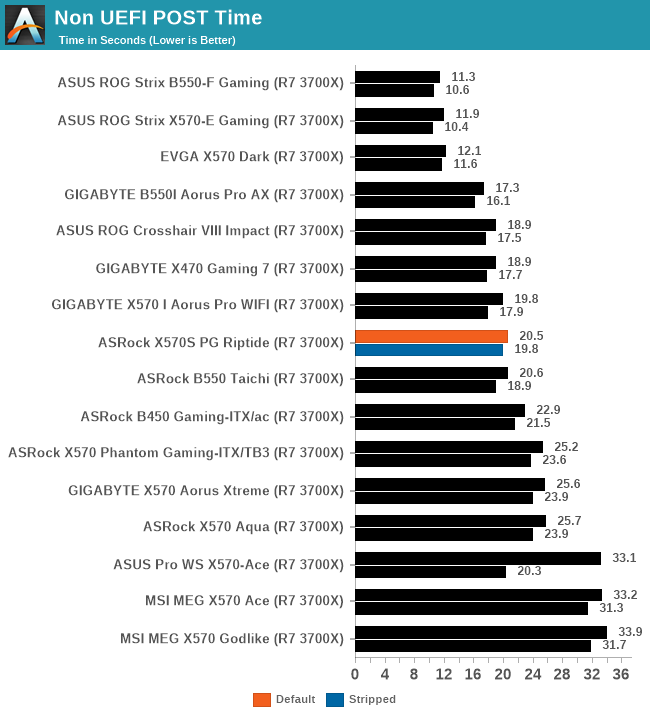
The ASRock performed creditably in our non-UEFI POST time testing, with a default booting time of 20.5 seconds, and a slightly reduced boot time of 19.8 seconds with networking and audio controllers disabled.
DPC Latency
Deferred Procedure Call latency is a way in which Windows handles interrupt servicing. In order to wait for a processor to acknowledge the request, the system will queue all interrupt requests by priority. Critical interrupts will be handled as soon as possible, whereas lesser priority requests such as audio will be further down the line. If the audio device requires data, it will have to wait until the request is processed before the buffer is filled.
If the device drivers of higher priority components in a system are poorly implemented, this can cause delays in request scheduling and process time. This can lead to an empty audio buffer and characteristic audible pauses, pops and clicks. The DPC latency checker measures how much time is taken processing DPCs from driver invocation. The lower the value will result in better audio transfer at smaller buffer sizes. Results are measured in microseconds.
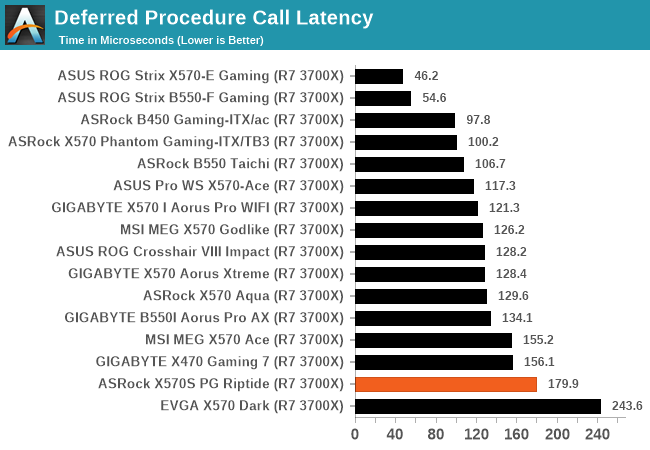
We test DPC latency out of the box at default settings, and the ASRock didn't perform as well as we've seen other ASRock models have on AM4. The result shows that the ASRock posted our second-slowest DPC latency on all the AM4 models we've tested so far.
Originally published at https://www.anandtech.com/show/16973/the-asrock-x570s-pg-riptide-motherboard-review (Wayback Machine).