
USB 3.2 Gen 2x2 Portable SSDs Go Native: The Silicon Motion SM2320 UFD Controller Preview
PCMark 10 Storage Bench - Real-World Access Traces
There are a number of storage benchmarks that can subject a device to artificial access traces by varying the mix of reads and writes, the access block sizes, and the queue depth / number of outstanding data requests. We saw results from two popular ones - ATTO, and CrystalDiskMark - in a previous section. More serious benchmarks, however, actually replicate access traces from real-world workloads to determine the suitability of a particular device for a particular workload. Real-world access traces may be used for simulating the behavior of computing activities that are limited by storage performance. Examples include booting an operating system or loading a particular game from the disk.
PCMark 10's storage bench (introduced in v2.1.2153) includes four storage benchmarks that use relevant real-world traces from popular applications and common tasks to fully test the performance of the latest modern drives:
- The Full System Drive Benchmark uses a wide-ranging set of real-world traces from popular applications and common tasks to fully test the performance of the fastest modern drives. It involves a total of 204 GB of write traffic.
- The Quick System Drive Benchmark is a shorter test with a smaller set of less demanding real-world traces. It subjects the device to 23 GB of writes.
- The Data Drive Benchmark is designed to test drives that are used for storing files rather than applications. These typically include NAS drives, USB sticks, memory cards, and other external storage devices. The device is subjected to 15 GB of writes.
- The Drive Performance Consistency Test is a long-running and extremely demanding test with a heavy, continuous load for expert users. In-depth reporting shows how the performance of the drive varies under different conditions. This writes more than 23 TB of data to the drive.
Despite the data drive benchmark appearing most suitable for testing direct-attached storage, we opt to run the full system drive benchmark as part of our evaluation flow. Many of us use portable flash drives as boot drives and storage for Steam games. These types of use-cases are addressed only in the full system drive benchmark.
The Full System Drive Benchmark comprises of 23 different traces. For the purpose of presenting results, we classify them under five different categories:
- Boot: Replay of storage access trace recorded while booting Windows 10
- Creative: Replay of storage access traces recorded during the start up and usage of Adobe applications such as Acrobat, After Effects, Illustrator, Premiere Pro, Lightroom, and Photoshop.
- Office: Replay of storage access traces recorded during the usage of Microsoft Office applications such as Excel and Powerpoint.
- Gaming: Replay of storage access traces recorded during the start up of games such as Battlefield V, Call of Duty Black Ops 4, and Overwatch.
- File Transfers: Replay of storage access traces (Write-Only, Read-Write, and Read-Only) recorded during the transfer of data such as ISOs and photographs.
PCMark 10 also generates an overall score, bandwidth, and average latency number for quick comparison of different drives. The sub-sections in the rest of the page reference the access traces specified in the PCMark 10 Technical Guide.
Booting Windows 10
The read-write bandwidth recorded for each drive in the boo access trace is presented below.
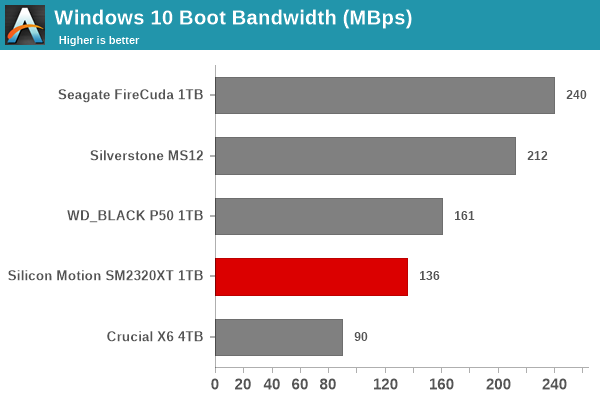
Portable SSDs based on the SM2320 reference design are provide good performance for the on-the-go OS installations. Portable drives based on SSDs equipped with controllers using external DRAM for flash management (like the Seagate FireCuda 510 / SK hynix P31 / WD_BLACK SN730E) perform better, but drives based on the SM2320 may end up better in terms of value proposition due to their lower cost.
Creative Workloads
The read-write bandwidth recorded for each drive in the sacr, saft, sill, spre, slig, sps, aft, exc, ill, ind, psh, and psl access traces are presented below.
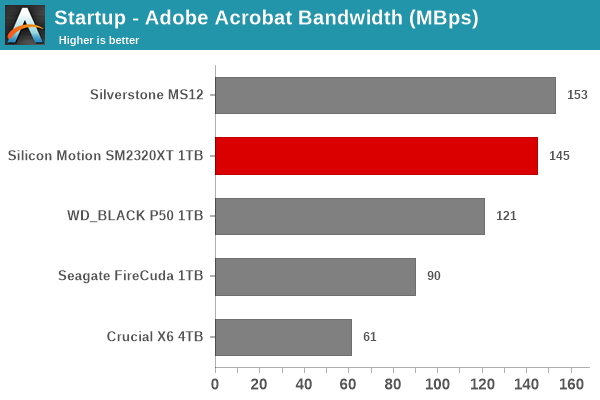
Performance for most workloads is in the middle of the pack, similar to what one can expect from a DRAM-less NVMe SSD. In the heavy workloads, the DRAM-less nature is more of a penalty, with the gulf widening to the extent of pushing the SM2320 reference design further down.
Office Workloads
The read-write bandwidth recorded for each drive in the exc and pow access traces are presented below.
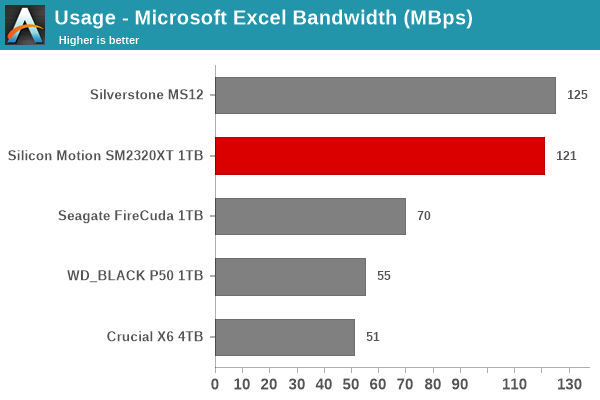
Workloads involving spreadsheets and slides are no sweat for the SM2320 reference design. With the active set being small, the access traces tend to not expose the lack of DRAM in the reference design. The numbers fall very close to the top performer in both tests.
Gaming Workloads
The read-write bandwidth recorded for each drive in the bf, cod, and ow access traces are presented below.
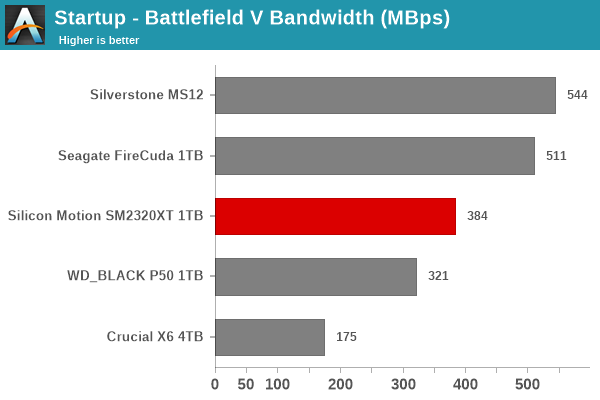
Read-intensive workloads such as game loading are one of the strong points of the SM2320. The DRAM-equipped Seagate FireCuda delivers better numbers consistently, but the SM2320 manages to make it to the middle of the pack.
Files Transfer Workloads
The read-write bandwidth recorded for each drive in the cp1, cp2, cp3, cps1, cps2, and cps3 access traces are presented below.
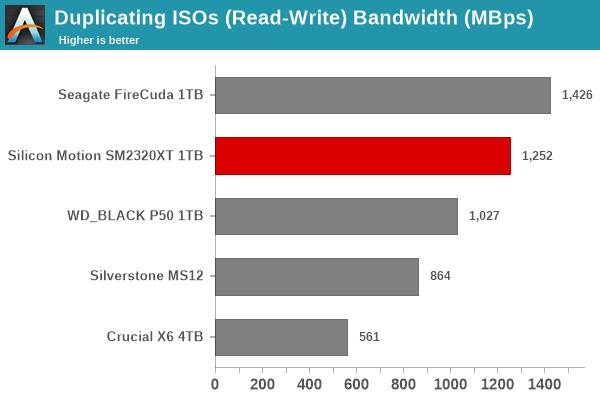
File transfer workloads put the SM2320 reference design firmly in the middle of the pack. Read-only workloads see it in the upper half of the performance table, while write-only ones push it down. These results are only to be expected
Overall Scores
PCMark 10 reports an overall score based on the observed bandwidth and access times for the full workload set. The score, bandwidth, and average access latency for each of the drives are presented below.
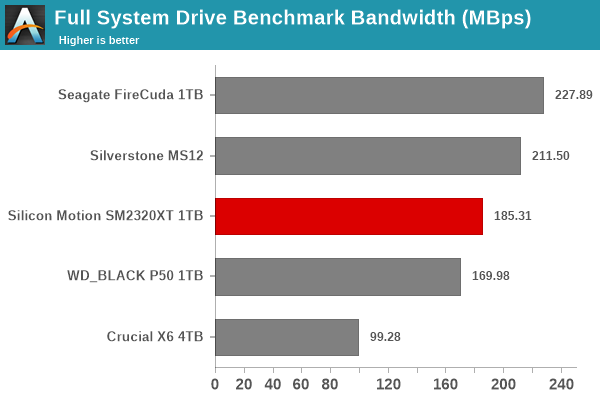
Overall, the SM2320 reference design performs similar to a DRAM-less PCIe 3.0 x4 NVMe SSD behind a USB 3.2 Gen 2x2 bridge. This puts it in the middle of the pack in terms of PCMark 10 Storage Bench scores when compared with the other portable SSDs under consideration in this review.
Originally published at https://www.anandtech.com/show/16942/usb-32-gen-2x2-portable-ssds-go-native-the-silicon-motion-sm2320-ufd-controller-preview (Wayback Machine).