
Seagate FireCuda Gaming SSD Review: RGB-Infused USB 3.2 Gen 2x2 Storage
Miscellaneous Aspects and Concluding Remarks
The performance of the Seagate FireCuda Gaming SSD in various real-world access traces as well as synthetic workloads was brought out in the preceding sections. We also looked at the performance consistency for these cases. Power users may also be interested in performance consistency under worst-case conditions, as well as drive power consumption. The latter is also important when used with battery powered devices such as notebooks and smartphones. Pricing is also an important aspect. We analyze each of these in detail below.
Worst-Case Performance Consistency
Flash-based storage devices tend to slow down in unpredictable ways when subject to a large number of small-sized random writes. Many benchmarks use that scheme to pre-condition devices prior to the actual testing in order to get a worst-case representative number. Fortunately, such workloads are uncommon for direct-attached storage devices, where workloads are largely sequential in nature. Use of SLC caching as well as firmware caps to prevent overheating may cause drop in write speeds when a flash-based DAS device is subject to sustained sequential writes.
Our Sequential Writes Performance Consistency Test configures the device as a raw physical disk (after deleting configured volumes). A fio workload is set up to write sequential data to the raw drive with a block size of 128K and iodepth of 32 to cover 90% of the drive capacity. The internal temperature is recorded at either end of the workload, while the instantaneous write data rate and cumulative total write data amount are recorded at 1-second intervals.
| Sequential Writes to 90% Capacity - Performance Consistency | |
| TOP: | BOTTOM: |
 |
|
 |
|
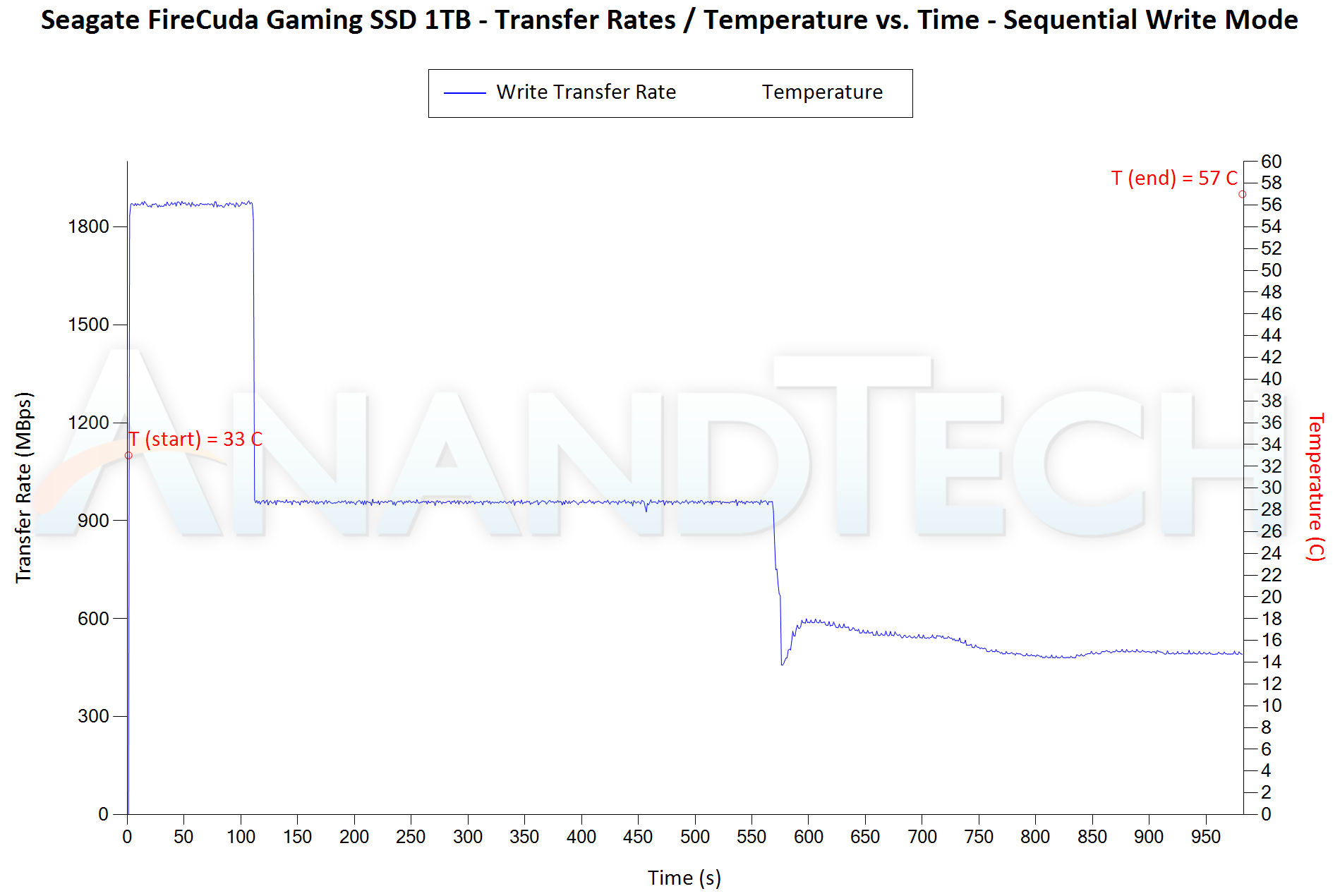
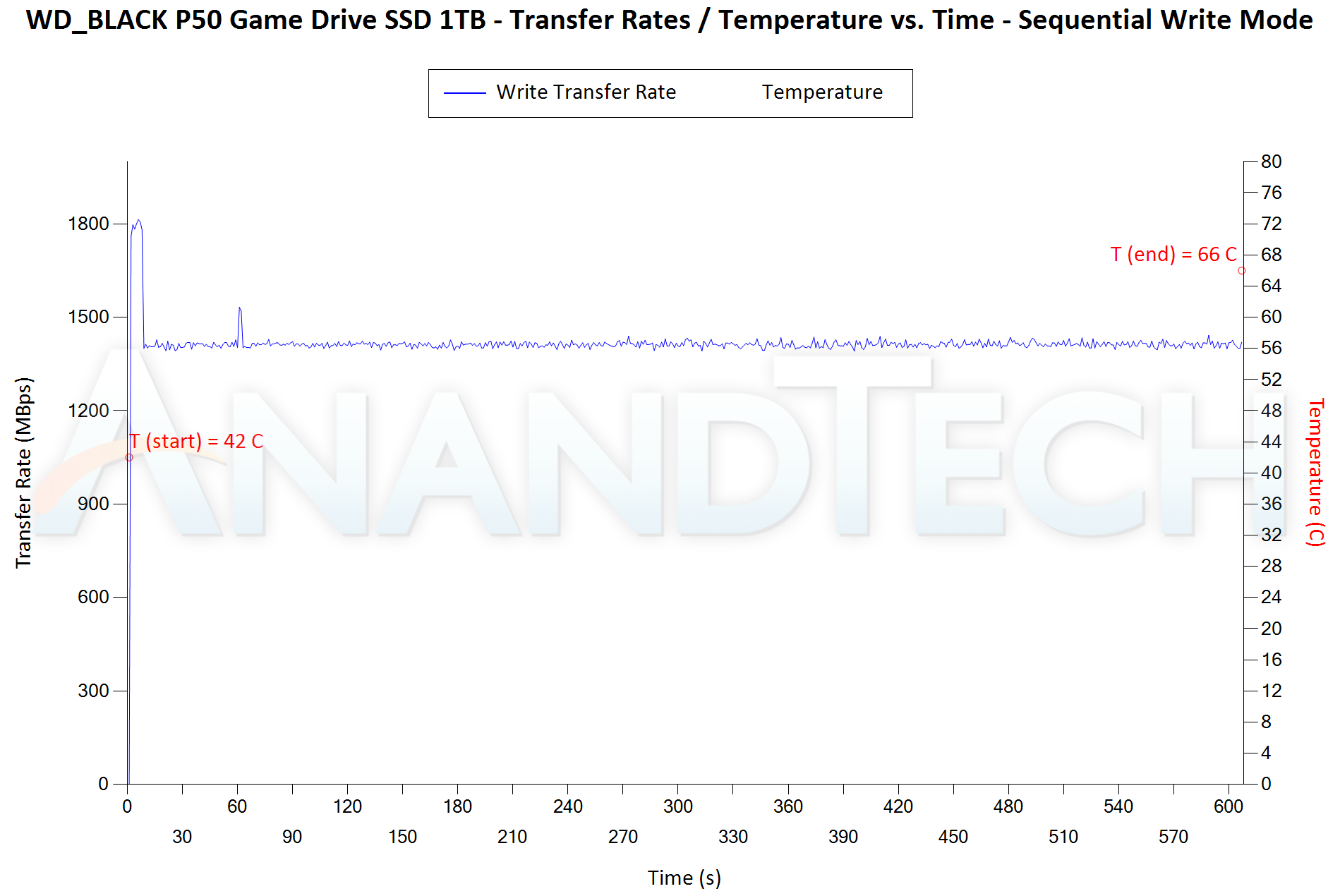
This test confirms our findings in the AnandTech DAS Suite performance consistency section. The SLC cache size for the WD_BLACK P50 is around 12GB, but the direct-to-TLC write is a very respectable 1400 MBps. On the other hand, the FireCuda Gaming SSD has a very liberal 200GB of SLC cache. Once that runs out, the writes first drop to around 900 MBps before moving down to the 550 MBps range. As long as the workload size is within the SLC cache region, the FireCuda Gaming SSD will emerge as the better performer in most cases. For larger workloads, the WD_BLACK P50 delivers better performance consistency. However, the P50 also runs a bit hot compared to the FireCuda Gaming SSD while deliver the performance.
Power Consumption
Bus-powered devices can configure themselves to operate within the power delivery constraints of the host port. While Thunderbolt ports are guaranteed to supply up to 15W for client devices, USB 2.0 ports are guaranteed to deliver only 2.5W (500mA @ 5V). In this context, it is interesting to have a fine-grained look at the power consumption profile of the various external drives. Using the Plugable USBC-TKEY, the bus power consumption of the drives was tracked while processing the CrystalDiskMark workloads (separated by 5s intervals). The graphs below plot the instantaneous bus power consumption against time, while singling out the maximum and minimum power consumption numbers.
| CrystalDiskMark Workloads - Power Consumption | |
| TOP: | BOTTOM: |
 |
|
 |
|
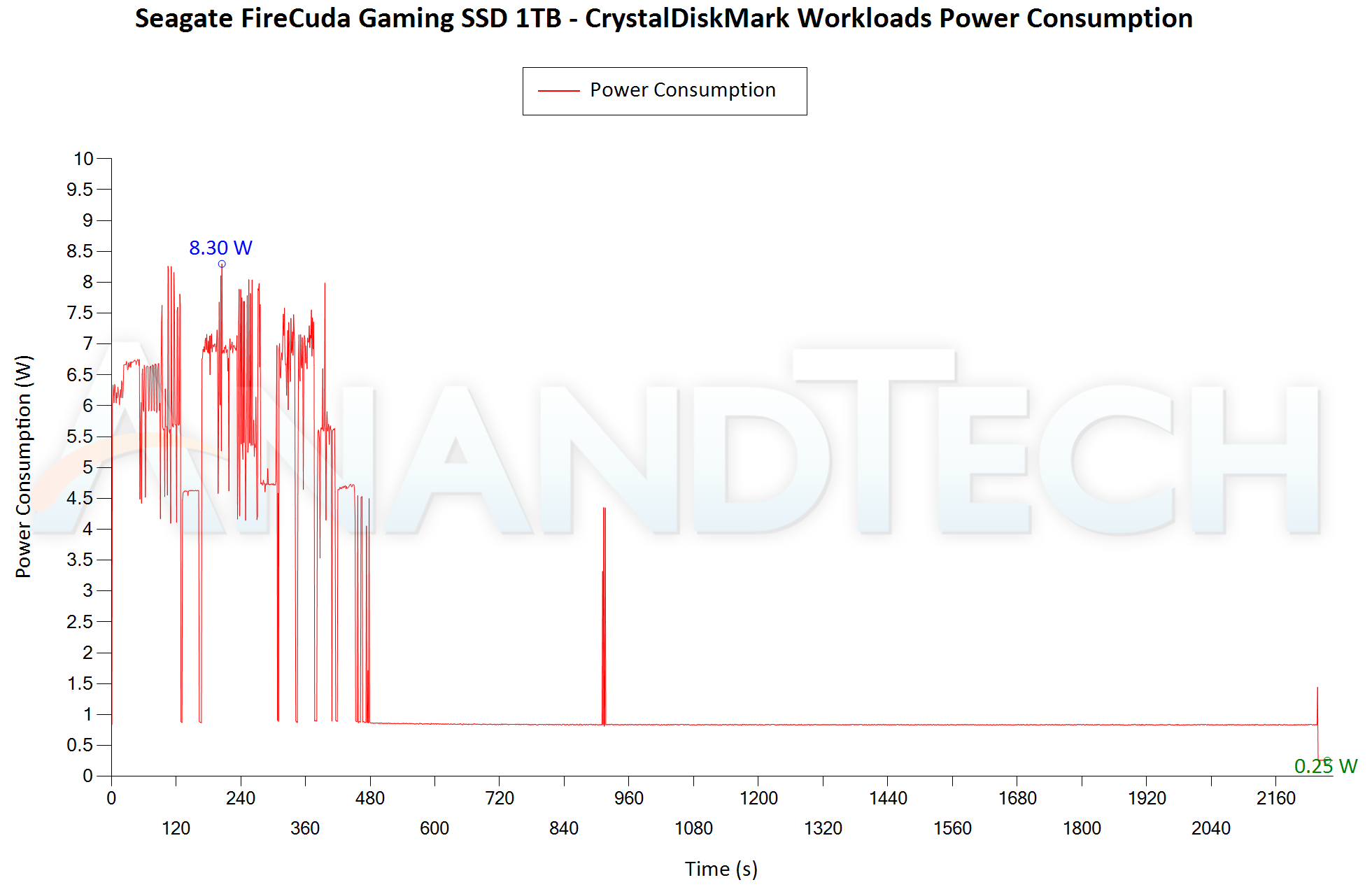
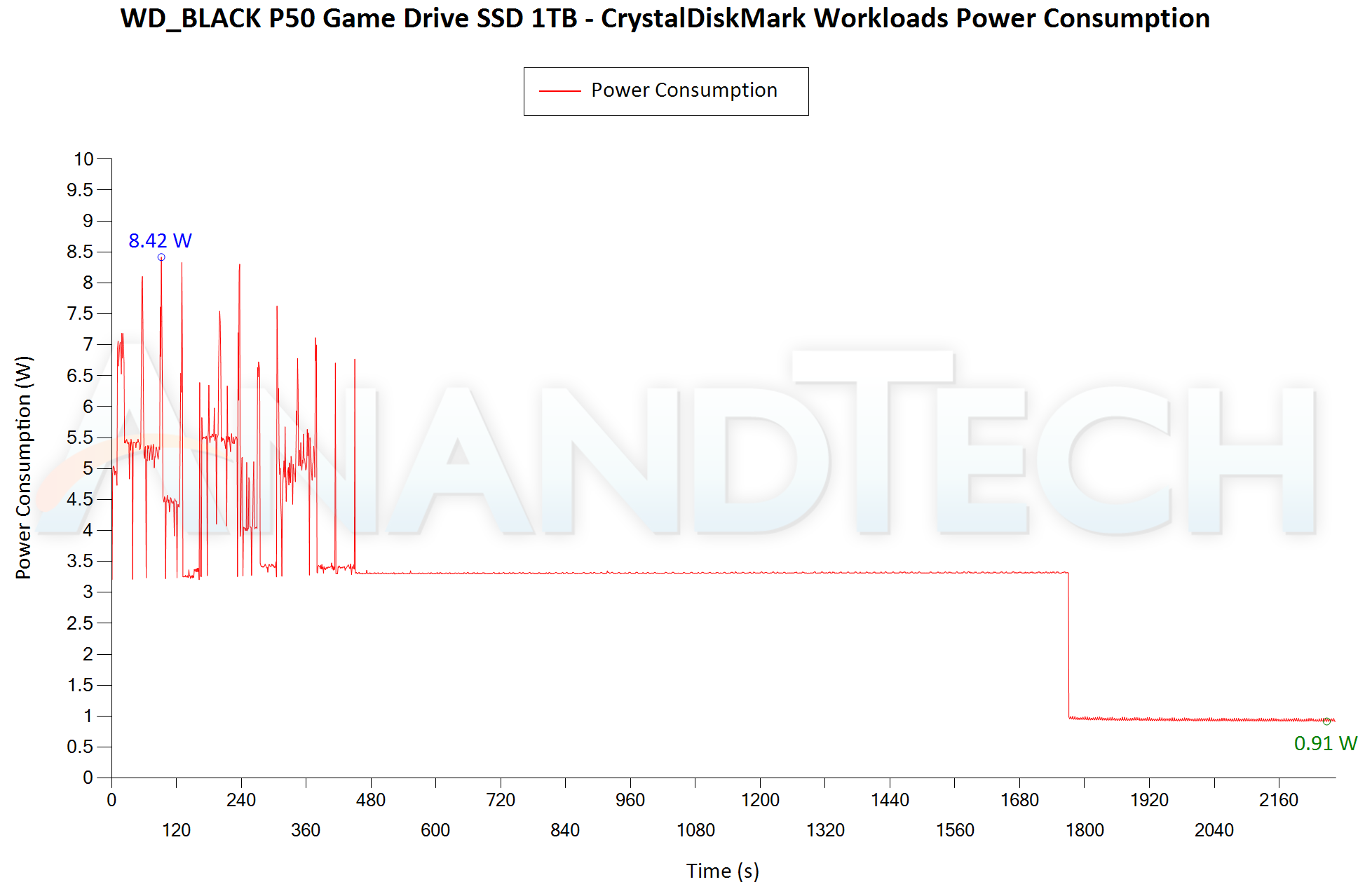
Despite the presence of RGB lighting, the FireCuda Gaming SSD does not have any power consumption penalty. In fact, the peak power consumption of the P50 is higher at 8.42W compared to 8.30W for the FireCuda. The Seagate SSD also goes down to a low power state faster than the P50.
Final Words
The Seagate FireCuda Gaming SSD is currently on Amazon for $210. Interestingly, the WD_BLACK P50 1TB is also priced the same. The FireCuda Gaming SSD holds the edge in most cases with its generous 200GB of SLC cache. This ensures that only heavy power users transferring more than 200GB of data in one go ever get to dip down to the 900 MBps TLC-direct write speeds. The WD_BLACK P50, on the other hand, holds steady at around 1400 MBps all through after the 12GB SLC cache runs out. The P50 delivers better long-term consistency, but the FireCuda Gaming SSD wins out on the important game loading trace replay benchmarks in the PCMark 10 Storage Bench. Seagate's configurable RGB feature makes the portable SSD blend well with other gaming peripherals - and this essentially comes at no extra cost. The 0.5m Type-C cable of the FireCuda Gaming SSD is also useful for gaming desktops where the Gen 2x2 port might be tucked away in the rear I/O. So, our recommendation is for the Seagate FireCuda Gaming SSD unless there is a demonstrable need to write more than 20% of the drive's capacity at full speed in one pass.

Users solely focused on performance (with no interest in RGB functionality or industrial design matching their existing gaming gear) can save quite a bit by going the DIY route - the Silverstone MS12 ($70) + SK hynix Gold P31 ($135 - $20) combination works out to $185. Despite costing $25 less, it performs just as well for regular gaming usage as the Seagate FireCuda Gaming SSD and the WD_BLACK P50.
Originally published at https://www.anandtech.com/show/16917/seagate-firecuda-gaming-ssd-review-rgbinfused-usb-32-gen-2x2-storage (Wayback Machine).