
ASRock Industrial NUC BOX-1165G7 Mini-PC Review: An Ultra-Compact Tiger Lake Desktop
BAPCo SYSmark 25
The ASRock NUC BOX-1165G7 was evaluated using our Fall 2018 test suite for small-form factor PCs. In the first section, we will be looking at SYSmark 25.
BAPCo's SYSmark 25 is an application-based benchmark that uses real-world applications to replay usage patterns of business users in the areas of productivity, creativity, and responsiveness. The 'Productivity Scenario' covers office-centric activities including word processing, spreadsheet usage, financial analysis, software development, application installation, file compression, and e-mail management. The 'Creativity Scenario' represents media-centric activities such as digital photo processing, AI and ML for face recognition in photos and videos for the purpose of content creation, etc. The 'Responsiveness Scenario' evaluates the ability of the system to react in a quick manner to user inputs in areas such as application and file launches, web browsing, and multi-tasking.
Scores are meant to be compared against a reference desktop (the SYSmark 25 calibration system, a Lenovo Thinkcenter M720q with a Core i5-8500T and 8GB of DDR4 memory to go with a 256GB M.2 NVMe SSD). The calibration system scores 1000 in each of the scenarios. A score of, say, 2000, would imply that the system under test is twice as fast as the reference system.
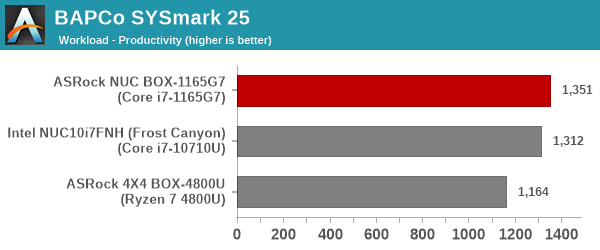
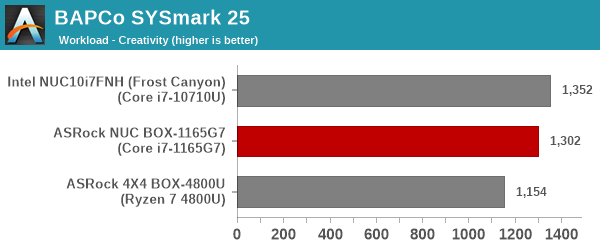
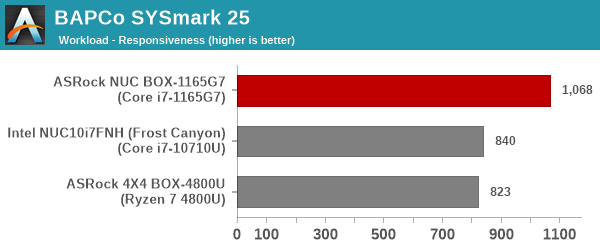
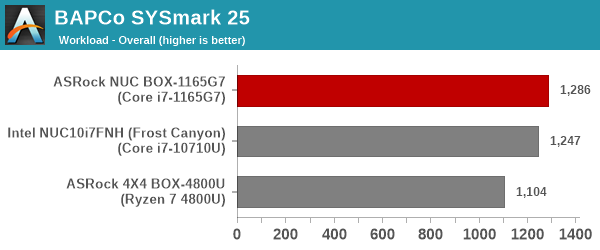
In terms of raw scores, the NUC BOX-1165G7 narrowly outperforms the Frost Canyon NUC. However, a closer look at the Creativity workload shows the benefits of having two additional cores (the Core i7-10710U is a hexa-core processor). The responsiveness metric is a huge win for the NUC BOX-1165G7, thanks to its PCIe 4.0 SSD and DDR4-3200 SODIMMs.
SYSmark 25 also adds energy measurement to the mix. A high score in the SYSmark benchmarks might be nice to have, but, potential customers also need to determine the balance between power consumption and the efficiency of the system. For example, in the average office scenario, it might not be worth purchasing a noisy and power-hungry PC just because it ends up with a 2000 score in the SYSmark 2014 SE benchmarks. In order to provide a balanced perspective, SYSmark 25 also allows vendors and decision makers to track the energy consumption during each workload. In the graphs below, we find the total energy consumed by the PC under test for a single iteration of each SYSmark 25 workload. For reference, the calibration system consumes 8.88 Wh for productivity, 10.81 Wh for creativity, and 19.69 Wh overall.
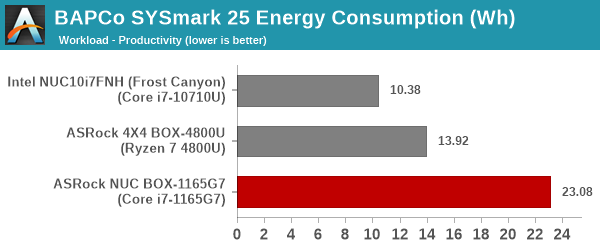
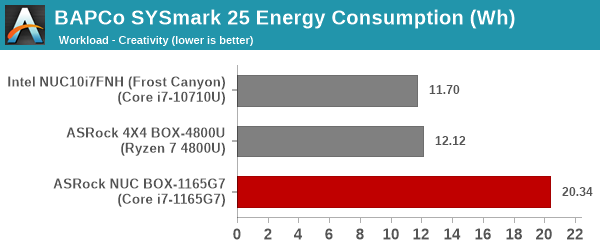
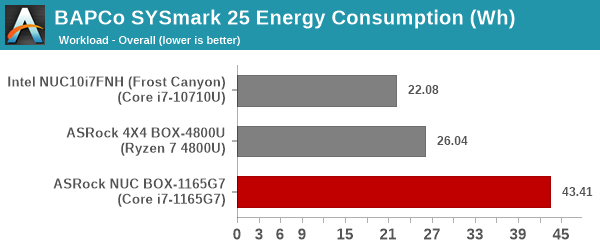
The energy numbers present a bad picture for the NUC BOX-1165G7. There are multiple components that could be responsible - 64GB of DDR-3200 DRAM compared to DDR-2666 in the Frost Canyon NUC, the presence of a PCIe 4.0 SSD compared to PCIe 3.0 SSDs in the other two systems, and general platform power. However, as we shall see further down in this review, the power consumption numbers are not that different from other mini-PCs. So, it is likely that boost clocks and other workload-specific triggers are responsible for these energy consumption numbers.
Originally published at https://www.anandtech.com/show/16914/asrock-industrial-nuc-box1165g7-minipc-review-an-ultracompact-tiger-lake-desktop (Wayback Machine).