
The ZTE Axon 30 Ultra Review - Something Surprisingly Different
- Posted in
- Mobile
- Smartphones
- ZTE
- Axon 30 Ultra
Display Measurement
The display on the Axon 30 Ultra is a 6.67” 2400 x 1080 AMOLED that goes up to 144Hz refresh rate. ZTE doesn’t have any special claims about the display beyond that it also supports 10-bit colour depth, so we don’t expect any newer display technology such as modern emitters or more efficient backplane materials.

Design wise, the display is great and has also very good viewing angles. The 1080p resolution is stretching things a bit thin at this size and people buying the phone will have to keep this in mind – personally I don’t find it quite enough due to my habit of doing lots of reading in the evening with the phone close to my face, but many other people with more general usage at hand held distances will be plenty satisfied with the density.

In terms of colour calibration options for the display, ZTE’s myOS gives you a more simplistic settings menu: The top slider of “Colourful”, “Standard” and “Soft” change the colour gamut between something that exceeds the P3 colourspace but below that of BT2020, a P3 gamut calibration, and an sRGB gamut calibration. For our testing we’re using the “Soft”/sRGB calibration for testing.
Additionally, ZTE gives us a colour wheel and colour temperature slider, more on this in a bit.
We move on to the display calibration and fundamental display measurements of the Axon 30 Ultra screen. As always, we thank X-Rite and SpecraCal, as our measurements are performed with an X-Rite i1Pro 2 spectrophotometer, with the exception of black levels which are measured with an i1Display Pro colorimeter. Data is collected and examined using Portrait Display's CalMAN software.
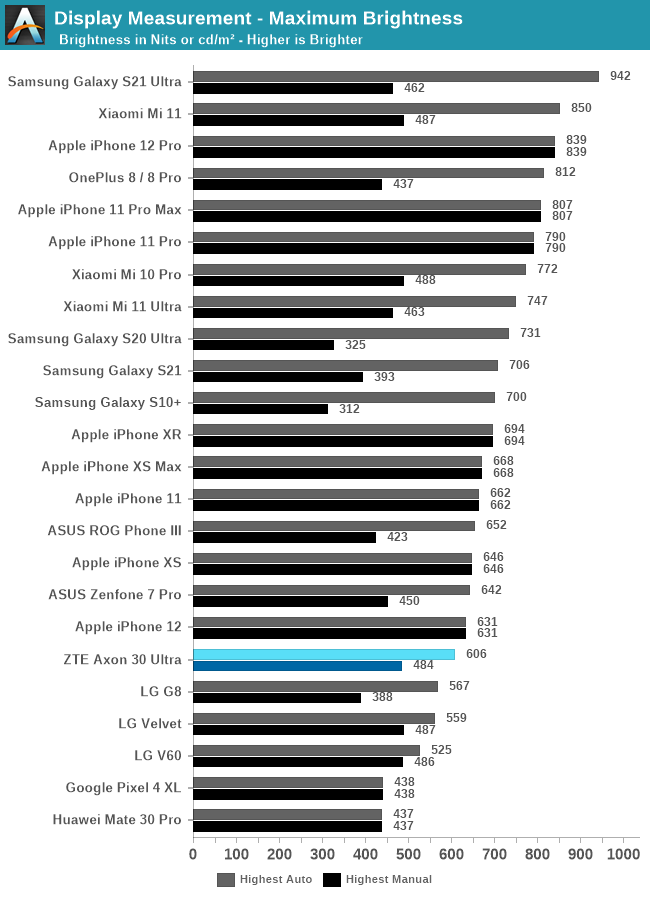
In terms of brightness, while the phone is in line with other industry devices in manual brightness, coming in at 484 nits full screen white, its actual auto brightness boost levels aren’t too convincing as they only reach 606 nits, which is below that of flagship devices of the last few years. It’s still a bright display, but won’t be competitive in very bright sunlit scenarios.


In the greyscale results, the out of the box default mode of the phone is pretty bad as it veers off to very blueish tones, with 6949K whites and average colour temperatures of 6715K across the levels.
Furthermore, the gamma curve also isn’t very consistent at all in our 50% window 50% APL test patterns, with non-linear results. Both the colour inaccuracy and the gamma error result in quite bad results in terms of the dEITP figures.

Usually, we don’t publish review calibrations as vendor’s controls makes things incredibly hard to replicate – this is also the case here with ZTE: the margin for hitting that exact spot that I’ve used for accurate colour temperature is very hard to hit on the Axon 30 Ultra as the colour wheel has some large implementation bugs that result in very different results when the selector is just a few pixels apart on the outer rim of the colour wheel. Still, generally hitting that area gave me the best results on our device.


The custom setting nearly eliminates all colour errors and we get near perfect whites at 6523K. The gamma error unfortunately is still there but we can’t do much about it.

In the default settings the error rates are extremely high due to the offset white point.

In our custom white point, we’re able to get pretty good results, although we see that blues and yellow are off-hue by a larger margin and this has a larger impact on the overall error rate. This is something that can’t be corrected with the given controls.


Here’s the GMB results at the default “Neutral” white point in the Soft profile.


And our custom white point calibration, which dramatically improves the error rates, at least as far as possible.
Overall, the display of the Axon 30 Ultra is relatively mediocre by flagship standards. While viewing angles are good, it doesn’t reach the brightness of the competition. Furthermore, ZTE’s colour calibration out of the box is amongst one of the worst we’ve seen in recent years, having no way to pre-set a somewhat accurate white point. Luckily, I was able to calibrate it manually to a reasonable colour balance, but that’s not something that should be left up to customers to do.
Originally published at https://www.anandtech.com/show/16838/the-zte-axon-30-ultra-review (Wayback Machine).