
ASRock Z590 Steel Legend WiFi 6E Review: Z590 On A Budget
- Posted in
- Motherboards
- Intel
- ASRock
- PCIe 4.0
- Steel Legend
- LGA1200
- Rocket Lake
- Z590
- i9-11900K
- Z590 Steel Legend WiFi 6E
Overclocking
The art of overclocking can be considered a skill. Getting the right combination of settings to deliver an optimized yet stable enough system to deliver the performance can be time-consuming and tedious. Despite the excellent work from both Intel and AMD over the last couple of years with its interpretations of 'turbo' and 'boost,' this doesn't typically affect all of the cores and instead focuses on one or two. On an eight-core processor such as the Intel Core i9-11900K, providing whatever software of application is being used can utilize the cores and threads, typically more performance can be had from pushing all of the cores higher. At present, Intel employs some of the most aggressive methods of automatic overclocking with its Thermal Velocity Boost (TVB), and more recently with Rocket Lake, its new Adaptive Boost Technology (ABT) on its 11th Gen Core i9 K and KF processors.
Perhaps the biggest disadvantage when it comes to overclocking the processor has to deal with the extra heat and power implications. As Intel pushes its silicon almost to its limit right out of the factory, adequate cooling is needed. Due to previous experiences when overclocking our i9-11900K in previous Z590 reviews, we've seen power consumption figures surpassing 350 W when overclocking, which is a phenomenal amount of wattage for an eight-core chip. Even at default settings, new processors from both Intel and AMD typically run warmer than previous generations. Hence, we recommend using premium cooling solutions such as AIO CPU coolers or even large tower coolers to help manage the extra heat generated.
Experience with the ASRock Z590 Steel Legend WiFi 6E

Looking at our experience with the ASRock, all the overclocking settings can be found within the Advanced Mode and under the OC Tweaker menu. ASRock provides plenty of customizable options for overclocking both the CPU and the memory. Focusing on the CPU side, users can simply set the CPU Ratio to the desired clock speed in increments of 100 MHz and set the CPU VCore voltage and go. For enthusiasts looking to fine-tune settings, users can also overclock the CPU cache ratio and alter the base clock frequency, which will also inherently overclock the memory. Users can overclock each of the CPU cores individually and tweak different power settings, including Intel's Adaptive and Thermal Boost technologies.
For memory, ASRock includes plenty of options for users to overclock memory. The simplest way to overclock the memory on Z590 is to enable X.M.P 2.0 profiles on compatible memory kits. Users can also do this manually with memory frequency options in the OC Tweaker menu and set latencies including primary, secondary, and tertiary. Another element that is new to Z590 is Intel's new Geared Memory Mode, which allows users to push memory higher while taking some of the strain of the integrated memory controller (IMC). Users can select between a 1:1 or 2:1 ratio.
Overall, ASRock's UEFI BIOS has everything need from a board of this type of pedigree. It's not an overclocking-focused model like some. Still, it does tick all the boxes required to overclock the processor, the memory, and the integrated graphics if users intend to use them as primary graphics.
Overclocking Methodology
Our standard overclocking methodology is as follows. We select the automatic overclock options and test for stability with POV-Ray and Prime95 to simulate high-end workloads. These stability tests aim to catch any immediate causes for memory or CPU errors.
For manual overclocks, based on the information gathered from the previous testing, start off at a nominal voltage and CPU multiplier, and the multiplier is increased until the stability tests are failed. The CPU voltage is increased gradually until the stability tests are passed. The process is repeated until the motherboard reduces the multiplier automatically (due to safety protocol) or the CPU temperature reaches a stupidly high level (105ºC+). Our testbed is not in a case, which should push overclocks higher with fresher (cooler) air.
Overclocking Results
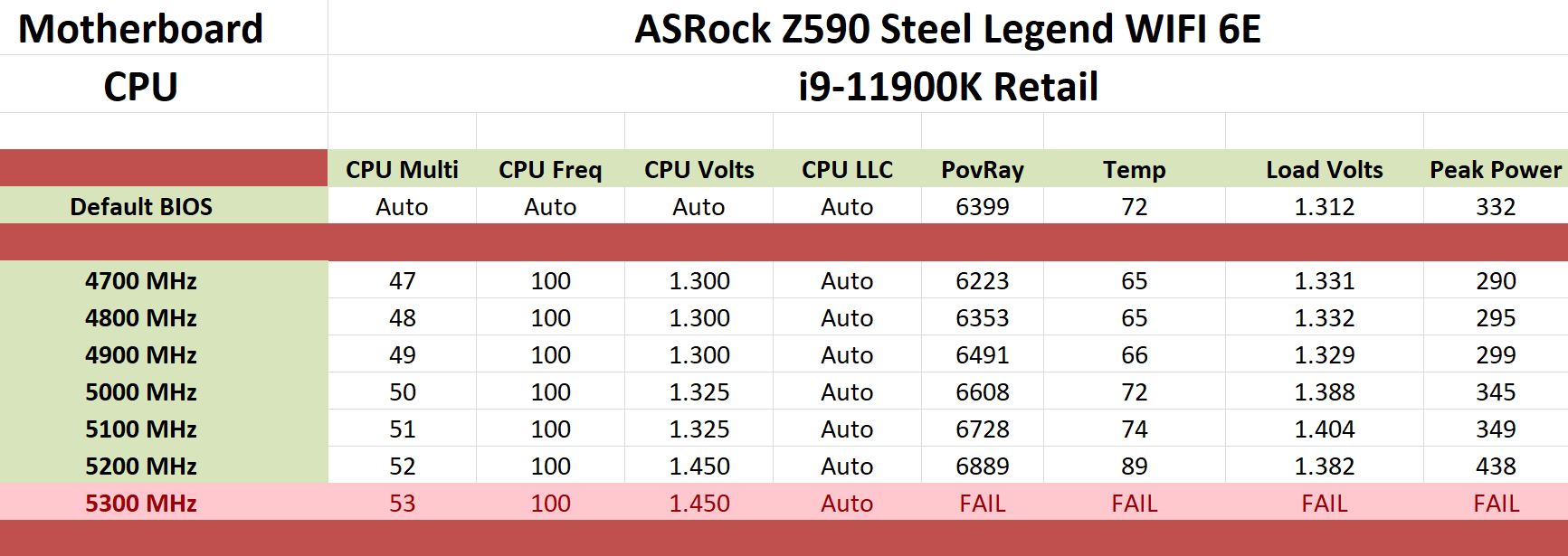
Overclocking our Core i9-11900K on the ASRock Z590 Steel Legend Wi-Fi 6E was quite pleasant for the most part. ASRock itself doesn't include any overclocking profiles to select from, so any overclocking will need to be applied manually.
We saw incremental increases in POV-Ray benchmark performance by testing the Steel Legend WiFi 6E from 4.7 GHz to 5.3 GHz all-cores. From 4.7 to 4.9 GHz, we set 1.30 V on the CPU VCore, and we noticed some overcompensation on the VCore at load, something which just wasn't needed. As we stepped up to 5.0 GHz at 1.325 V in the BIOS, the CPU VCore at full-load hovered around 1.38-1.39 V, which is a massive increase in the levels of VDroop. We test all of the boards with default load-line calibration settings. This seemed to negatively affect power consumption, which is notoriously high on Intel's Rocket Lake when overclocking anyway.
Pushing beyond the 5.1 GHz, and the board would start to overcompensate even more, with 5.1 GHz at 1.325 V in the BIOS equating to 1.404 V at full load, which just isn't acceptable in my opinion, knowing that this particular i9-11900K can run these settings with much lower. It was a different case at 5.2 GHz, with 1.45 V in the BIOS translating to 1.382 V at full load, which was under-compensation. As expected at 5.2 GHz, Temperatures hit just below 90c, with an eye-watering power consumption measured at the wall of 438 W. We didn't experience any thermal throttling at 5.2 GHz. However, we couldn't get our chip stable at 5.3 GHz on this board.
While there's obviously some VDroop on the board, none of the overclocks we tested outside of 5.3 GHz failed. Although we would like to see tighter control of voltages at load, the ASRock Z590 Steel Legend WiFi 6E holds its own compared to other models on test.
Originally published at https://www.anandtech.com/show/16779/asrock-z590-steel-legend-wifi-6e-review- (Wayback Machine).