
ATI's Radeon X800 XL 512MB - A toe in the 512MB pool
- Posted in
- GPUs
256MB vs. 512MB - The Real World Performance Difference
More local GPU memory is never a bad thing, but it must be taken advantage of to be worth its high cost. That means we need games with larger textures and higher detail levels to truly require 512MB cards, but given that the majority of gamers still have 64MB or less on their graphics cards - it's going to be a while before 512MB is necessary. Game developers are notorious for developing "for the masses" and thus, will spend very little time on that which can only be taken advantage of by owners of $500+ graphics cards, today's 512MB card included.ATI's own marketing literature claims that the X800 XL 512MB offers up to a 40% performance increase over the 256MB X800 XL...at 1600 x 1200, with 6X anti-aliasing and 16X anisotropic filtering enabled. The problem is that at such high resolutions with AA/AF cranked up, the X800 XL doesn't have the fill rate or the memory bandwidth to offer reasonable frame rates in most games, which is why we find the X800 XL 512MB to be more of a mismatch than anything else. A faster GPU with more memory bandwidth would be able to offer more real world benefit when coupled with 512MB of memory than the X800 XL.
That being said, let's look at the performance breakdown for the X800 XL 256MB vs. X800 XL 512MB at 1600 x 1200 with 4X AA and 8X AF enabled - pretty aggressive settings for the X800 XL to begin with.
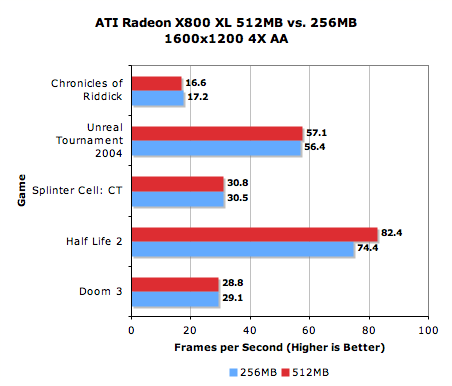
The Half Life 2 performance boost is particularly interesting, but that was the only game we encountered where the performance boost was not only reasonable, but the game was also fairly smooth in actual game play. However, at the price of the X800 XL 512MB, you are better off just purchasing an X850 XT and getting better performance across the board, including Half Life 2.
Although the single graph on this page pretty much tells the story of the X800 XL 512MB, we've included performance results from both X800 XL cards, the X850 XT as well as NVIDIA's GeForce 6800GT and 6800 Ultra on the coming pages, if you want to see things in perspective. We included the X850 XT and 6800 Ultra in the comparisons because it is priced similarly to the X800 XL 512MB's suggested retail price.
The Test
AMD Athlon 64 ConfigurationAthlon 64 4000+ Socket-939 CPU
2 x 512MB OCZ PC3200 EL Dual Channel DIMMs 2-2-2-10
ASUS nForce4 SLI Motherboard
ATI Catalyst 5.4 Drivers
NVIDIA 71.89 Drivers
Originally published at https://www.anandtech.com/show/1673 (Wayback Machine).