
The 20" LCD Shootout: Dell versus Apple
- Posted in
- Displays
Cable Management, Pivot, Stand
Cable management is very important to us, and Apple’s cable management might only be second to Samsung’s SyncMaster 193P or SyncMaster 172T. In fact, if you don’t mind the power brick, Apple might even excel past Samsung with this regard. Power, USB, Firewire and DVI signal are all transmitted via a single (proprietary) cable from the panel. The result is a very clean, no nonsense look that really complements the all aluminum bezel in only the best way possible.
Click to enlarge.

Click to enlarge.
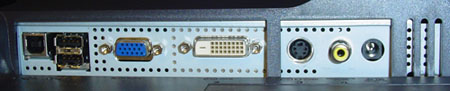
Apple takes a more subtle approach by locating their Firewire 400 and USB 2.0 inputs behind the bottom right of the panel. This was slightly awkward at first, and we actually ended up using a separate USB hub, since the hubs were very difficult to attach and detach easily. On the other hand, Apple gets points for including a Firewire 400 input, something that we were accustomed to quite quickly. Below, you can see the input set of the Dell 2005FPW.
Dell might not stack up to Apple as far as cable management goes, but how important is cable management compared to monitor flexibility? Flexibility is a term that we’ve had to coin over the last few display reviews for lack of a better word to describe how we can manipulate a monitor. Dell, in fact, allows us to rotate to 90 degrees counterclockwise, pivot to 90 degrees in either direction and tilt 45 degrees vertically. Several degrees of freedom are not something that we particularly lust for in a display, but they certainly have their functionality to some. ATI and NVIDIA both include pivot drivers in their latest driver packages, so pivoting can be enabled via the desktop control panel. For everybody else, Dell includes their own pivot drivers as well, although we had some difficulty getting these to work correctly on multiple display setups.
Originally published at https://www.anandtech.com/show/1668 (Wayback Machine).