
Wildcat Realizm 800: 3Dlabs MultiGPU First Look
- Posted in
- GPUs
Inside the Wildcat Realizm 800
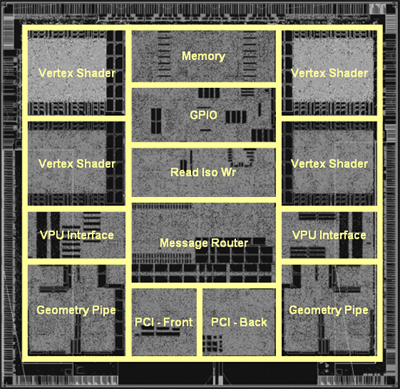
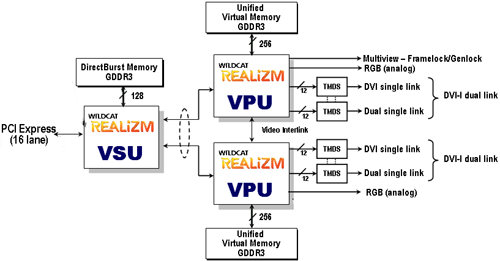
The first thing that we noticed about the Wildcat Realizm 800 was its size. This is a full length card in every way. Sporting two of the GPUs featured on the Realizm 200, the 800 needs plenty of space for silicon, RAM, and all the routing going on. For background on the GPUs referenced in this article, take a peek at our architectural analysis of the Wildcat Realizm 200.The two GPUs are connected by a discreet vertex unit that 3Dlabs calls a Vertex/Scalability Unit (VSU). This bit of hardware is responsible for the card's PCI Express interface, geometry processing for the entire scene, and splitting the workload into two parts. There's also 128MB GDDR3 "DirectBurst" memory off of the VSU (connected with a 128-bit wide interface). This memory stores rendering commands and geometry data for the VSU.
With NVIDIA's solution using separate framebuffers that are either combined in every frame or used in an alternating fashion, there are some compatibility limitations that prevent all graphics from benefiting equally from the technology. Situations can come up where one GPU will need data from a previous frame or a part of the current frame being rendered on the other GPU. Not having a unified framebuffer makes this more difficult logistically than it needs to be.
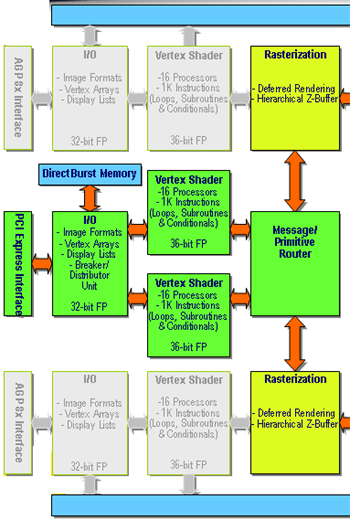
So, the VSU splits the frame first, then processes the graphics and sends fragment data on to the GPUs over two 64-bit parallel interfaces. It's unclear whether this is a physically different interface from the AGP interfaces already on the GPUs. If 3Dlabs reused the interface, it's definitely running faster than normal delivering 4.2GB/s from the VSU to each GPU.
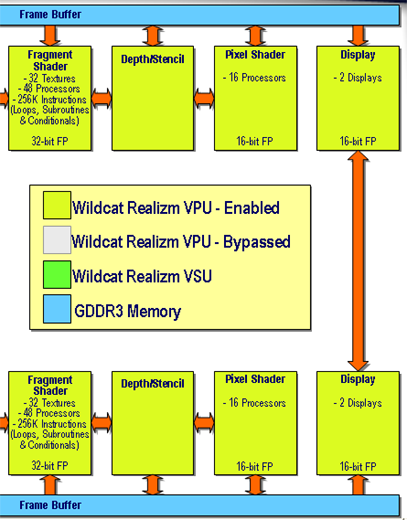
Each GPU then handles the rest of the pipeline as it would normally have done on the Wildcat Realizm 200.
Before we head to the numbers, we'll lead off by saying that doubling the hardware doesn't usually result in a linear 2x performance increase. 3Dlabs still has not disclosed core clock speeds to us, and it may well be the case that the WR800 runs its GPUs at a slightly decreased speed from the 200. With some of our numbers, it's difficult to tell exactly what causes performance to look like it does, but we will do our best to explain our results.
Test
Here are our test system setups:| Performance Test Configuration | |
| Processor(s): | 2 x AMD Opteron 250 AMD Opteron 150 AMD Opteron FX-53 |
| RAM: | 4 x 512MB OCZ PC3200 EL ECC Registered (2 per CPU) 2 x 1024MB Kingston PC 3200 ECC Registered 2 x 1024MB OCZ PC3200 EB Platinum Edition |
| Hard Drive(s): | Seagate 120GB 7200RPM IDE (8MB Buffer) |
| Motherboard & IDE Bus Master Drivers: | AMD 8131 APIC Driver NVIDIA nForce 5.10 NVIDIA nForce 6.10 |
| Video Card(s): | ATI FireGL V5000 3Dlabs Wildcat Realizm 200 ATI FireGL X3-256 NVIDIA Quadro FX 4000 HIS Radeon X800 XT Platinum Edition IceQ II Prolink GeForce 6800 Ultra Golden Limited |
| Video Drivers: | 3Dlabs 4.04.0757 Driver ATI FireGL 8.083 Driver NVIDIA Quadro 70.41 (Beta) NVIDIA ForceWare 67.03 (6800U) ATI Catalyst 4.12 (X800) |
| Operating System(s): | Windows XP Professional SP2 |
| Motherboards: | HP WX9300 (nForce Professional) IWill DK8N v1.0 (AMD-81xx + NVIDIA nForce 3) DFI LANParty UT nF4 Ultra-D (for FireGL V5000) |
| Power Supply: | 600W OCZ Powerstream PSU |
Originally published at https://www.anandtech.com/show/1651 (Wayback Machine).