
ASRock DeskMini H470 Review: A No-Frills LGA 1200 mini-PC Platform
HTPC Credentials - Local Media Playback and Video Processing
Evaluation of local media playback and video processing is done by playing back files encompassing a range of relevant codecs, containers, resolutions, and frame rates. A note of the efficiency is also made by tracking GPU usage and power consumption of the system at the wall. Users have their own preference for the playback software / decoder / renderer, and our aim is to have numbers representative of commonly encountered scenarios. Towards this, we played back the test streams using the following combinations:
- MPC-HC x64 1.8.5 + LAV Video Decoder (DXVA2 Native) + Enhanced Video Renderer - Custom Presenter (EVR-CP)
- MPC-HC x64 1.8.5 + LAV Video Decoder (D3D11) + madVR 0.92.17 (DXVA-Focused)
- VLC 3.0.8
- Kodi 18.9
Fourteen test streams comprising of various codecs and frame rates (each of 90s duration) were played back from the local disk with an interval of 30 seconds in-between. Various metrics including GPU usage and at-wall power consumption were recorded during the course of this playback. Prior to looking at the metrics, a quick summary of the decoding capabilities of the GPU is useful to have for context.

Other than for AV1, the Intel UHD Graphics 630 in Comet Lake-S processors such as the Core i7-10700 should have no trouble activating hardware acceleration for various commonly-used video codecs.
All our playback tests were done with the desktop HDR setting turned on. It is possible for certain system configurations to have madVR automatically turn on/off the HDR capabilities prior to the playback of a HDR video, but, we didn't take advantage of that in our testing.
VLC and Kodi
VLC is the playback software of choice for the average PC user who doesn't need a ten-foot UI. Its install-and-play simplicity has made it extremely popular. Over the years, the software has gained the ability to take advantage of various hardware acceleration options. Kodi, on the other hand, has a ten-foot UI making it the perfect open-source software for dedicated HTPCs. Support for add-ons make it very extensible and capable of customization. We played back our test files using the default VLC and Kodi configurations, and recorded the following metrics.
| Video Playback Efficiency - VLC and Kodi | |||
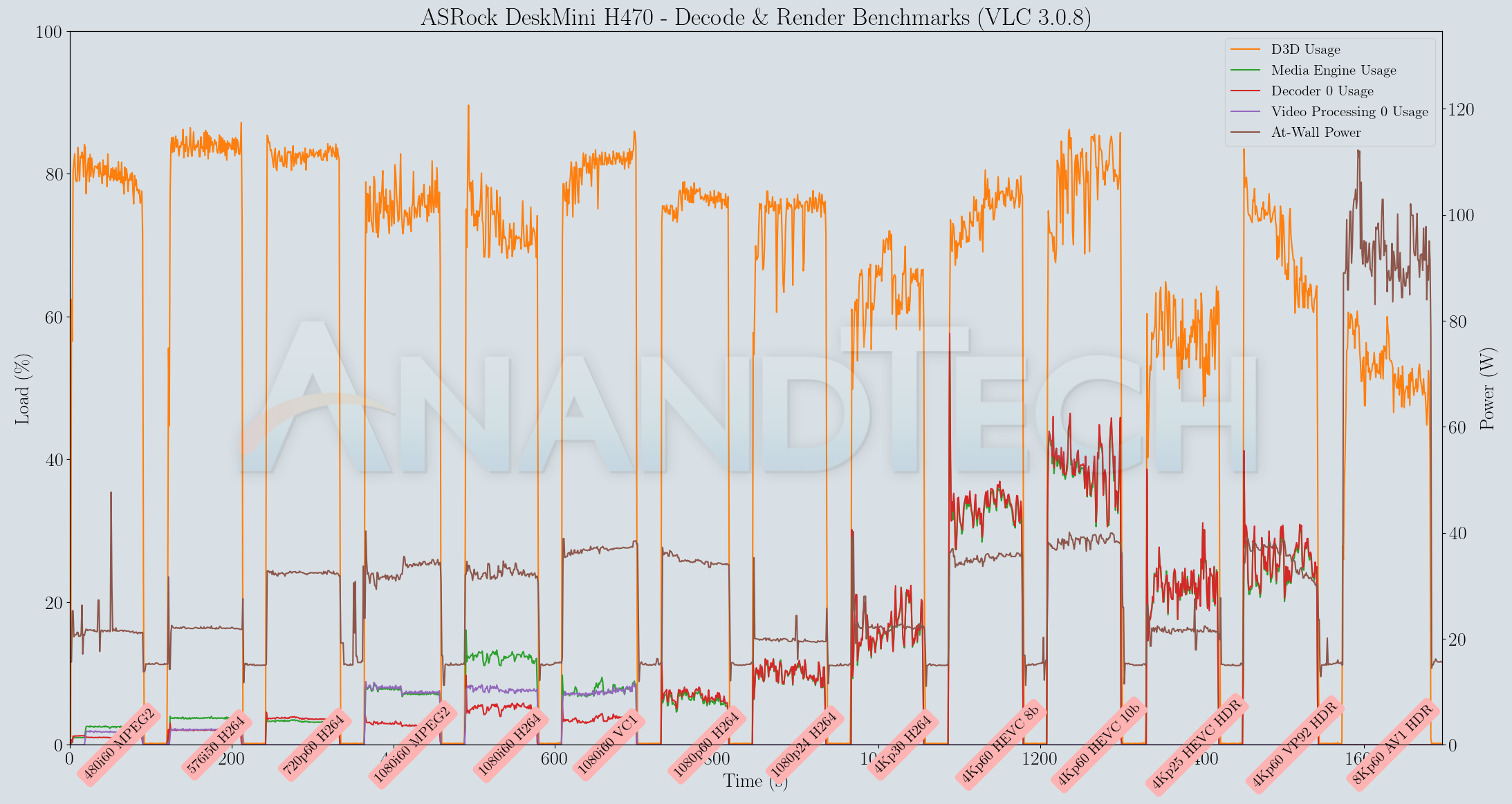
The resource usage profiles for both VLC and Kodi are quite similar, with the Kodi playback making additional usage of the video processor block in the GPU. However, in terms of power consumption at the wall, both programs stay south of 40W for almost all of the hardware-accelerated codec streams. The AV1 stream plays back in software-decode mode as a bunch of still frames and the collected metrics corresponding to that can be ignored.
MPC-HC
MPC-HC offers an easy way to test out different combinations of decoders and renderers. The first configuration we evaluated is the default post-install scenario, with only the in-built LAV Video Decoder forced to DXVA2 Native mode. Additional passes were done with different madVR configurations, but we only present results from the DXVA-focused one. The metrics collected during the playback of the test files using the above two configurations are presented below.
| Video Playback Efficiency - MPC-HC with EVR-CP and madVR | ||
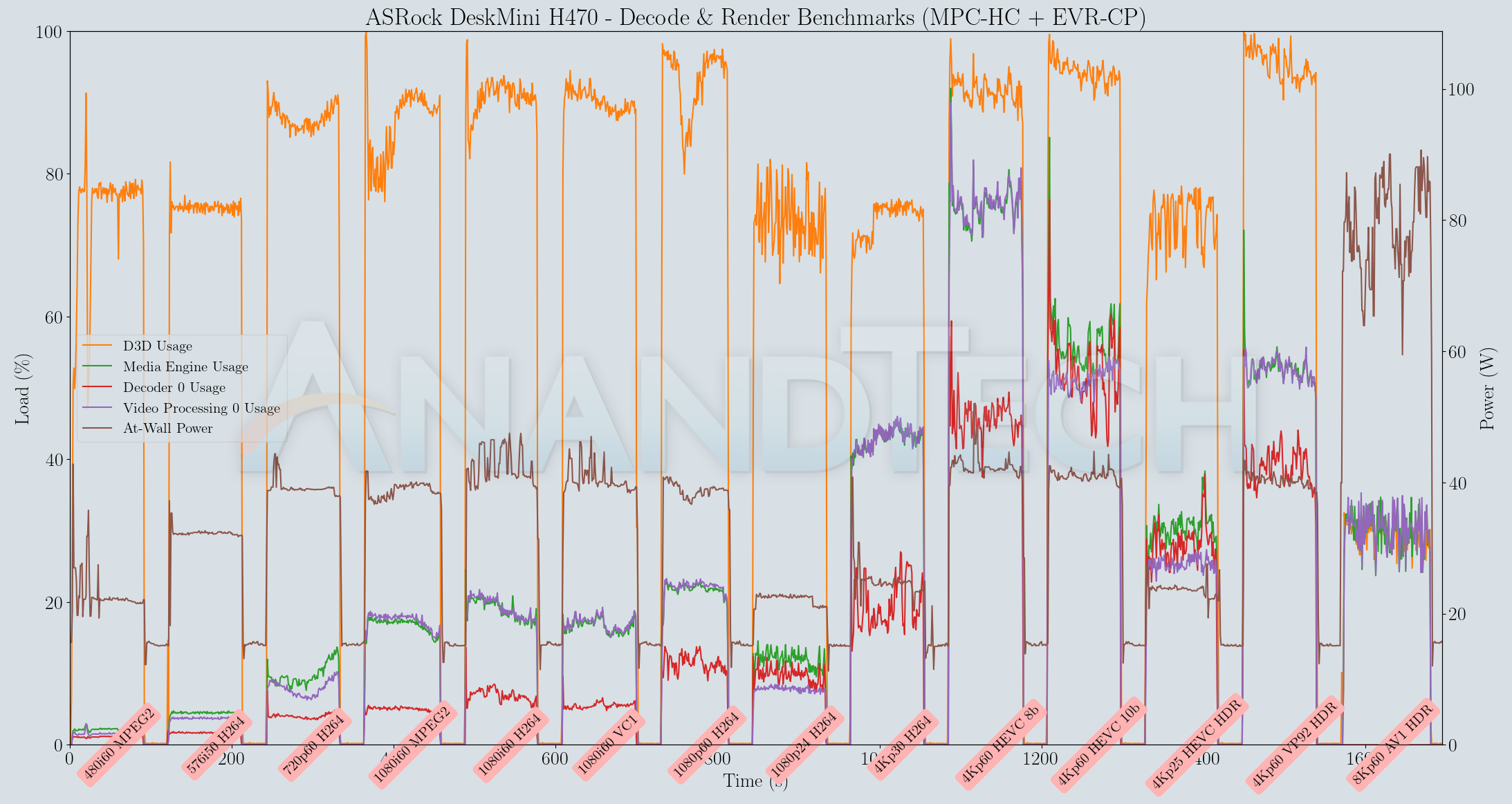
In both MPC-HC modes, the system has no trouble playing back the streams without apparent dropped frames. However, the 60fps clips are too close to consuming 100% of the D3D resources.
In terms of HTPC capabilities, both Kodi and VLC are capable of showcasing the video playback capabilities of the DeskMini H470 in an effective manner.
Originally published at https://www.anandtech.com/show/16335/asrock-deskmini-h470-review-a-nofrills-lga1200-minipc-platform (Wayback Machine).