
ECS LIVA Z3 Plus Review: Compact Comet Lake NUC Clone Cuts Corners
HTPC Credentials - II
Evaluation of local media playback and video processing is done by playing back files encompassing a range of relevant codecs, containers, resolutions, and frame rates. A note of the efficiency is also made by tracking GPU usage and power consumption of the system at the wall. Users have their own preference for the playback software / decoder / renderer, and our aim is to have numbers representative of commonly encountered scenarios. Towards this, we played back the test streams using the following combinations:
- MPC-HC x64 1.8.5 + LAV Video Decoder (DXVA2 Native) + Enhanced Video Renderer - Custom Presenter (EVR-CP)
- VLC 3.0.8
- Kodi 18.9
Fourteen test streams (each of 90s duration) were played back from the local disk with an interval of 30 seconds in-between. Various metrics including GPU usage and at-wall power consumption were recorded during the course of this playback. Prior to looking at the metrics, a quick summary of the decoding capabilities of the integrated Intel UHD Graphics is useful to have for context.

On paper, the GPU should be able to play back all codecs with hardware acceleration (except for AV1).
We opted to not test madVR as the single-channel memory and weak integrated GPU suggest suitability of the PC only for mainstream HTPC usage - not geared towards users desiring top-notch video post-processing.
VLC and Kodi
VLC is the playback software of choice for the average PC user who doesn't need a ten-foot UI. Its install-and-play simplicity has made it extremely popular. Over the years, the software has gained the ability to take advantage of various hardware acceleration options. Kodi, on the other hand, has a ten-foot UI making it the perfect open-source software for dedicated HTPCs. Support for add-ons make it very extensible and capable of customization. We played back our test files using the default VLC and Kodi configurations, and recorded the following metrics.
| Video Playback Efficiency - VLC and Kodi | |||
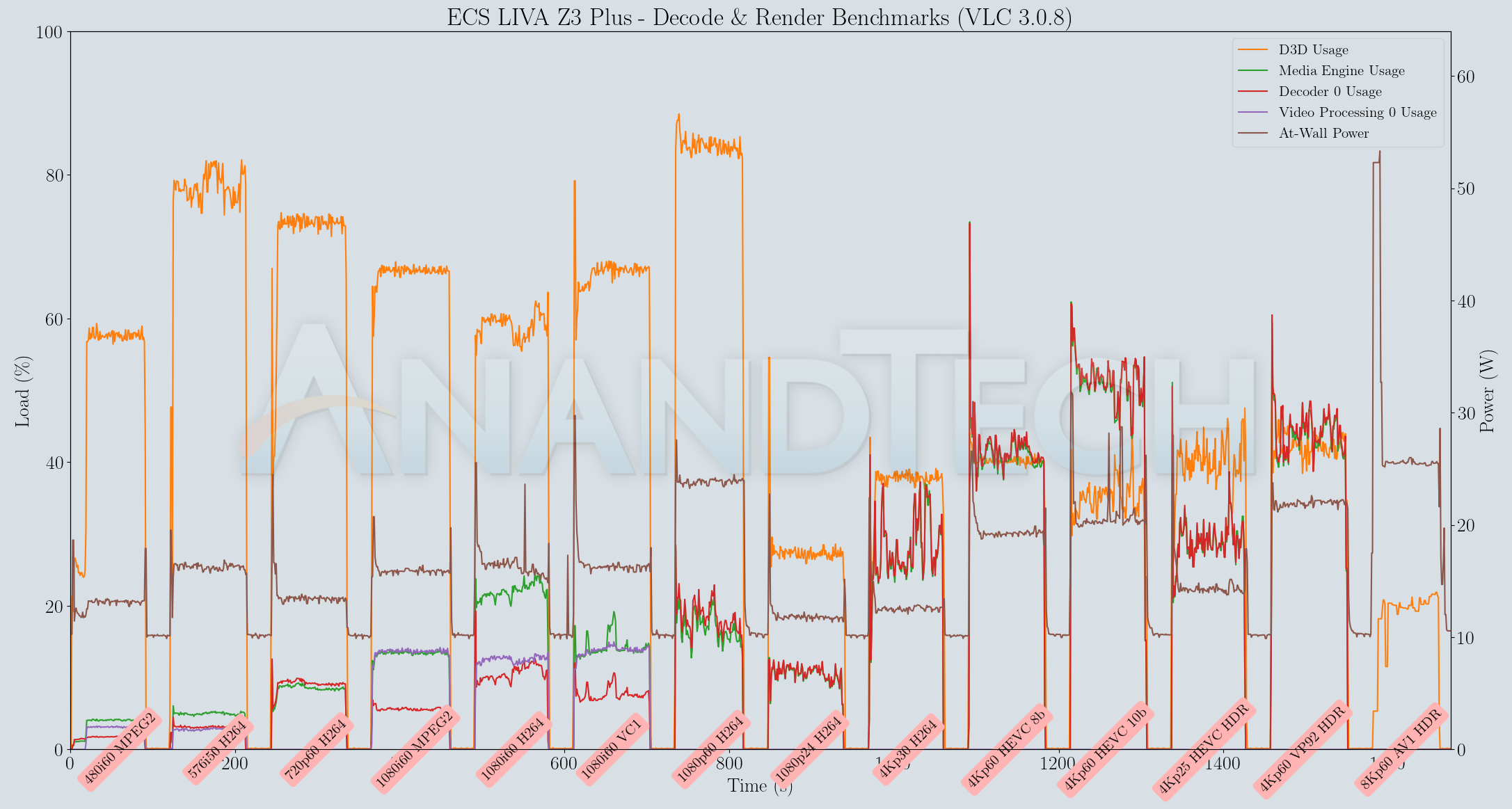
Both players were able to play back our streams (except for the AV1 clip) successfully despite the single channel DRAM.
MPC-HC
MPC-HC offers an easy way to test out different combinations of decoders and renderers. The configuration we evaluated is the default post-install scenario, with only the in-built LAV Video Decoder forced to DXVA2 Native mode. The metrics collected during the playback of the test files using the above configuration are presented below.
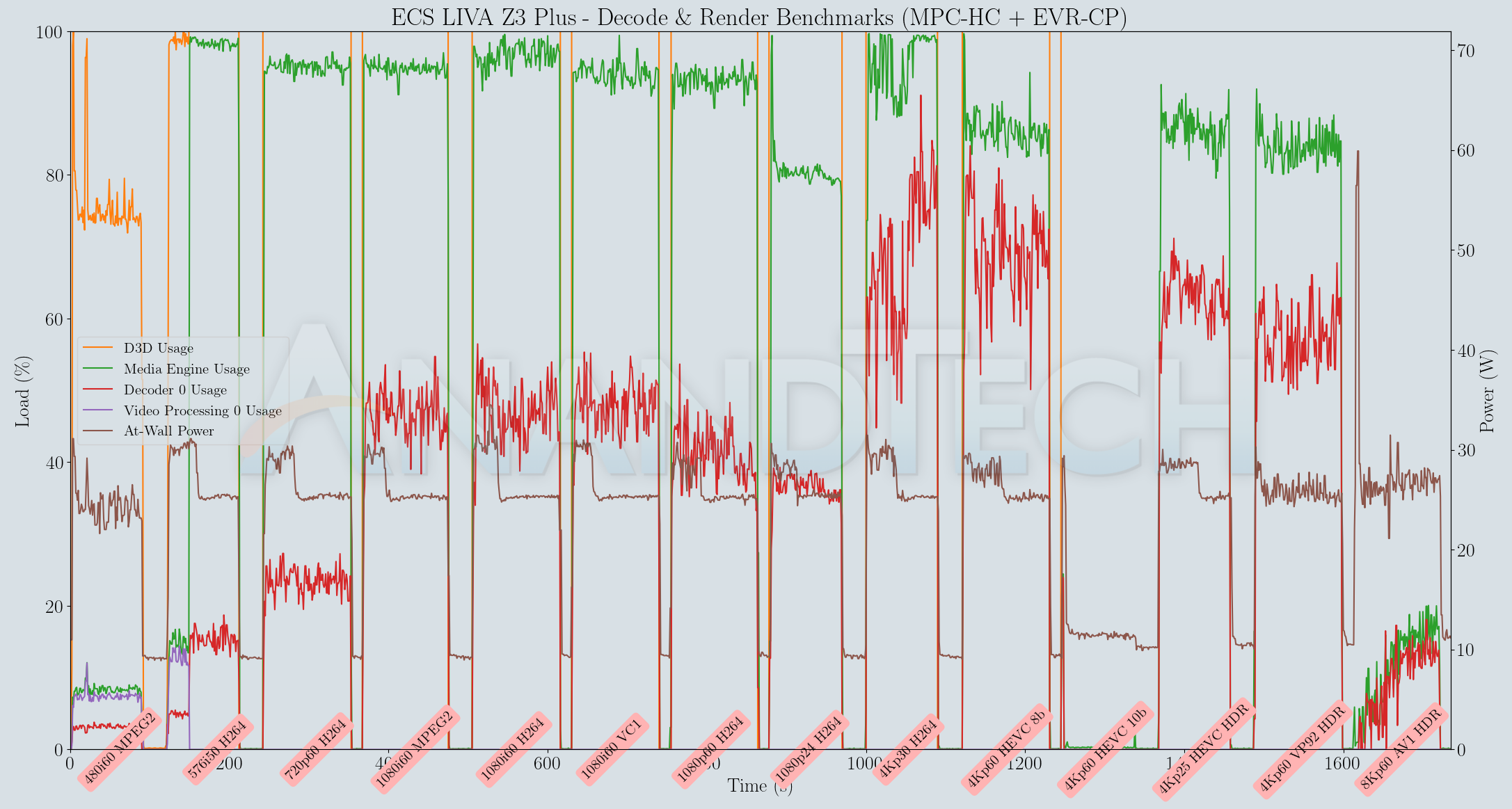
Unlike VLC and Kodi, MPC-HC seemed to suffer greatly from the usage of a single SODIMM module. There were frequent stutters during the playback session - something we hadn't observed with the Frost Canyon NUC. We did not take the trouble to evaluate with dual-channel RAM for this workload, but it is likely that would solve the problem similar to what we saw in the case of 4Kp60 playback with overlays in YouTube.
Originally published at https://www.anandtech.com/show/16331/ecs-liva-z3-plus-review-compact-comet-lake-nuc-clone-cuts-corners (Wayback Machine).