
nForce4 SLI Roundup: Painful and Rewarding
- Posted in
- Motherboards
DFI LANParty nF4 SLI-DR: Features and Layout
| Specification | DFI LANParty nF4 SLI-DR |
| CPU Interface | Socket 939 Athlon 64 |
| Chipset | nForce4 SLI (single chip) |
| BUS Speeds | 200MHz to 456MHz (in 1MHz increments) |
| PCI/AGP Speeds | Asynchronous (Fixed) |
| PCI Speeds | 100MHz to 145MHz in 1MHz increments |
| Core Voltage | Auto, 0.8V to 1.55V in 0.025V increments (Normal) PLUS *104%, 110%, 113%, 123%, 126%, 133%, 136% (Special - to 1.85V) |
| CPU Startup Voltage | Startup, 0.825V to 1.550V in 0.025V increments |
| DRAM Voltage | 2.5V to 3.2V in 0.1V increments (3V jumper) 2.5V to 4.0V in 0.1V increments (5V jumper) |
| Chipset Voltage | 1.5V, 1.6V, 1.7V, 1.8V |
| Hyper Transport Ratios | Auto, 1.0, 1.5, 2.0, 2.5, 3.0, 4.0, 5.0 |
| LDT Bus Transfer | 16/16, 16/8, 8/16, 8/8 |
| LDT Voltage | 1.2V, 1.3V, 1..4V, 1.5V |
| CPU Ratios | Auto, 4x to 25x in 0.5x increments |
| Cool'n'Quiet MAX FID | Auto, 8.0 to 13.0 in 0.5x increments |
| DRAM Speeds | Auto, 100, 120, 133, 140, 150, 166, 180, 200 |
| Memory Command Rate | Auto, 1T, 2T |
| Memory Slots | Four 184-pin DDR Dual-Channel Slots Unbuffered ECC or non-ECC Memory to 4GB Total |
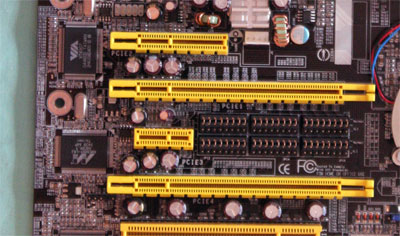
| Expansion Slots | 2 x16 PCIe Slots 1 x4 PCIe 1 x1 PCIe 2 PCI Slots |
| SLI Setup | Six 16-pin Jumper Blocks |
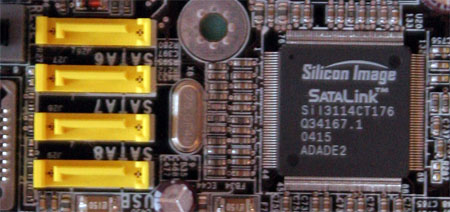
| Onboard SATA | 4-Drive SATA 2 by nF4 PLUS 4-Drive SATA by Sil3114 |
| Onboard IDE | Two Standard nVidia ATA133/100/66 (4 drives) |
| SATA/IDE RAID | 4-Drive SATA 2 PLUS 4-Drive IDE (8 total) Can be combined in RAID 0, 1 PLUS 4-Drive SATA by Sil3114 Sil3114 Raid 0, 1, 5 |
| Onboard USB 2.0/IEEE-1394 | 10 USB 2.0 ports supported nF4 2 1394A FireWire ports by VIA VT6307 |
| Onboard LAN | Dual Gigabit Ethernet PCIe by Vitesse VSC8201 PHY PCI by Marvel 88E8001 |
| Onboard Audio | Karajan Audio Module based on Realtek ALC850 8-Channel codec with 6 UAJ audio jacks, CD-in, front audio, and coaxial SPDIF In and Out |
| Other Features | Power and Reset momentary switches |
| BIOS | Award 2/17/2005 Release |
The DFI boards all support the full range of nVidia nForce4 features including nVRAID, Active Armor, SATAII 3Gb/s drives, NCQ, any-drive IDE/SATA Raid, PCIe Gigabit LAN by a PHY Ethernet chip (plus an additional PCI Gigabit LAN), and the nTune utility.
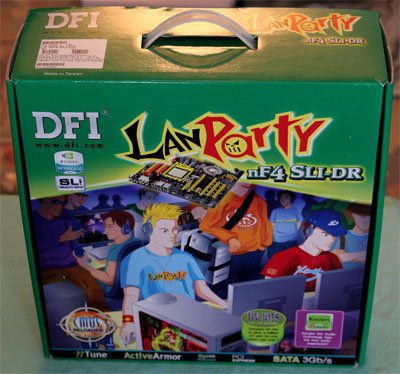
Packaging for the full LANParty nF4 SLI-DR is typical LANParty.
DFI has continued with the Karajan Audio Module first introduced on their LANParty 925x. As you will see later in our audio tests, the Karajan module was a much better performer than what we expected when we first saw the onboard Realtek 850 codec. We still wish that DFI had been able to use the High Definition ALC880 or a similar chip instead of the more common ALC850. However, the Karajan Module on the DFI SLI does provide the lowest CPU overhead that we have seen on any board using the 850.
The ALC850 Codec provides four pairs of stereo outputs, with 5-Bit volume controls and multiple stereo and mono inputs, along with flexible mixing, and gain and mute functions. Two 50mW/20ohm headset audio amplifiers are integrated at Front-Out and Surround-Out, and both amplifiers are selectable for Front-Out, Line-In and Mic-In as a Universal Audio Jack.
You can find more information on the ALC850 at Realtek.
DFI provides a full selection of rear I/O ports. These include 6 programmable audio mini jacks plus coaxial SPDIF in and out connectors to support the Realtek ALC850. The back panel also includes PS2 mouse and keyboard, 1 standard Firewire (IEEE1394a), 6 USB, and two RJ45 Gigabit Ethernet. There are no rear ports for a Parallel Printer or serial devices, but there is an onboard header for an external serial device an IR header.
The four DIMM slots support up to 4GB of up to DDR400 memory in a Dual-Channel memory configuration. Dual-Channel 1 is DIMMs 1 and 3, and Dual-Channel 2 is DIMMs 2 and 4. DFI specifies support for both ECC and non-ECC unbuffered memory. Contacts at DFI advise that best overclocking is achieved with the dual-channel DIMMs in Sockets 2 and 4.
Board Layout
The DFI LANParty nF4 SLI-DR is very well arranged, with almost everything located where it works best. As you will see if you study the layouts of the other SLI boards, the DFI differs substantially in layout.The DFI nF4 place the CPU in the top center of the board and DIMMs at the top. This arrangement worked well in our testing and should work better (for those who change memory frequently) than in the crowded right-hand alternate location used on many boards.
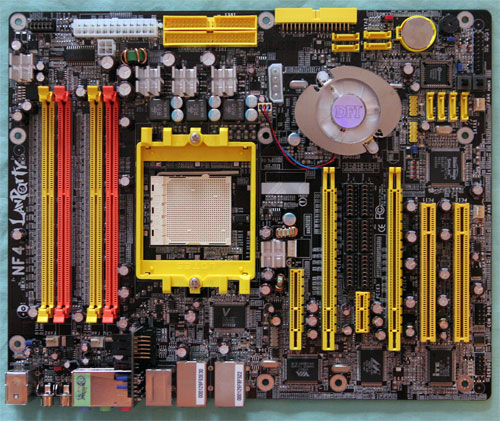
There is plenty of room around the Socket 939, so most Heat sink/Fans should work fine. A Zalman 7000 overhung DIMM slot 4, but it still cleared our stock OCZ memory and memory could work in all slots.
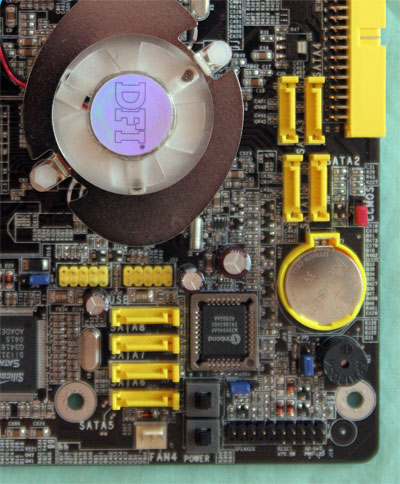
The IDE connectors are at our preferred upper right edge of the motherboard, and the floppy connector is a board edge connector located on the right edge around the middle of the board. Both locations worked well in our testing.
Originally published at https://www.anandtech.com/show/1626 (Wayback Machine).