
AnandTech Guide to Better Photos: Night Photography
- Posted in
- Digital Camera
Night Portraits and More Ideas
When taking a picture of someone in a relatively dark setting (inside or outside), you should be aware of a special flash setting that most digicams offer called “slow sync”. With slow-sync disabled, a flash will fire typically with a shutter speed of 1/60th – 1/200th sec. or so (depending on the camera). This relatively fast-sync flash is what most cameras will use by default and it works well for illuminating your subject’s face. Unfortunately, even 1/60th sec. is typically not enough time for the dim background light to be captured by your camera’s sensor. The result is that your subject is illuminated, but everything behind him/her is dark. To get a more well-balanced picture with lighting detail on your subject and in the background, enable your camera’s slow-sync flash option. A slow-sync flash does just what it sounds like. The flash itself will fire for the same duration, but the shutter speed will be slower. Some advanced cameras even allow you to specify when the flash will fire – with the first shutter curtain or the second. The difference between the two will be important if your subject is moving. For example, with the flash synced with the first shutter curtain, the flash will illuminate your subject right when the shutter opens. Then, the camera will capture the ambient light, resulting in a trail of light in front of the subject. The second shutter curtain is usually more desirable because it leaves a motion trail behind the subject, resulting in a natural-looking path of motion. For general portrait purposes, either setting will work. In the example below, the original image was taken in Program mode (1/60th sec., f/5.0), while the rollover image was taken in Aperture-priority (0.3 sec., f/5.0). Hold your mouse over the image to see the dramatic difference when a slow-sync flash is used.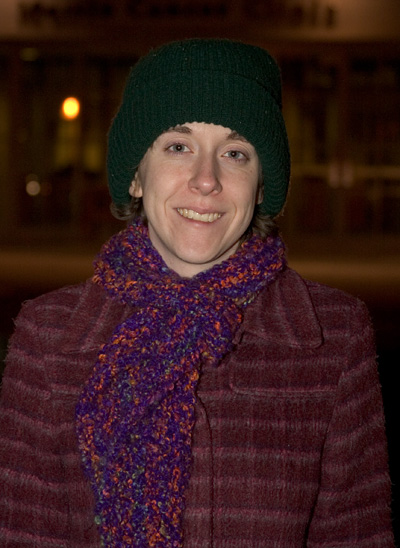
Hold mouse over image.
Because stabilizing the camera is so important for longer exposures, we wanted to mention a couple of important points about this. If at all possible, you should always avoid having to touch the camera during an exposure. If you don’t have a cable release to trip the shutter, another great way to avoid camera movement is to use the self-timer. Simply set the self-timer to the shortest length and press the shutter button. Then remove your hands from the camera and let it stabilize before the shutter opens. If you own a digital SLR, your camera might have the option to enable mirror lock-up. Because the mirror has to physically move before an exposure, sometimes the vibrations can affect the clarity of the image. Enabling mirror lock-up causes the mirror to flip up and stabilize prior to the actual exposure. This ensures that any vibrations caused by the mirror will have ceased by the time that the shutter opens.
If you are taking a picture of a distant landscape, check to see if your camera has an “infinity focus” setting (or focus to infinity using manual focus). This will not only make sure that your image will be in focus, but it will spare you the annoyance of waiting for your camera’s auto-focus system to find a focus point. If your camera has the option, once you have achieved the focus that you want, disable the auto-focus system. Now, you can take several pictures without waiting for the camera to refocus for each shot. Another tip is to use AE (auto-exposure) bracketing if it is available. With AE bracketing, a camera can take multiple versions of a picture, each with different exposure values. This can be a lifesaver for night photography when it is hard to judge if an image is exposed properly by viewing the LCD monitor.
Originally published at https://www.anandtech.com/show/1619 (Wayback Machine).